Aufnehmen mit minimiertem
In Aufnahmesituationen, wo Kamerawackeln oft auftritt,
beispielsweise bei Tele-Aufnahmen oder beim
Aufnehmen im Gehen, können Sie mit dieser Funktion
das Bild stabilisieren.
u. U. nicht stabilisieren.
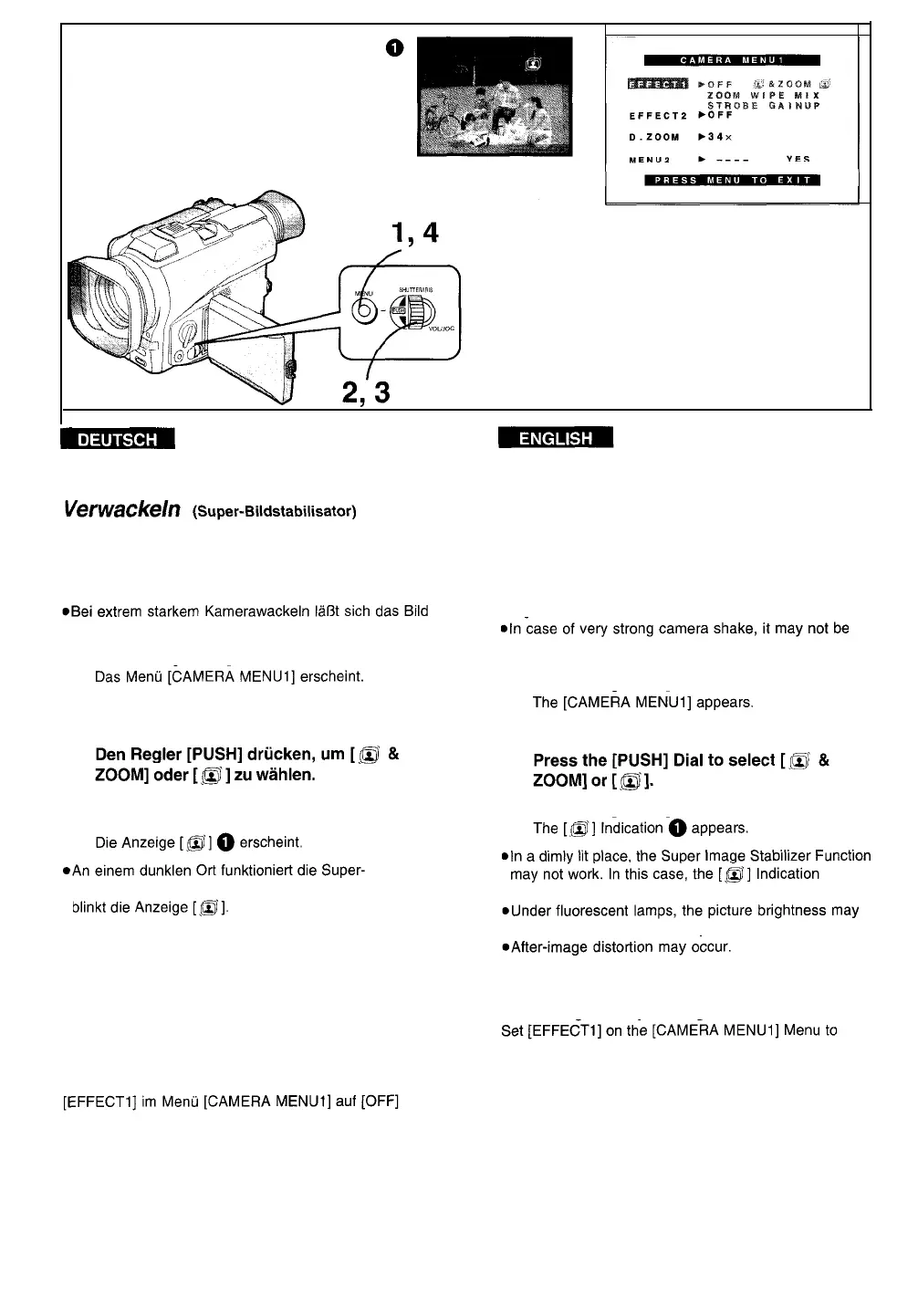
1
Die Taste [MENU] drücken.
2
Den Regler [PUSH] drehen, um [EFFECT1]
LU
wählen.
3
4
Die Taste [MENU] drücken, um das Menü
auszublenden.
Bildstabilisator-Funktion u. U. nicht. In diesem Fall
l
Unter Leuchtstofflampen-Beleuchtung schwankt die
Bildhelligkeit u. U., und die Farben sind möglicherweise
unnatürlich.
l
Das Wiedergabebild kann u. U. durch Nachziehen
gestört werden.
l
Beim Einsatz eines Stativs empfiehlt es sich, die
Super-Bildstabilisator-Funktion auszuschalten.
Ausschalten der Super-Bildstabilisator-
Funktion
einstellen.
-42-
Recording with Minimised Camera
Shake (Super Image Stabilher)
In recording situations where shaking of the Movie
Camera is likely to happen, for example when you have
zoomed in on a distant subject or when you record
while walking, you can use this function to stabilize the
image.
possible to stabilize the picture.
1
Press the [MENU] Button.
2
Turn the [PUSH] Dial to select [EFFECT1].
3
4
Press the [MENU] Button to exit the Menu.
flashes.
fluctuate and the colours may be unnatural.
l When you use a tripod, we recommend that you turn
the Super Image Stabilizer Function off.
Cancelling the Super Image Stabilizer Function
[OFF].






 To Next Page