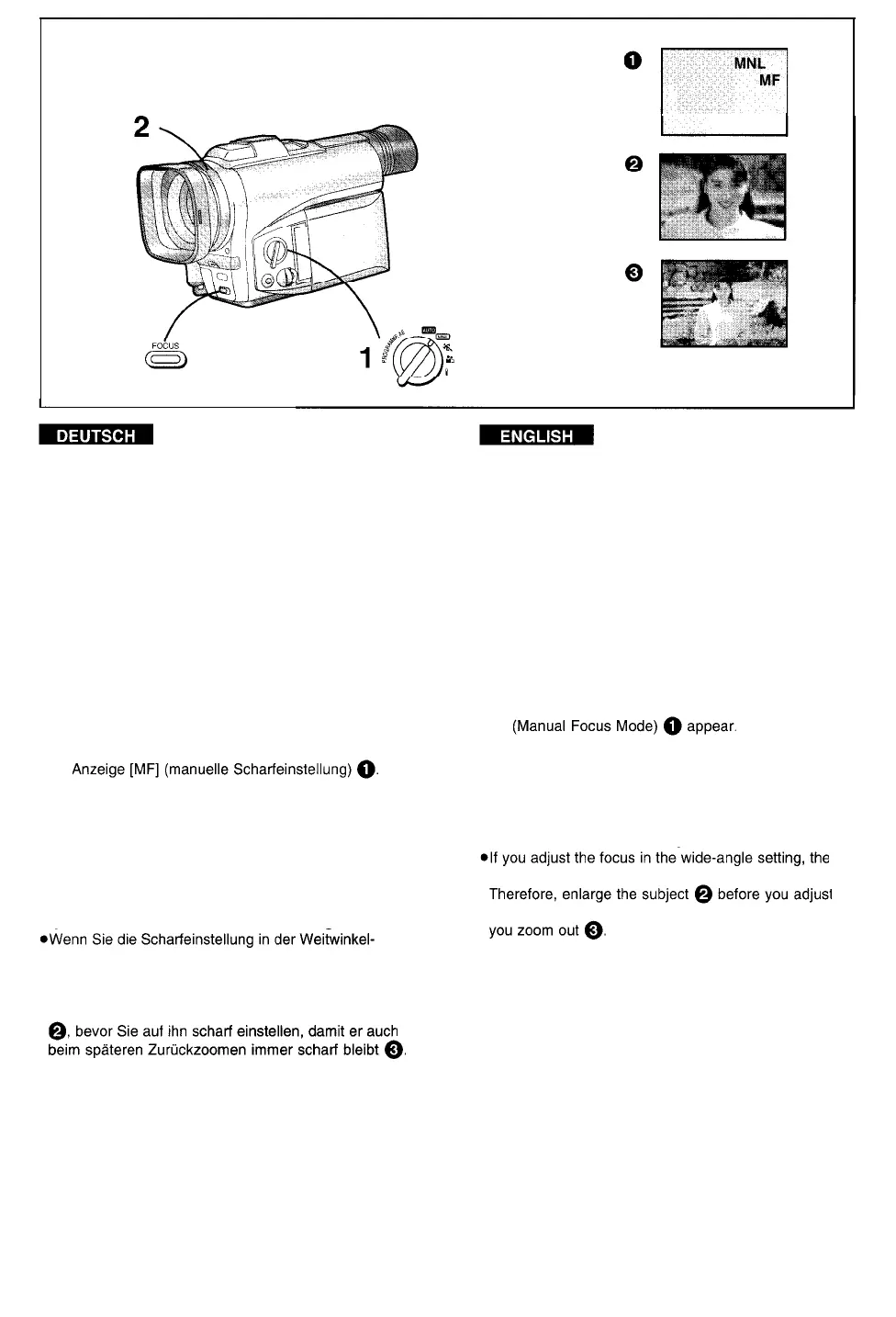
Manuelle Scharfeinstellung des
Bildgegenstands
(Manuelle Scharfeinstellung)
Dies ermöglicht das manuelle Durchführen der
Scharfeinstellung für Motive und Aufnahmesituationen,
bei welchen die automatische Scharfeinstellung nicht
präzise funktioniert.
1
Den Modus-Wahlschalter auf [MNL] stellen.
Die Anzeige [MNL] erscheint.
2 Durch Drehen des Scharfeinstellrings auf
den Bildgegenstand scharf einstellen.
Beim Drehen des Scharfeinstellrings erscheint die
Zurückschalten auf automatische
Scharfeinstellung
Die Taste [FOCUS] drücken, damit die Anzeige [MF]
verschwindet. Oder, den Modus-Wahlschalter auf
[AUTO] stellen.
Tip für die manuelle Scharfeinstellung
Einstellung des Objektivs durchführen, ist der
Bildgegenstand nach dem Heranzoomen u. U. nicht
mehr scharf. Um dies zu vermeiden empfiehlt es sich,
zuerst den Bildgegenstand bildfüllend heranzuzoomen
Focusing on the Subject Manually
(Manual Focus)
This makes it possible to adjust the focus manually for
subjects and recording situations for which automatic
focusing is not precise.
1
Set the Mode Selector Switch to [MNL].
The [MNL] Indication appears.
2
Turn the Focus Ring on the Lens to adjust
the focus manually.
Turning the Focus Ring makes the [MF] Indication
Returning to the Automatic Focusing Mode
Press the [FOCUS] Button to make the [MF] Indication
disappear. Or, set the Mode Selector Switch to [AUTO].
Hint for Manual Focus Adjustment
subject may go out of focus when you enlarge it.
the focus, so that the picture remains focused when
-84-



 To Next Page