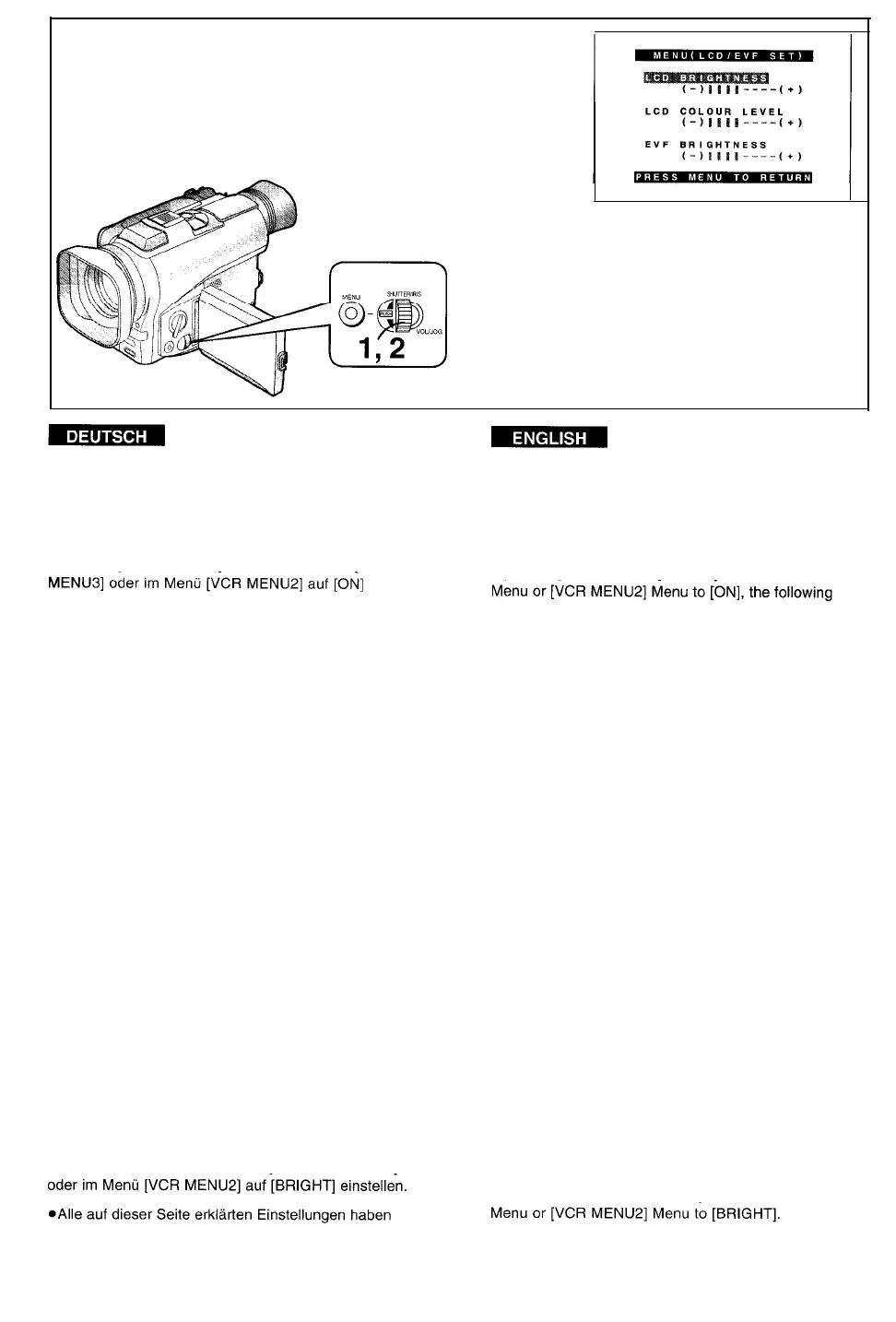
Einstellen der Helligkeit und
Adjusting the Brightness and
Farbsättigung des LCD-Monitors/
Colour Level of the LCD Monitor/
Suchers
Finder
Wenn Sie [LCD/EVF SET] entweder im Menü [CAMERA
einstellen, erscheinen die folgenden Einstellpunkte:
If you set [LCD/EVF SET] on the [CAMERA MENUS]
items are displayed:
Helligkeit des LCD-Monitors [LCD BRIGHTNESS]
Zum Regeln der Helligkeit des Bildes auf dem LCD-
Monitor.
LCD Brightness [LCD BRIGHTNESS]
To adjust the brightness of the picture on the LCD
Screen.
Farbsättigung des LCD-Monitors
[LCD COLOUR LEVEL]
Zum Regeln der Farbsättigung (Intensität der Farben)
des Bildes auf dem LCD-Monitor.
LCD Colour Level [LCD COLOUR LEVEL]
To adjust the colour Saturation of the picture on the LCD
Screen.
Helligkeit des Sucherbildes [EVF BRIGHTNESS]
Zum Regeln der Helligkeit des Sucherbildes.
Finder Brightness [EVF BRIGHTNESS]
To adjust the brightness of the picture in the Finder.
1
Den Regler [PUSH] drücken, um den
gewünschten Einstellpunkt zu wählen.
2
Den Regler [PUSH] so drehen, daß mehr
oder weniger vertikale Balken angezeigt
werden.
Die Balkenanzeige ist in 8 Stufen unterteilt. Je
mehr vertikale Balken sichtbar sind, desto höher
ist die Helligkeit bzw. Farbsättigung des Bildes.
Wenn Sie diese Einstellung mit der Fernbedienung
durchführen, die Taste [ITEM] drücken und dann die
Helligkeit bzw. Farbsättigung durch Drücken der Taste
[SET] regeln. Die Zahl der Striche erhöht sich allmählich
gegen rechts, und danach verringert sie sich wieder.
1
Press the [PUSH] Dial to select the item
that you want to adjust.
2
Turn the [PUSH] Dial to increase or
decrease the vertical bars of the Bar
Indication.
The Bar Indication is divided into 8 Steps. The
more vertical bars are shown, the stronger is the
brightness or colour Saturation.
If you use the Remote Controller for this adjustment,
press the [ITEM] Button and then adjust the brightness
or colour Saturation by pressing the [SET] Button. The
bars gradually increase toward the right end, and then
Anheben der Helligkeit der Rückbeleuchtung
they decrease again.
des LCD-Monitors
[LCD MODE] entweder im Menü [CAMERA MENUS]
keinen Einfluß auf das aufgezeichnete Bild.
Increasing the Brightness of the LCD Monitor’s
Backlighting
Set [LCD MODE] either on the [CAMERA MENUS]
l
All adjustments explained on this page have no
influence on the actually recorded picture.
-138-



 To Next Page