Timer Recording
Setting Timer Recordings from Bar
Codes
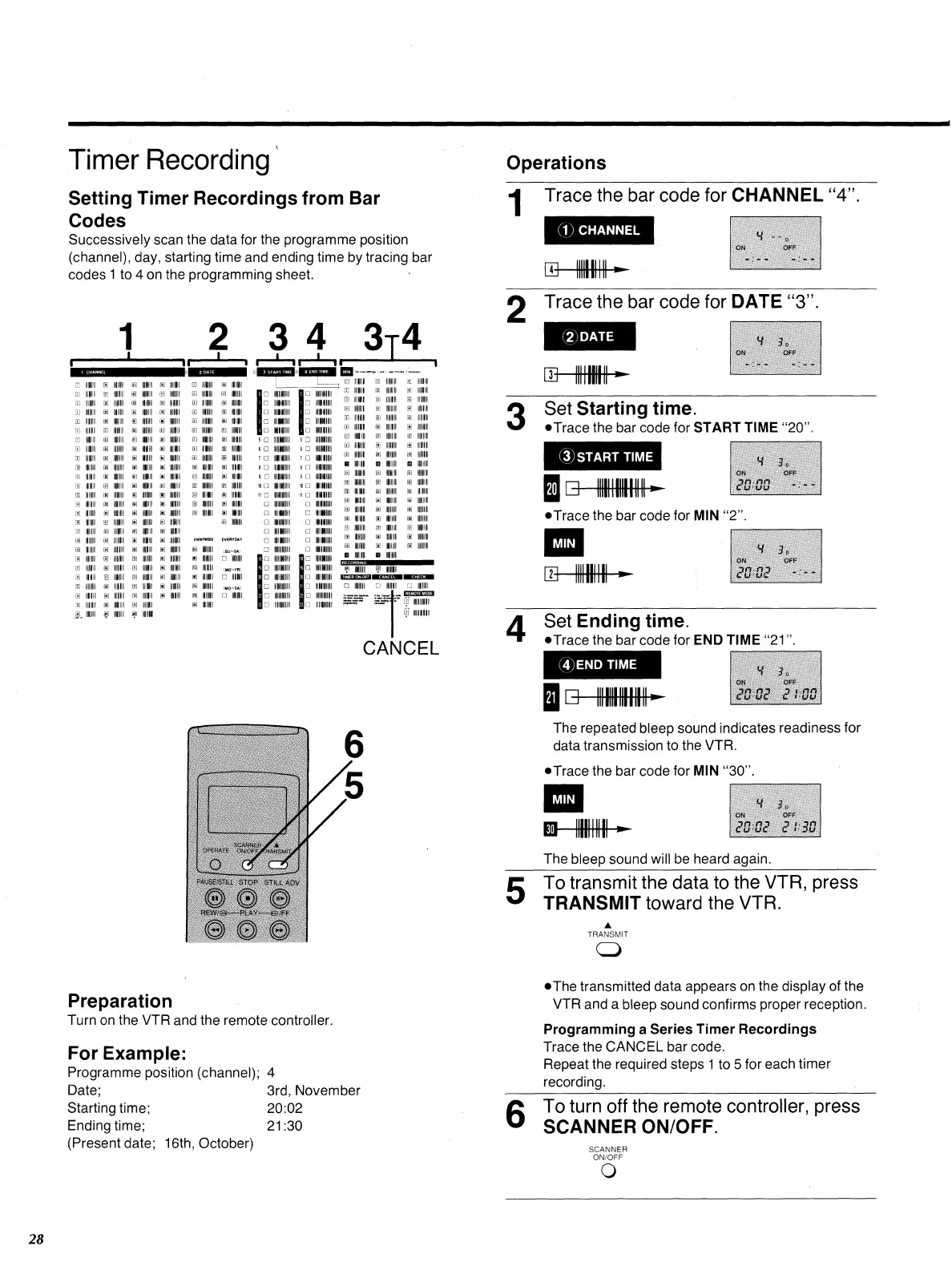
Successively scan the data for the programme position
(channel), day, starting time and ending time by tracing bar
codes 1 to 4 on the programming sheet.
1
2 3 4 3T4
I
I-J-1
I
CANCEL
1111111111
1111
111 1 11
111 111110
1
111111111
011 11111
1111 1 111 1
1
111111 I I II
III 1111111
111111111
11111 111 11
1111111 I II
1111111 III
111 I 111111
11111 11 1 11
1111111111
111111111
111111 I III
11111 1111
1111 11 1111
UI
It
Ifi
Al
UI
0
m
11111011111
❑
100111 11
O
01111111
❑
0101111
❑
1111 11 1111
E
1111111 111
111E1111
111111111
11111111E
1111 II 1 11
11111 III II
1111 11111
11111111
111111E11
11111E11
11111 1 1111
111111111
11110111
111 1111111
1111 I III
11111011
111111111
1111111 11
III 11111I1
11111111
1111111
1111011/
11110111
1111111111
1111 1111
11111111
10111
1111111
111 11111
111111111
111 11111
11111111
11111E11
1111111
0E1111
0
UI
0
171
UI
1111 101 11
1111111 11
111 111111
11111E11
1111 11 11
11111111
110101 II
1111111
11E111 1 II
11111111
1111 III 11
1011 1 11
111111111
11111111
11111011
111111111
11111111
11 111111
1111111 I II
1111101
1111E111
11E11 I 11
1111111111
11111111 11
18
EVERYDAY
0 0011111
A
fit
19
19
UI
lA
20
20
IMO-FR1
❑
1111111
1111111111
1111111111
1111111111
1111111111
110111111
1111111111
1111111 1 11
11111111 II
11 II I II
11111E11
11111 III II
1E1 I III
11111 II II
111111111
11111111 11
III 11111 II
11111111 11
III 11111 II
11111 III II
III 11111 11
10111
11111111 II
III 11111 II
11111111 11
111111 II II
111111 11 11
21
(MO-SAI
❑
11010111
111 1111111
1111111
111111111
1111111 11 11
11E1 11111 II
1011111111
1111 11111111 11
1101111
111101111
11111111 11
1111 1 11111 II
11111 11 1 1111
111101111
111 111 111 11
1111 1111 11 11
111111111111 II
1111111111 11
1111111111 11
.111111 11111111
1111111111
11111111111
111 1001111
1111111 1 1111
11111 1111 1111
1111111111111
101 1111111
001111111
01101111
111111111
11111 1 11
11 1111111
1111111111
1111 1 111
11111 1111
111111111
MI 111 11 11
000I111
111101111
111111 111
11111111 1111
1111111111111
11111111111111
UI
UI
O
111
At
At
Al
AYI
•
1111111111
.
1111111111
•
111011
•
1111111 1 II
•
011110
▪
011111
El
l
-
,
11111 II
•
111 111111
•
1101111 11
A
1011 111 11
•
11111111 11
rt
1111 11 1 11
111 1 1111 11
E
011 II I II
g
11111 1101
fi
1111 1 II 11
11111111 II
g
111011111
g
1111 1111 II
U
11111 111 11
g
11111111
•
1111111111
E
111111 11
•
11111111
N
11 III 11
1111111111
1111E1 I 11
11E11 I 11
111/11111
1111111 I II
11111111 11
11E11011
1111 1 II
11111 11 II
1111 II 11
1111 II 11
1111E1 I II
11E1 1 II
11111111 11
10111111
111011 II
111111
11111 1 1 11
111111 II II
111111 11 11
11111 III II
111 1101 11
1111 1111 II
111 I 1111 II
11111111 11
111 1101 11
1111 11101
EVERMEEK
E
1111 1 111
N
11101111
10 1110111
E
111111111
A
11011111
•
1111111111
g
11010111
I
0:
6
❑
6 0
1
0
1 0
1 0
I
❑
11
❑
❑
❑
0
0
0
22
23
RECORDING
1
;
1
IIf011111 ? 1111
1E3=1 1111132212M®
0
11111 II 1 11
11 II 11
E
1011 1 II 11
REMOTE MODE
mcimci
o
oloncl
6 0
7 0
8 E
I
❑
10 E
11
0
❑
0
22
23
Operations
Trace the bar code for CHANNEL "4".
(1) CHANNEL
O
1111111111
2
Trace the bar code for DATE "3".
DATE
•
Set Starting time.
‘if
*Trace the bar code for
START TIME
"20".
*START TIME
20
•
Trace the bar code for
MIN
"2".
MIN
A
Set Ending time.
.Trace
the bar code for
END TIME
"21".
® END TIME
010
The repeated bleep sound indicates readiness for
data transmission to the VTR.
*Trace the bar code for
MIN
"30".
MIN
El-
1111111111 —
The bleep sound will be heard again.
‘1
•
To transmit the data to the VTR, press
TRANSMIT toward the VTR.
A
TRANSMIT
O
•
The transmitted data appears on the display of the
VTR and a bleep sound confirms proper reception.
Programming a Series Timer Recordings
Trace the CANCEL bar code.
Repeat the required steps 1 to 5 for each timer
recording.
‘.°
•
To turn off the remote controller, press
SCANNER ON/OFF.
SCANNER
ON/OFF
0
Preparation
Turn on the VTR and the remote controller.
For Example:
Programme position (channel); 4
Date;
3rd, November
Starting time;
20:02
Ending time;
21:30
(Present date; 16th, October)
28
II












 To Next Page