EasyManua.ls Logo

Panasonic NV-HD90 - Page 10

Panasonic NV-HD90
40 pages
Print Icon
To Next Page IconTo Next Page
To Previous Page IconTo Previous Page
Loading...
10
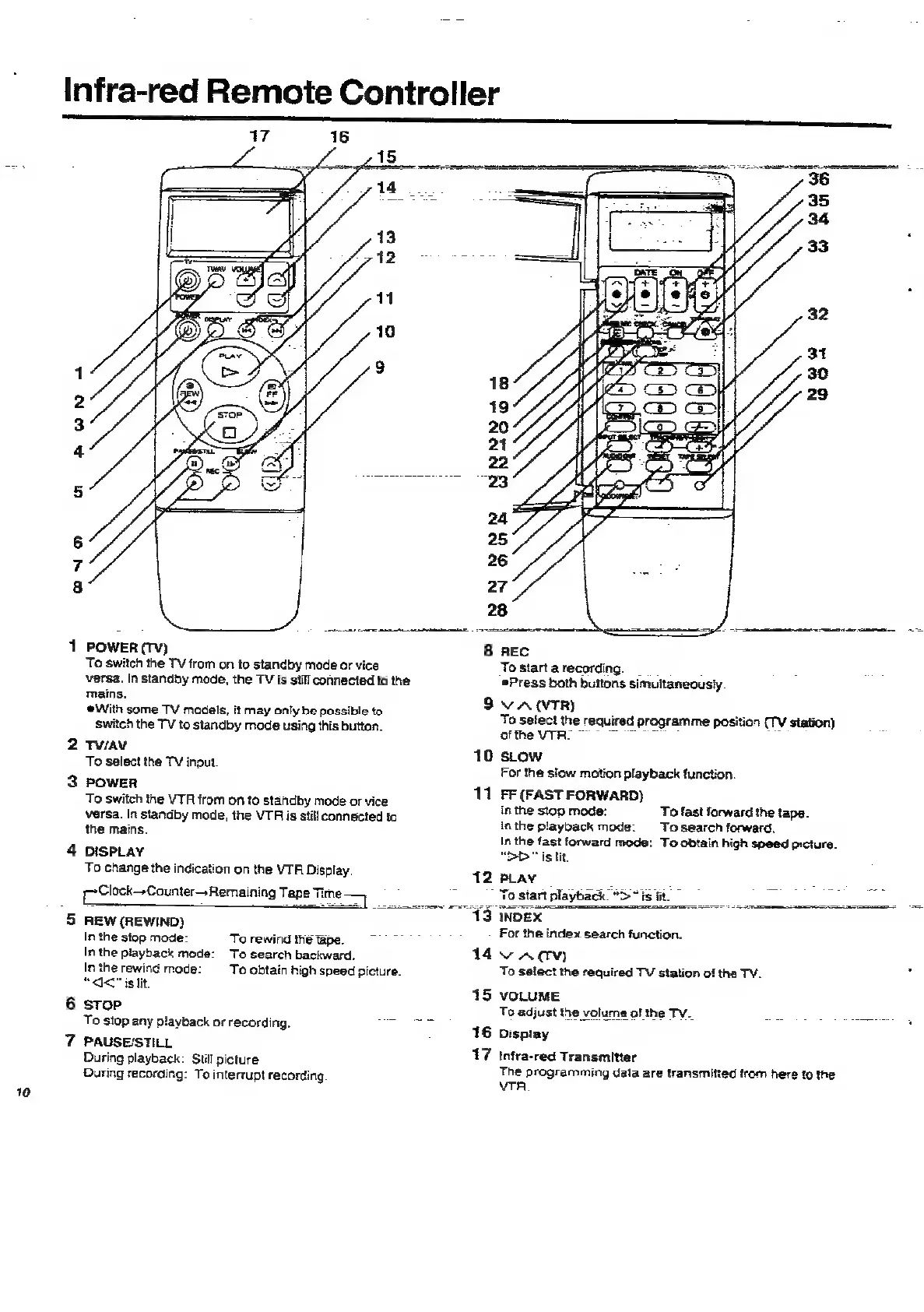
Infra-red
Remote
Controller
7
PON
+
ao
emer
1
POWER
(TY)
8
To
switch
the
TV
from
on
to
standby
mode
or
vice
versa.
In
standby
mode,
the
TV
is
still
connected
to
the
mains.
9
With
some
TV
madels,
it
may
only
be
possible
to
switch
the
TV
to
standby
mode
using
this
button.
2
Tw/AV
10
To
select
the
TV
input.
3
power
rr
To
switch
the
VTR
from
on
to
standby
mode
or
vice
versa.
In
standby
mode,
the
VTR
is
stil!
connected
to
the
mains.
4
DISPLAY
To
change
the
indication
on
the
VTA
Dispiay.
12
[PClock-Counter—+Remaining
Tape
Time—
ar
TEA
OTAT
ns
REC
To
start
arecording.
_
¢Press
both
buttons
simultaneously.
VA
(TR)
To
select
the
required
programme
position
(TV
station)
ofthe
VITRO
~
3
5
REW
(REWIND)
In
the
stop
mode:
To
rewind
the
tape.
7
In
the
playback
mode:
To
search
backward.
14
In
the
rewind
mode:
To
obtain
high
speed
picture.
“<<
is
lit.
15
6
stop
To
stop
any
playback
or
recording.
=:
16
7
PAUSE/STILL
17
During
playback:
Still
picture
During
recording:
To
interrupt
recording
SLOW
For the
slow
motion
playback
function.
FF
(FAST
FORWARD)
in
the
stop
mode:
To
fast
forward
the
tape.
in
the
playback
mode:
To
search
forward.
In
the
fast
forward
mode:
To
obtain
high
speed
picture.
“DD
is
lit.
PLAY
5
a
_
ea
To
start
playback.
“>
“is
fit.
a
INDEX
For
the
index
search
function.
VAC
To
select
the
required
TV
station
of
the
TV.
ss
VOLUME
To
adjust
the
volume
of
the
TV._
se
fuiaie®
fe
Display
Infra-red
Transmitter
The
programming
data
are
ransmitied
trom
here
to
the
VTR

Related product manuals