EasyManua.ls Logo

Panasonic NV-HD90 - Timer Recording

Panasonic NV-HD90
40 pages
Print Icon
To Next Page IconTo Next Page
To Previous Page IconTo Previous Page
Loading...
26
5
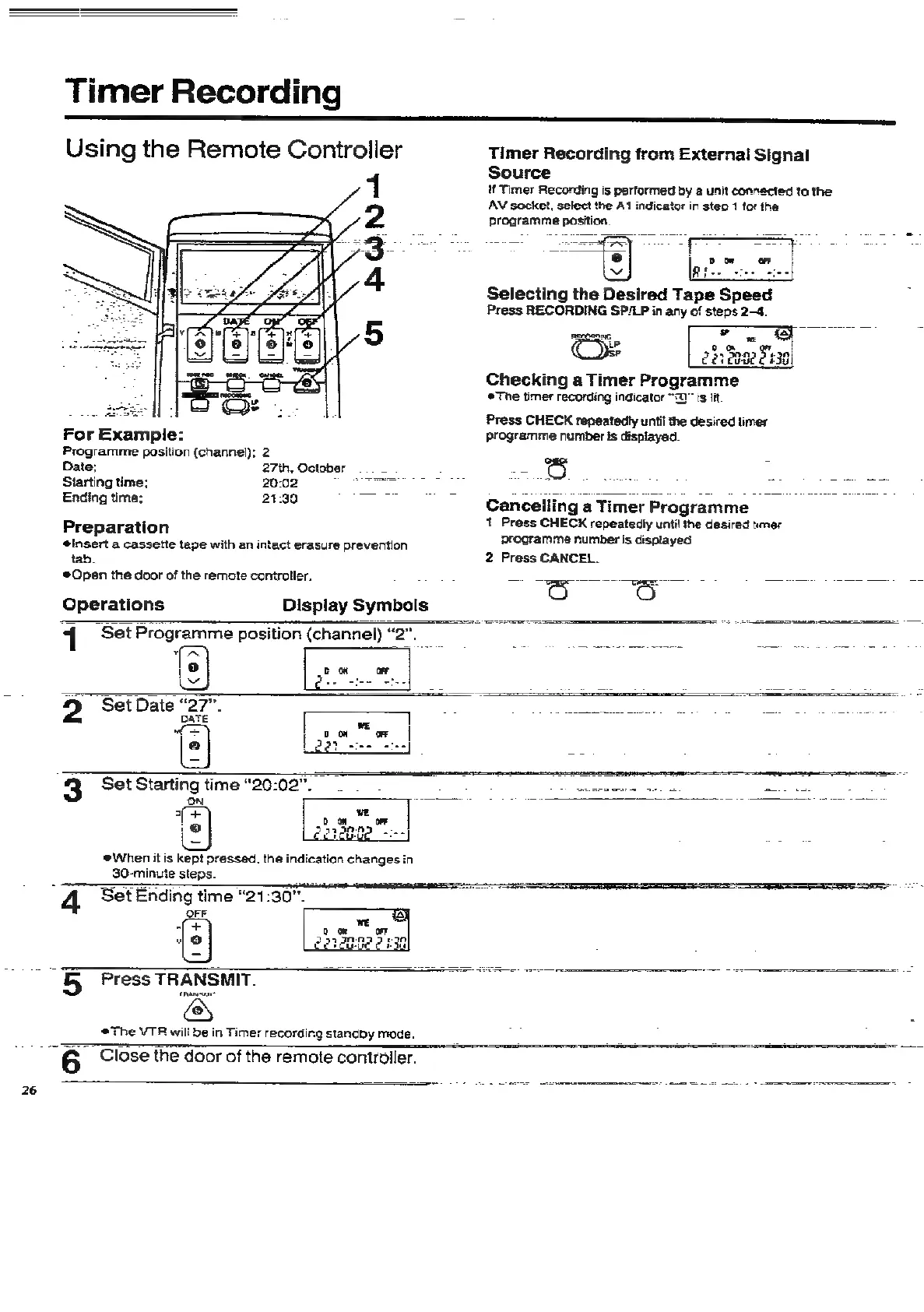
Press
TRANSMIT.
Timer
Recording
Using
the
Remote
Controller
Timer
Recording
from
External
Signal
Source
1
If
Timer
Recording
is
performed
by
a
unit
connected
to
the
AV
socket,
select
the
At
indicator
in
steo
1
for
the
2
programme
position.
Selecting
the
Desired
Tape
Speed
Press
RECORDING
SP/LP
in
any
of
steps
2-4.
aC
=
we
te
err
2b
anee
£438
Checking
a
Timer
Programme
The
timer
recording
indicator
“0”
is
lit
é
:
=
Press
CHECK
repeatedly
until
the
desired
timer
For
Example:
programme
number
is
displayed.
Programme
position
(channel);
2
é
Date;
27th,
October
~
ie)
eee
Starting
time;
2002.
EG
GR
ee
oe
io
Matte
Ending
time;
21:30
a.
ca
Cancelling
a
Timer
Programme
Preparation
1
Press
CHECK
repeatedly
until
the
desired
tmer
insert
a
cassette
tape
with
an
intact
erasure
prevention
Programme
number
Is
displayed
ae
2
Press
CANCEL.
Open
the
door
of
the
remote
controller.
=
von
chee
on
cena
tert
Operations
Display
Symbols
1
"Set
Programme
position
(channel)
“2”.
,@
cow
or
v
Qe]
;
7
nee
2
Set
Date
“27”.
aa
ns
Piocele
Seats
ad
2p
sea
a
etn
nk
pate
aa
|
iad
0
OW
oe
e
Lear
see
eee
3
Set
Starting
time
“20:02”.
re
io
he
steps.
g
time
“21:30”.
‘OFF
(+
|
Oo
trance
The
VTR
will
be
in
Timer
recording
standby
mode.
2
6
Close
the
door
of
the
remote
controller.

Related product manuals