EasyManua.ls Logo

Panasonic NV-HD90 - Setting the Remote Controller for Operation of Your TV

Panasonic NV-HD90
40 pages
Print Icon
To Next Page IconTo Next Page
To Previous Page IconTo Previous Page
Loading...
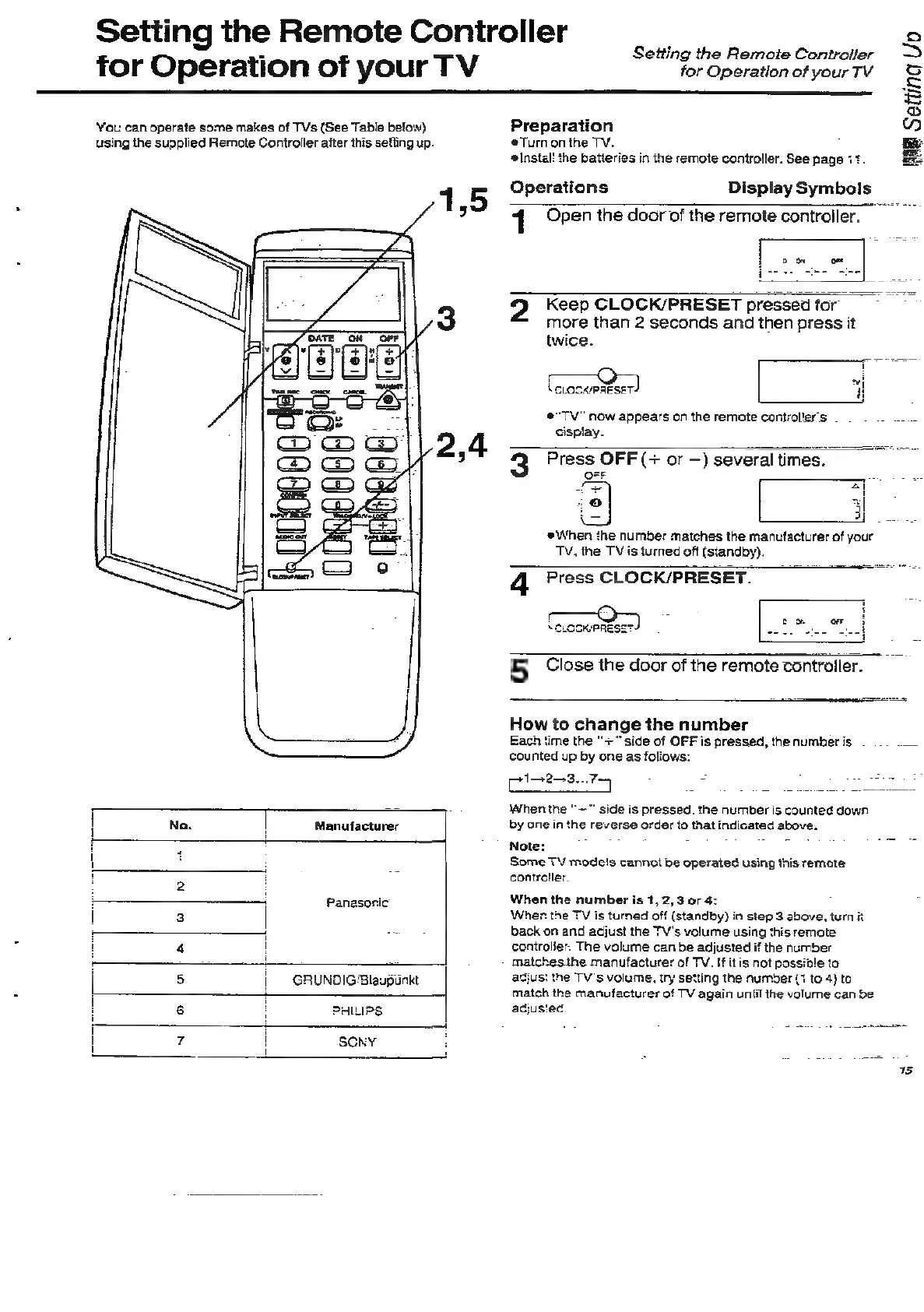
Setting
the
Remote
Controller
for
Operation
of
your
TV
‘You
can
operate
some
makes
of
TVs
(See
Table
below)
using
the
supplied
Remote
Controller
after
this
sefting
up.
|
No.
|
Manufacturer
\
:
:
:
2
:
>
Panasonic
3
£
4
!
i
8
|
GRUNDIG
Blaupunkt
|
6
!
PHILIPS
;
|
\
7
|
SCRY
:
Setting
the
Remote
Controller
for
Operation
of
your
TV
Preparation
Tum
on
the
TV.
‘Instal:
the
batteries
in
the
remote
controller.
See
page
+
IME
Setting
Vo
Operations
Display
Symbols
1
Open
the
door
of
the
remote
controiler.
;
9
Keep
CLOCK/PRESET
pressed
for
more
than
2
seconds
and
then
press
it
twice.
4
cuoseestser)
#"TV"
now
appears
on
the
remote
controller's
.
cispiay.
3
Press
OFF
(+
or
—)
several
times.
2D
i
|
@
“2
yo.
When
the
number
matches
the
manufacturer
of
your
TV,
the
TV
is
turned
off
(standby).
q
Press
CLOCK/PRESET.
co
or
5
Close
the
door
of
the
remote
controller.
How
to
change
the
number
Each
time
the
"+"
side
of
OFF
is
pressed,
the
numberis
—
..
___
counted
up
by
one
as
foliows:
Tdlenicoicartien
=
When
the
“—"
side
is
pressed.
the
number
is
counted
down
by
one
in
the
reverse
order
to
that
indicated
above.
Note:
Some
TV
mode's
cannot
be
operated
using
this
remote
controller.
When
the
number
is
1,
2,3
or
4:
Wher
the
TV
is
turned
off
(standby)
in
step
3
above,
turn
it
back
on
and
adjust
the
TV's
volume
using
this
remote
controlier.
The
volume
can
be
adjusted
if
the
number
matches
the
manufacturer
of
TV.
If
it
is
not
possible
to
adjusi
the
TV's
volume,
try
setting
the
number
(1
to
4)
to
match
the
manufacturer
of
TV
again
until
the
volume
can
be
adjusted.