EasyManua.ls Logo

Panasonic NV-HD90 - Before Requesting Service

Panasonic NV-HD90
40 pages
Print Icon
To Next Page IconTo Next Page
To Previous Page IconTo Previous Page
Loading...
*
.
Setting
the
Clock
of
the
VTR
Before
Requesting
Service
Beare
Requosiity
Seve
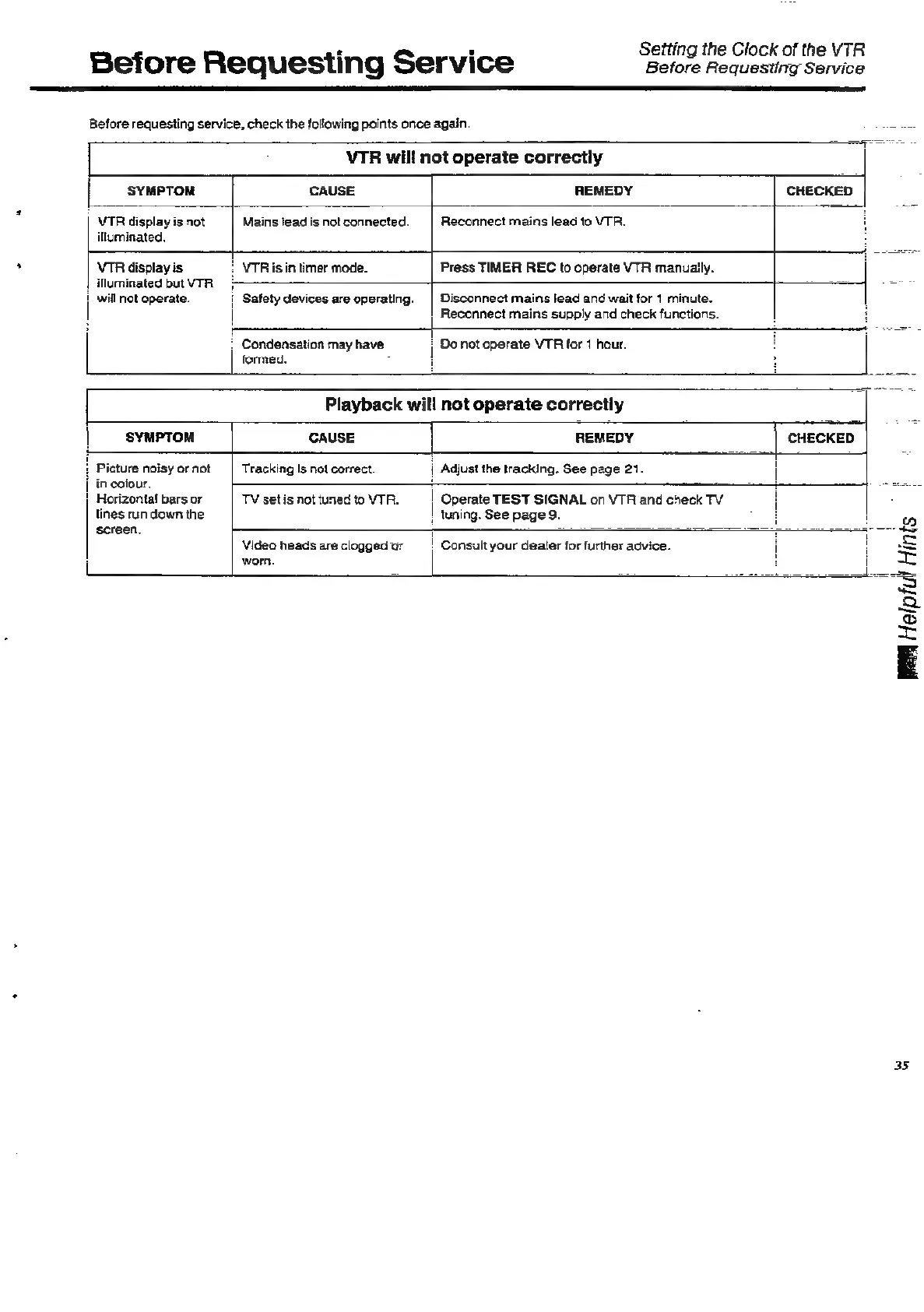
Before
requesting
service,
check
the
following
points
once
again
VTR
will
not
operate
correctly
,
Condensation
may
have
formed.
:
;
Do
not
operate
VTR
for
1
hour.
SYMPTOM
CAUSE
REMEDY
CHECKED
VIR
display
is
not
Mains
lead
is
notconnected.
|
Reconnect
mains
lead
to
VTR.
i
illuminated.
VTR
display
is
VTR
is in
timer
mode.
Press
TIMER
REC
to
operate
VTR
manually.
illuminated
butVTR_
>
=
i
will
not
operate.
|
Safety
devices
are
operating.
|
Disconnect
mains
lead
and
wait
for
1
minute.
Reconnect
mains
supply
and
check
functions.
Playback
will
not
operate
correctly
CHECKED
|
SYMPTOM
CAUSE
REMEDY
icture
noisy
or
not
Tracking
is
not
correct.
|
Adjust
the
tracking.
See
page
21.
in
colour,
|
Horizontal
bars
or
TV
set
is
not
tuned
to
VTR.
|
Operate
TEST
SIGNAL
on
VTR
and
check
TV
lines
run
down
the
|
tuning.
See
page
9.
screen,
7
Video
heads
are
cloggedar
=|
Consult
your
dealer
for
further
advice.
worn.
35

Related product manuals