EasyManua.ls Logo

Panasonic NV-HD90 - Tuning the TV to Your VTR

Panasonic NV-HD90
40 pages
Print Icon
To Next Page IconTo Next Page
To Previous Page IconTo Previous Page
Loading...
Tuning
the
TV
to
your
VTR
Connections
Tuning
the
TV
to
your
VTR
‘etting
Up
[tis
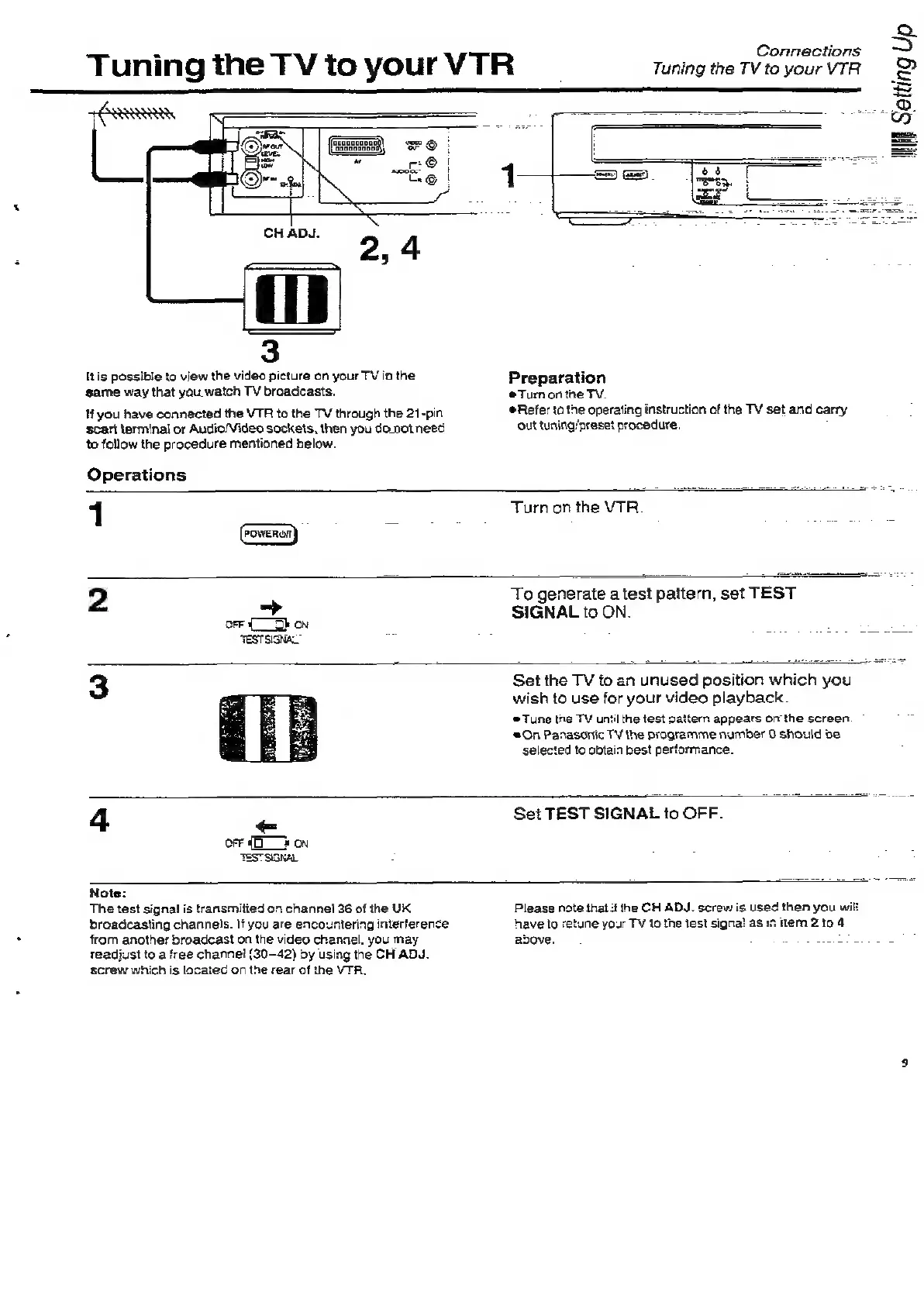
possible
to
view
the
video
picture
on
your
TV
in
the
game
way
that
you.
watch
TV
broadcasts.
Hf
you
have
connected
the
VTR
to
the
TV
through
the
21-pin
scart
terminal
or
Audio/Video
sockets,
then
you
do_not
nee
to
follow
the
procedure
mentioned
below.
Operations
Preparation
Turn
onthe
TV.
Refer
to
the
operating
instruction
of
the
TV
set
and
carry
out
tusing/preset
procedure,
1
Turn
on
the
VTR.
2
>
To
generate
a
test
pattern,
set
TEST
SIGNAL
to
ON.
4
a
Set
the
TV
fo
an
unused
position
which
you
wish
to
use
for
your
video
playback.
Tune
tne
TY
until
the
test
pattern
appears
on
the
screen.
‘a
On
Panasonic
TV
the
programme
number
0
should
oe
selected
to
obtain
best
performance.
Set
TEST
SIGNAL
to
OFF.
Note:
The
test
signal
is
transmitied
on
channel
36
of
the
UK
broadcasting
channels.
If
you
are
encountering
interference
from
another
broadcast
on
the
video
channel.
you
may
readjust
to
a
free
channel
(30-42)
by
using
the
CH
ADJ.
screw
which
is
lacated
on
the
rear
of
the
VTR.
Please
note
thal:
the
CH
ADJ.
screw
is
used
then
you
wi
have
to
retune
your
TV
to
the
test
signa!
as
i
item
2
to
4
above.
:

Related product manuals