EasyManua.ls Logo

Panasonic NV-HD90 - Page 36

Panasonic NV-HD90
40 pages
Print Icon
To Next Page IconTo Next Page
To Previous Page IconTo Previous Page
Loading...
36
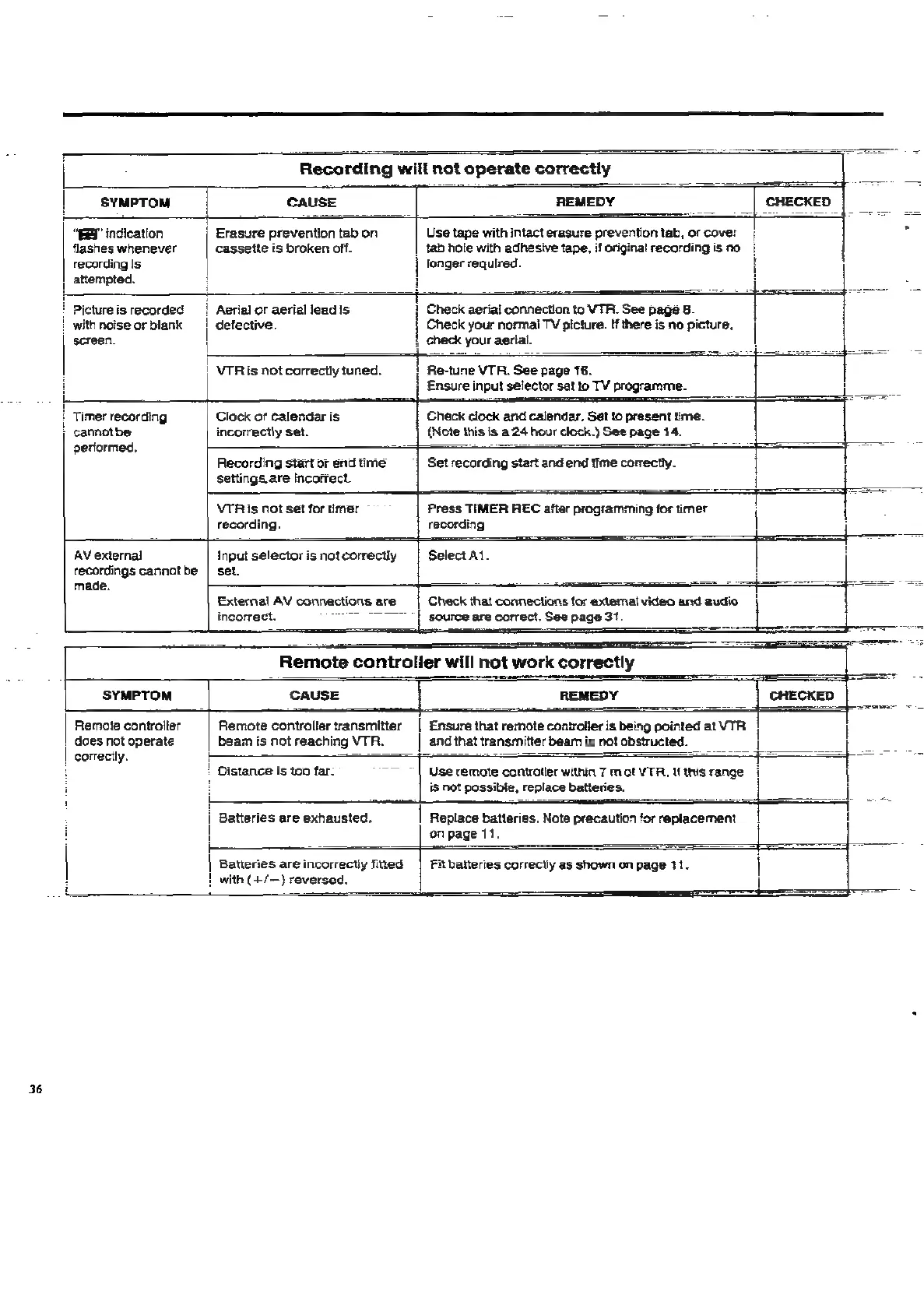
Recording
will
not
operate
correctly
H
SYMPTOM
CAUSE
REMEDY
“ERY
indication
|
Erasure
prevention
tab
on
flashes
whenever
cassette
is
broken
off.
recording
Is
longer
required.
attempted.
|
tab
hole
with
adhesive
tape,
if
originat
recording
is
no
Use
tape
with
intact
erasure
prevention
tab,
or
cover
E
Picture
is
recorded
with
noise
or
blank
screen.
Aerial
or
aerial
lead
Is
H
defective.
—-
Check
aerial
connection
to
VTR.
See
page
8.
|
check
your
aerial.
Check
your
normal
TV
picture.
ff
there
is
no
picture,
|
VTR
is
not
correctly
tuned.
i
Ensure
input
selector
set
to
TV
programme.
Re-tune
VTR.
See
page
16.
Check
clock
and
calendar.
Set
to
present
time.
(Note
this
is
a
24
hour
clock.)
See
page
14.
Set
recording
start
and
end
time
correctly.
Press
TIMER
REC
after
programming
for
timer
4
Timer
recording
Clock
of
calendar
is
j
cannotbe
incorrectly
set.
performed,
~
Recording
start
or
end
time
settings
are
Incorrect.
VTR
is
not
set
for
timer
~
recording.
recording
AV
external
Input
selector
is
not
correctly
Select
A1.
recordings
cannotbe
|
set.
made.
External
AV
connections
are
incorrect.
ray
te
|
source
are
correct.
See
page
31.
2
sense
EE
Check
that
connections
tor
external
video
and
audio.
SYMPTOM
Remote
controller
does
not
operate
correctly.
Remote
controller
transmitter
beam
is
not
reaching
VTR.
Ensure
that
remote
controller
is
being
pointed
at
VTR
and
that
transmitter
beam
is
not
obstructed.
Distance
Is
too
far.
ahd
Use
remote
controller
within
7
m
of
VTA,
Uf
this
range
is
not
possible,
replace
batteries.
i
Batteries
are
exhausted.
!
|
Replace
batteries.
Note
precaution
for
replacement
on
page
11.
j=
Batteries
are
incorrectly
fied
1
!
with
(+/—)
reversed.
i
Fit
batteries
correctly
as
shown
on
page
11.
oe

Related product manuals