EasyManua.ls Logo

Panasonic RX-ES50 - Page 10

Panasonic RX-ES50
32 pages
Print Icon
To Next Page IconTo Next Page
To Previous Page IconTo Previous Page
Loading...
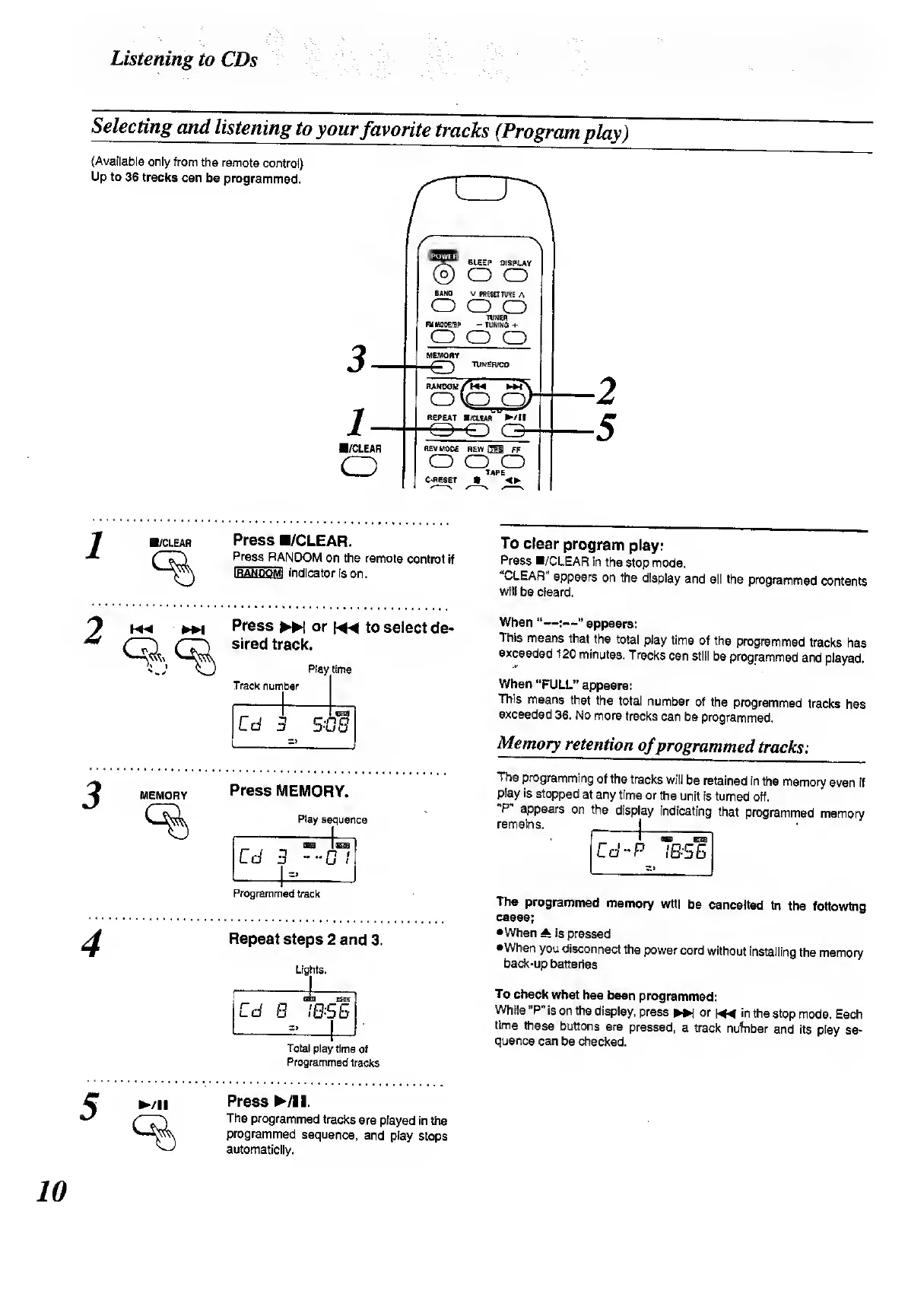
Listening
to
CDs
vv;'
Selecting
and
listening
to
your
favorite
tracks
(Program
play)
(Available
only
from
the
remote
control)
Up
to
36
tracks
can
be
programmed.
’“ST"
BLEEP
DISPLAY
®
O
O
BAND
V
PRESET
TUNE
A
o
o
o
TUNER
FU
MOE/UP
-
TUNING
+
o
o
o
/CLEAR
o
RANDOM
Am
wN
o
b^d
REPEAT
B/CIEAR
/!!
REV
MODE
REW
®i
FF
o
o
o
TAPE
C-RESET
4P
/CLEAR
Press
B/CLEAR.
Press
RANDOM
on
the
remote
control
if
IRANDOMI
indicator
is
on.
Press
or
««
to
select
de¬
sired
track.
MEMORY
Track
number
Play
time
Cd
3
=>
BOB
Press
MEMORY.
Play
sequence
IBS
isQS
Cd
3
0
1
-i_-
Programmed
track
Repeat
steps
2
and
3.
Lights.
tHT
~
Od
B
I
BBS
Totai
play
time
of
Programmed
tracks
Press
/!
I.
The
programmed
tracks
are
played
in
the
programmed
sequence,
and
play
stops
automaticlly.
To
clear
program
play:
Press
B/CLEAR
in
the
stop
mode.
“CLEAR"
appears
on
the
display
and
all
the
programmed
contents
will
be
cleard.
When
“—:—"
appears:
This
means
that
the
total
play
time
of
the
programmed
tracks
has
exceeded
120
minutes.
Tracks
can
still
be
programmed
and
played.
When
“FULL”
appears:
This
means
that
the
total
number
of
the
programmed
tracks
has
exceeded
36.
No
more
tracks
can
be
programmed.
Memory
retention
of
prog
rammed
tracks:
The
programming
of
the
tracks
will
be
retained
in
the
memory
even
if
play
is
stopped
at
any
time
or
the
unit
is
turned
off.
‘P
appears
on
the
display
indicating
that
programmed
memory
remains.
_|__
"
BED
Bran
Cd-P
IBS5
The
programmed
memory
will
be
cancelled
in
the
following
cases;
•When
A
is
pressed
•When
you
disconnect
the
power
cord
without
installing
the
memory
back-up
batteries
To
check
what
has
been
programmed:
While
"P"
is
on
the
display,
press
or
HMI
in
the
stop
mode.
Each
time
these
buttons
are
pressed,
a
track
nufnber
and
its
play
se¬
quence
can
be
checked.
10

Related product manuals