EasyManua.ls Logo

Panasonic RX-ES50 - Setting the Clock; Selecting the Display

Panasonic RX-ES50
32 pages
Print Icon
To Next Page IconTo Next Page
To Previous Page IconTo Previous Page
Loading...
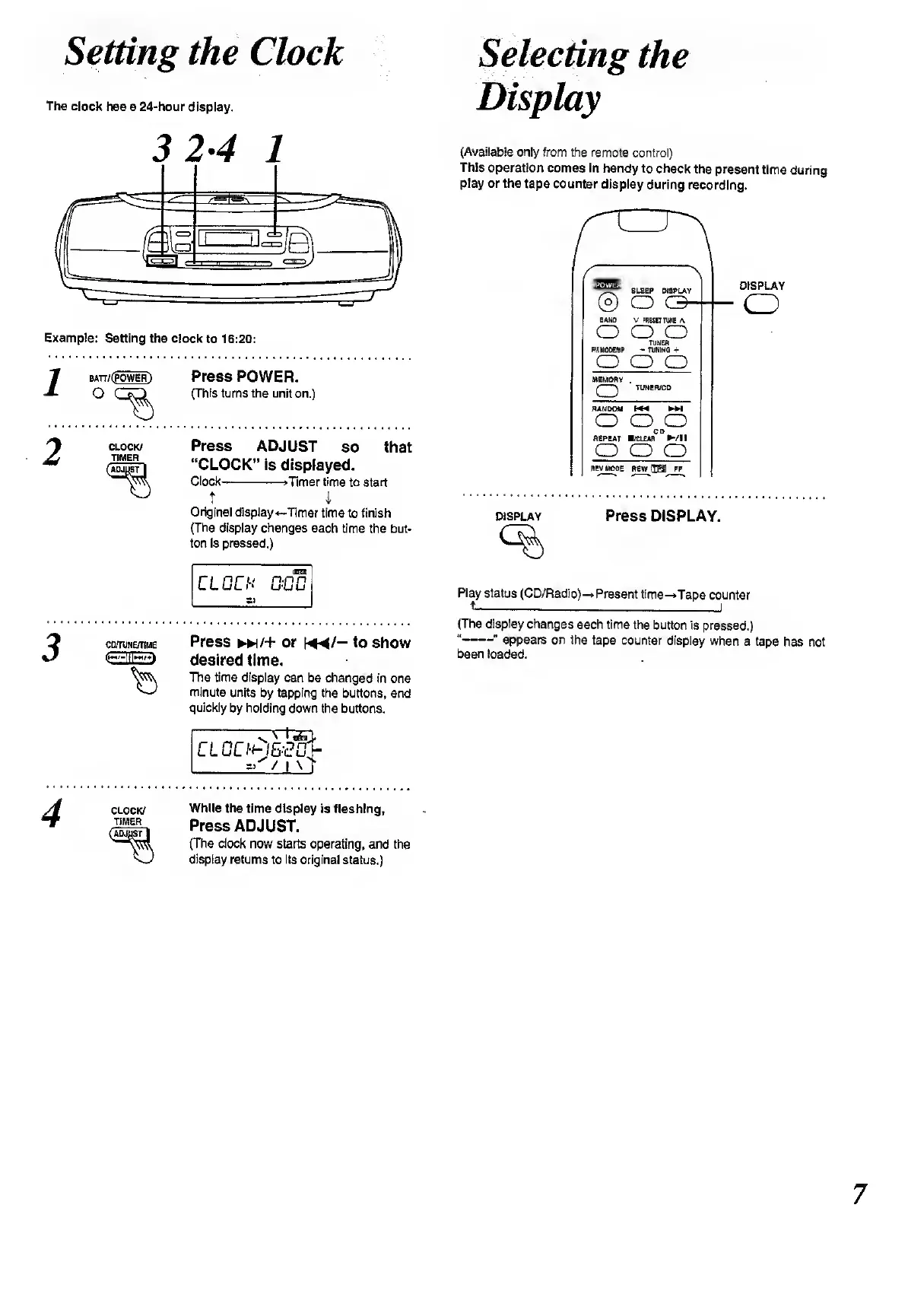
Setting
the
Clock
The
clock
has
a
24-hour
display.
3
2-4
1
Example;
Setting
the
clock
to
16:20;
Press
POWER.
(This
turns
the
unit
on.)
Press
ADJUST
so
that
“CLOCK”
is
displayed.
Clock-*Timer
time
to
start
T
i
Original
display
-Timer
time
to
finish
(The
display
changes
each
time
the
but¬
ton
is
pressed.)
CLOCK
n.np
u-uu
=3
CD/TUNE/T1ME
Press
►►
)/+
or
to
show
desired
time.
The
time
display
can
be
changed
in
one
minute
units
by
tapping
the
buttons,
and
quickly
by
holding
down
the
buttons.
-
s
\
l
i
T
CLCO-0&£O>
=>
/1
\
r
Selecting
the
Display
(Available
only
from
the
remote
control)
This
operation
comes
In
handy
to
check
the
present
time
during
play
or
the
tape
counter
display
during
recording.
SLEEP
CNSPLAY
©
O
C3
BANO
V
PRESET
JUNE
A
o
o
o
TUNER
FttUODEIBP
-
TUNING
+
o
o o
MEMORY
CJ
TUNEfVCD
RANDOM
W*
H
o
o
o
REPEAT
/CLEAR
/!!
o
o
o
REV
MODE
REWCnS]
FF
DISPLAY
o
display
Press
DISPLAY.
Play
status
(CD/Radio)-
Present
time-*Tape
counter
t_I
(The
display
changes
each
time
the
button
is
pressed.)
“-"
appears
on
the
tape
counter
display
when
a
tape
has
not
been
loaded.
CLOCK/
TIMER
While
the
time
display
is
flashing,
Press
ADJUST.
(The
clock
now
starts
operating,
and
the
display
returns
to
Its
original
status.)
7

Related product manuals