EasyManua.ls Logo

Panasonic RX-ES50 - Location of Controls

Panasonic RX-ES50
32 pages
Print Icon
To Next Page IconTo Next Page
To Previous Page IconTo Previous Page
Loading...
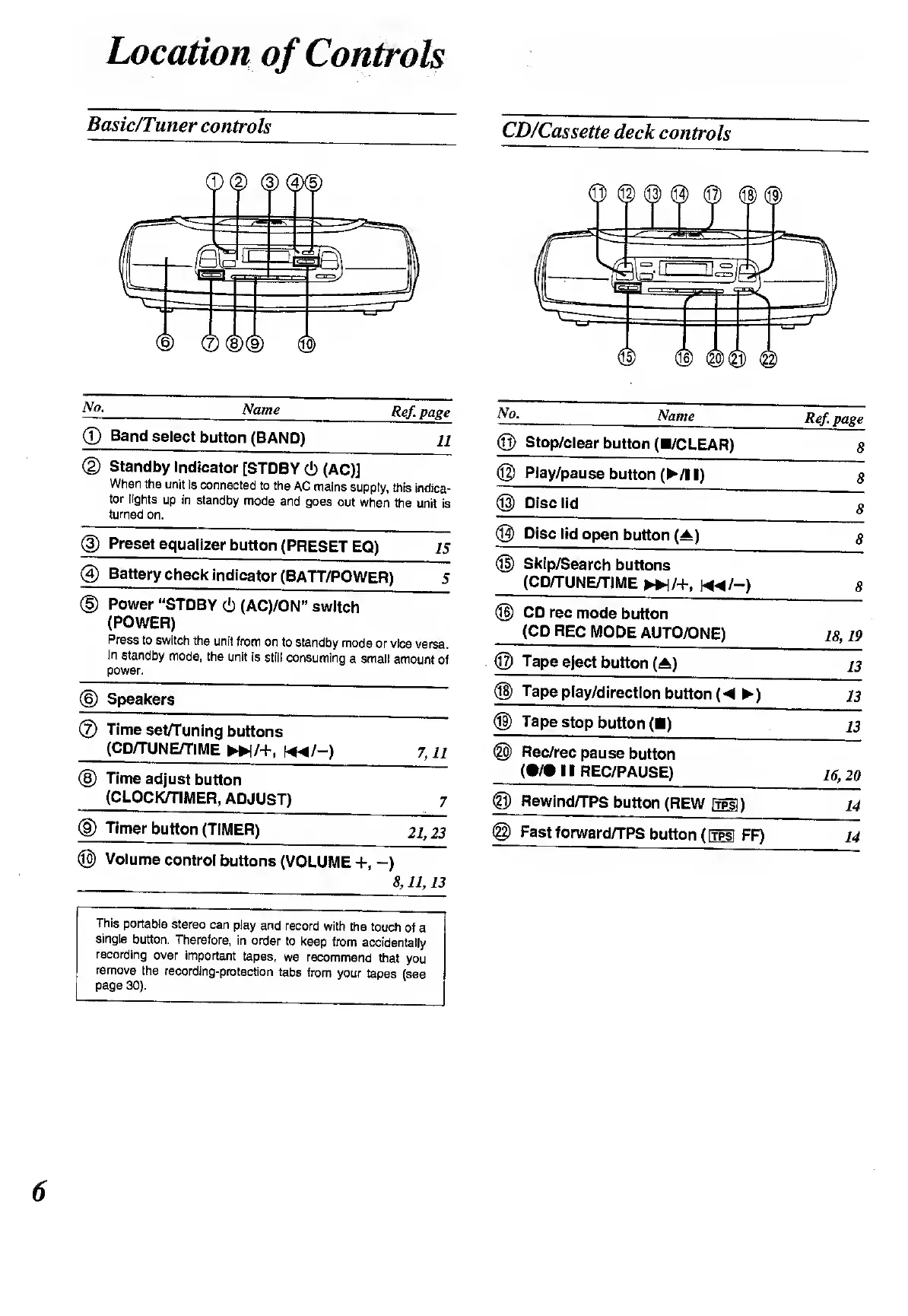
Location
of
Controls
Basic/Tuner
controls
CD/Cassette
deck
controls
No.
_
Name
©
Band
select
button
(BAND)
Ref
page
11
©
Standby
Indicator
[STDBY
(!)
(AC)]
When
the
unit
is
connected
to
the
AC
mains
supply,
this
indica¬
tor
lights
up
in
standby
mode
and
goes
out
when
the
unit
is
turned
on.
©
Preset
equalizer
bu
tton
(PRESET
EQ)
/5
®
Battery
chec
k
indicator
(BATT/POWER)
5
©
Power
“STDBY
(!)
(AC)/ON”
switch
(POWER)
Press
to
switch
the
unit
from
on
to
standby
mode
or
vice
versa.
In
standby
mode,
the
unit
is
still
consuming
a
small
amount
of
power.
@
Speakers
®
Timesetfiuning
buttons
(CD/TUNE/TIME
»/+,
«^/-)
7,
1
1
®
Time
adjust
button
(CLOCK/TIMER,
ADJUST)
7
©
Timer
button
(TIMER)
21,
23
©
Volume
control
buttons
(VOLUME
+,
-)
8,11,13
This
portable
stereo
can
play
and
record
with
the
touch
of
a
single
button.
Therefore,
in
order
to
keep
from
accidentally
recording
over
important
tapes,
we
recommend
that
you
remove
the
recording-protection
tabs
from
your
tapes
(see
page
30).
No.
__
Name
_
©
Stop/clear
button
(B/CLEAR)
©
Play/pause
butto
n
(
/!
B)
@
Disc
lid
©
Disc
lid
open
button
(A)
©
Skip/Search
buttons
(CD/TUNE/TIME
►►
]/+,
m/-)
©
CD
rec
mode
button
(CD
REC
MODE
AU
TO/ONE)
@
Tape
eject
button
(A)
®
Tape
play/direction
b
utton
(
)
©
Tape
stop
button
(B)
©
Rec/rec
pause
button
(•/•IB
REC/PAUSE)
®
Rewind/TPS
butto
n
(REW
ItpsI
)
@
Fast
forward/TPS
button
(
[tpsI
FF)
Ref
page
8

Related product manuals