EasyManua.ls Logo

Panasonic RX-ES50 - Listening to the Radio

Panasonic RX-ES50
32 pages
Print Icon
To Next Page IconTo Next Page
To Previous Page IconTo Previous Page
Loading...
Listening
to
the
Radio
CD/TUNE/TIME
-g
BAND
POWER
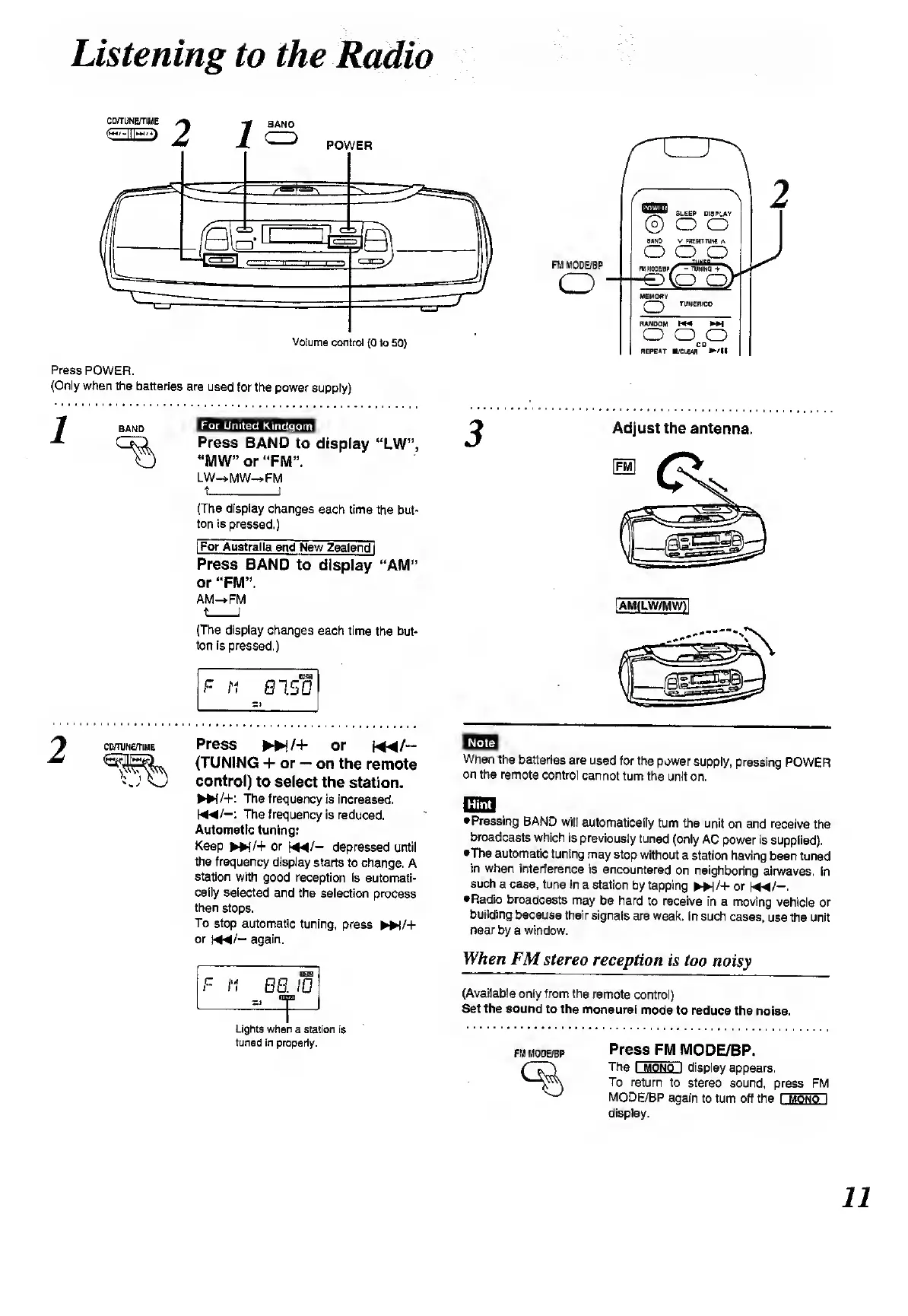
Press
POWER.
(Only
when
the
batteries
are
used
for
the
power
supply)
1
BAND
mmmmwm
Press
BAND
to
display
“LW”,
"MW”
or
“FM”.
LW—>MW—»FM
t_I
(The
display
changes
each
time
the
but¬
ton
is
pressed.)
[For
Australia
and
New
Zealand
j
Press
BAND
to
display
“AM”
or
“FM”.
AM—»FM
t_I
(The
display
changes
each
time
the
but¬
ton
is
pressed.)
F
M
8150
FM
MODE/BP
o
Adjust
the
antenna.
[AM(LW/MW)1
comiNerriME
Press
►►
!/+
or
m/-
(TUNING
+
or
on
the
remote
control)
to
select
the
station.
NN/+:
The
frequency
is
increased.
K*/-:
The
frequency
is
reduced.
Automatic
tuning:
Keep
►►
{/+
or
b4*/-
depressed
until
the
frequency
display
starts
to
change.
A
station
with
good
reception
is
automati¬
cally
selected
and
the
selection
process
then
stops.
To
stop
automatic
tuning,
press
►►
)/+
or
m/—
again.
F
H
88
=.
“j
10
n
Lights
when
a
station
is
tuned
in
properly.
BE1E1
When
the
batteries
are
used
for
the
power
supply,
pressing
POWER
on
the
remote
control
cannot
turn
the
unit
on.
ITffiTI
Pressing
BAND
will
automatically
turn
the
unit
on
and
receive
the
broadcasts
which
is
previously
tuned
(only
AC
power
is
supplied),
•The
automatic
tuning
may
stop
without
a
station
having
been
tuned
in
when
interference
is
encountered
on
neighboring
airwaves,
In
such
a
case,
tune
in
a
station
by
tapping
»/+
or
NM/-.
Radio
broadcasts
may
be
hard
to
receive
in
a
moving
vehicle
or
building
because
their
signals
are
weak.
In
such
cases,
use
the
unit
near
by
a
window.
When
FM
stereo
reception
is
too
noisy
(Available
only
from
the
remote
control)
Set
the
sound
to
the
monaural
mode
to
reduce
the
noise.
fm
mode/bp
Press
FM
MODE/BP.
The
I
mono
I
display
appears.
To
return
to
stereo
sound,
press
FM
MODE/BP
again
to
turn
off
the
I
mono
i
display.

Related product manuals