EasyManua.ls Logo

Panasonic RX-ES50 - Using the Sleep Timer; Using Two Timer Functions.24

Panasonic RX-ES50
32 pages
Print Icon
To Next Page IconTo Next Page
To Previous Page IconTo Previous Page
Loading...
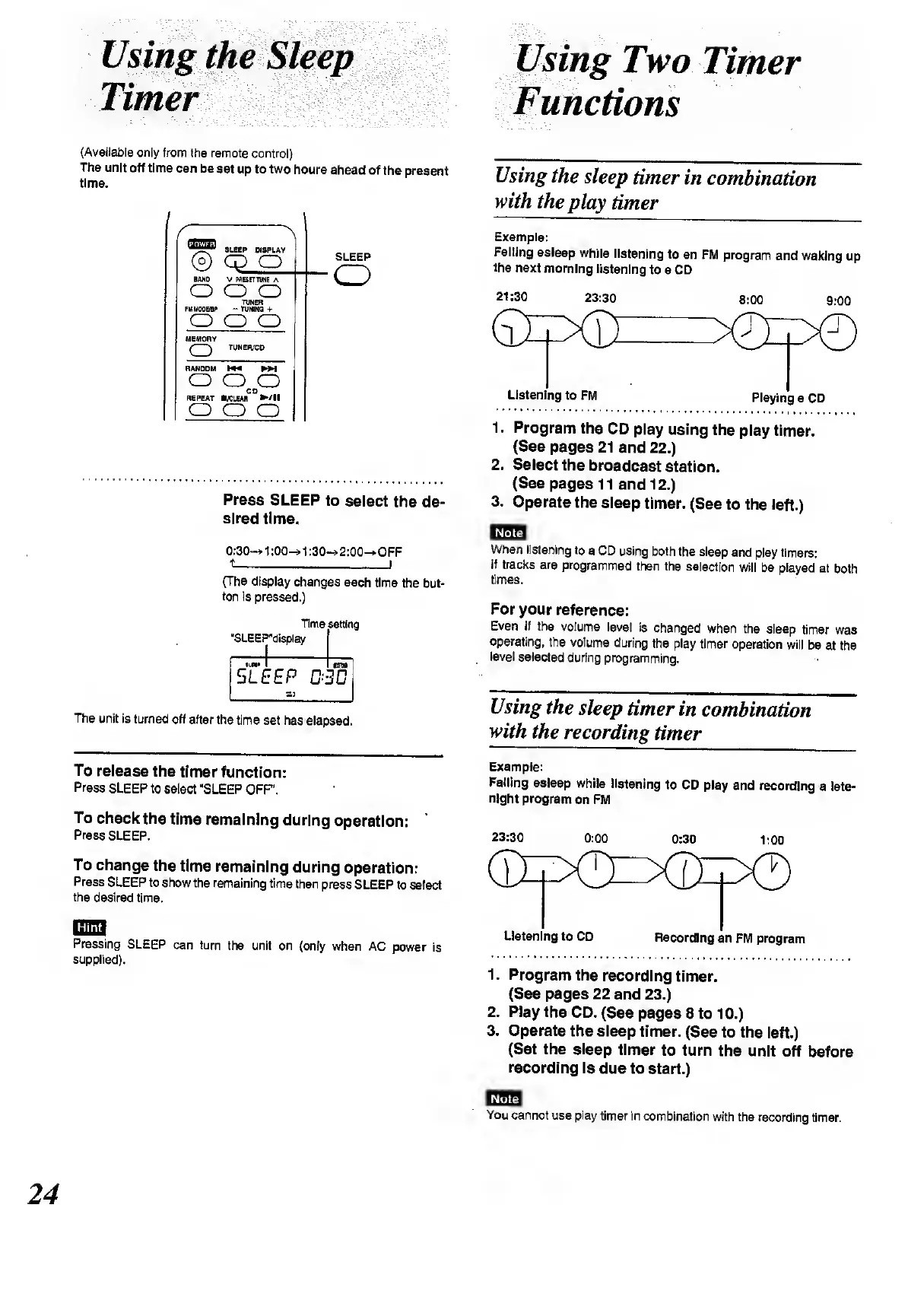
Using
the
Sleep
Using
Two
Timer
Timer
Functions
(Available
only
from
the
remote
control)
The
unit
off
time
can
be
set
up
to
two
hours
ahead
of
the
present
time.
/
1
f
SLEEP
DISPLAY
©
cp
o
BAN0
V
MESETTUJtE
A
o
o o
TUNER
FMTO0BBP
-
TOWNS
+
o
o
o
MEMORY
(
)
TUNER/CO
RANDOM
W4
MM
o
o
o
CD
REPEAT
B/CLEAR
/!!
o
o
o
SLEEP
o
Press
SLEEP
to
select
the
de¬
sired
time.
0:30~»
1:00-»1:30-»2:00-*OFF
(The
display
changes
each
time
the
but¬
ton
is
pressed.)
“SLEEF
Time
^display
setting
llO»
1
1
SLEEP
ffi
ITS
3D
The
unit
is
turned
off
after
the
time
set
has
elapsed.
To
release
the
timer
function:
Press
SLEEP
to
select
“SLEEP
OFF'.
To
check
the
time
remaining
during
operation:
Press
SLEEP.
To
change
the
time
remaining
during
operation:
Press
SLEEP
to
show
the
remaining
time
then
press
SLEEP
to
select
the
desired
time.
RFHT1
Pressing
SLEEP
can
turn
the
unit
on
(only
when
AC
power
is
supplied).
Using
the
sleep
timer
in
combination
with
the
play
timer
Example:
Falling
asleep
while
listening
to
an
FM
program
and
waking
up
the
next
morning
listening
to
a
CD
21:30
23:30
8:00
9:00
1.
Program
the
CD
play
using
the
play
timer.
(See
pages
21
and
22.)
2.
Select
the
broadcast
station.
(See
pages
11
and
12.)
3.
Operate
the
sleep
timer.
(See
to
the
left.)
ijbiei
When
listening
to
a
CD
using
both
the
sleep
and
play
timers:
If
tracks
are
programmed
then
the
selection
will
be
played
at
both
times.
For
your
reference:
Even
if
the
volume
level
is
changed
when
the
sleep
timer
was
operating,
the
volume
during
the
play
timer
operation
will
be
at
the
level
selected
during
programming.
Using
the
sleep
timer
in
combination
with
the
recording
timer
Example:
Falling
asleep
while
listening
to
CD
play
and
recording
a
late-
night
program
on
FM
23:30
0:00
0:30
1:00
Listening
to
CD
Recording
an
FM
program
1.
Program
the
recording
timer.
(See
pages
22
and
23.)
2.
Piay
the
CD.
(See
pages
8
to
10.)
3.
Operate
the
sleep
timer.
(See
to
the
left.)
(Set
the
sleep
timer
to
turn
the
unit
off
before
recording
is
due
to
start.)
Note
You
cannot
use
play
timer
in
combination
with
the
recording
timer.
24

Related product manuals