EasyManua.ls Logo

Panasonic RX-ES50 - Recording Radio Programs

Panasonic RX-ES50
32 pages
Print Icon
To Next Page IconTo Next Page
To Previous Page IconTo Previous Page
Loading...
SAND
V
PRESET
TUNE
A
o
o
o
TUNER
FMMCOE/BP
-
TUNING
+
-OOP
MEMORY
/
)
TUNER/CD
RANDOM
KM
POO
CO
REPEAT
/CLEAR
/II
P
P
P
REV
MODE
REWHSl
FP
POP
TAPE
C-RESET
-4K
OOP
PRESET
£Q
-VOLUME
+
/"
n
/-n-N
Normal
and
high
position
tapes
can
be
used.
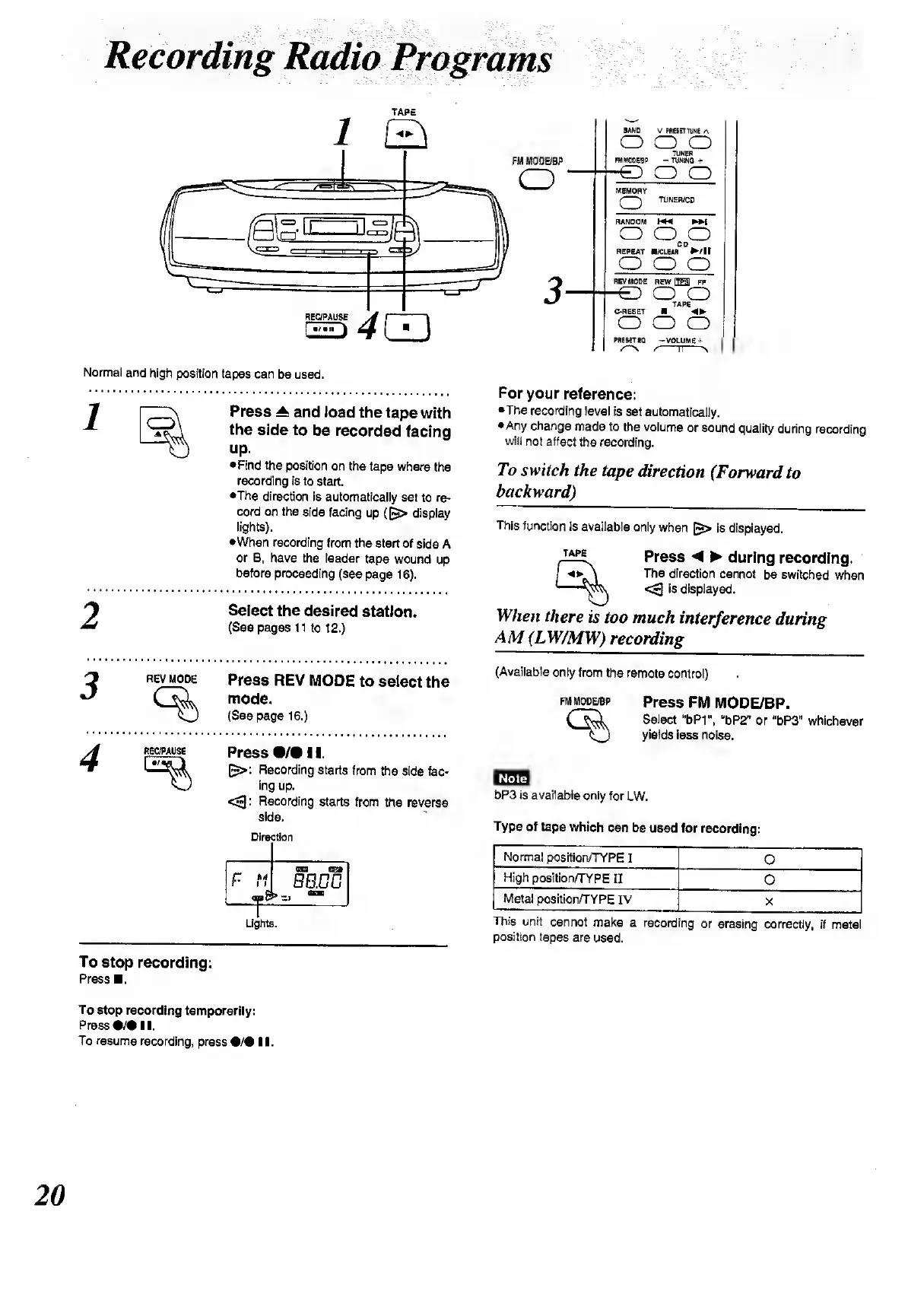
1
Press
^
and
load
the
tape
with
the
side
to
be
recorded
facing
up.
Find
the
position
on
the
tape
where
the
recording
is
to
start.
•The
direction
is
automatically
set
to
re¬
cord
on
the
side
facing
up
(display
lights).
•When
recording
from
the
start
of
side
A
or
B,
have
the
leader
tape
wound
up
before
proceeding
(see
page
16).
2
Select
the
desired
station.
(See
pages
11
to
12.)
3
REV
MODE
%
Press
REV
MODE
to
select
the
mode.
(See
page
16.)
RE
C/PAUS
E
Press
•/•!!.
[$>:
Recording
starts
from
the
side
fac¬
ing
up.
<3:
Recording
starts
from
the
reverse
side.
Direction
C
/
i
i
<H»
£
(EES
Qjft
BB.BD
«
Lights.
For
your
reference:
The
recording
level
is
set
automatically.
Any
change
made
to
the
volume
or
sound
quality
during
recording
will
not
affect
the
recording.
To
switch
the
tape
direction
(Forward
to
backward)
This
function
is
available
only
when
£>
is
displayed.
TAPE
Press
during
recording.
The
direction
cannot
be
switched
when
<~1
is
displayed.
When
there
is
too
much
interference
during
AM
(LW/MW)
recording
(Available
only
from
the
remote
control)
FM
MODE/BP
Press
FM
MODE/BP.
Select
u
bPt",
u
bP2”
or
“bP3"
whichever
yields
less
noise.
bP3
is
available
only
for
LW.
Type
of
tape
which
can
be
used
for
recording:
Normal
position/TYPE
I
0
High
position/TYPE
II
O
Metal
position/TYPE
IV
X
This
unit
cannot
make
a
recording
or
erasing
correctly,
if
metal
position
tapes
are
used.
To
stop
recording:
Press
.
To
stop
recording
temporarily:
Press
•/•
II.
To
resume
recording,
press
•/•!!.

Related product manuals