EasyManua.ls Logo

Panasonic RX-ES50 - Listening to Cds

Panasonic RX-ES50
32 pages
Print Icon
To Next Page IconTo Next Page
To Previous Page IconTo Previous Page
Loading...
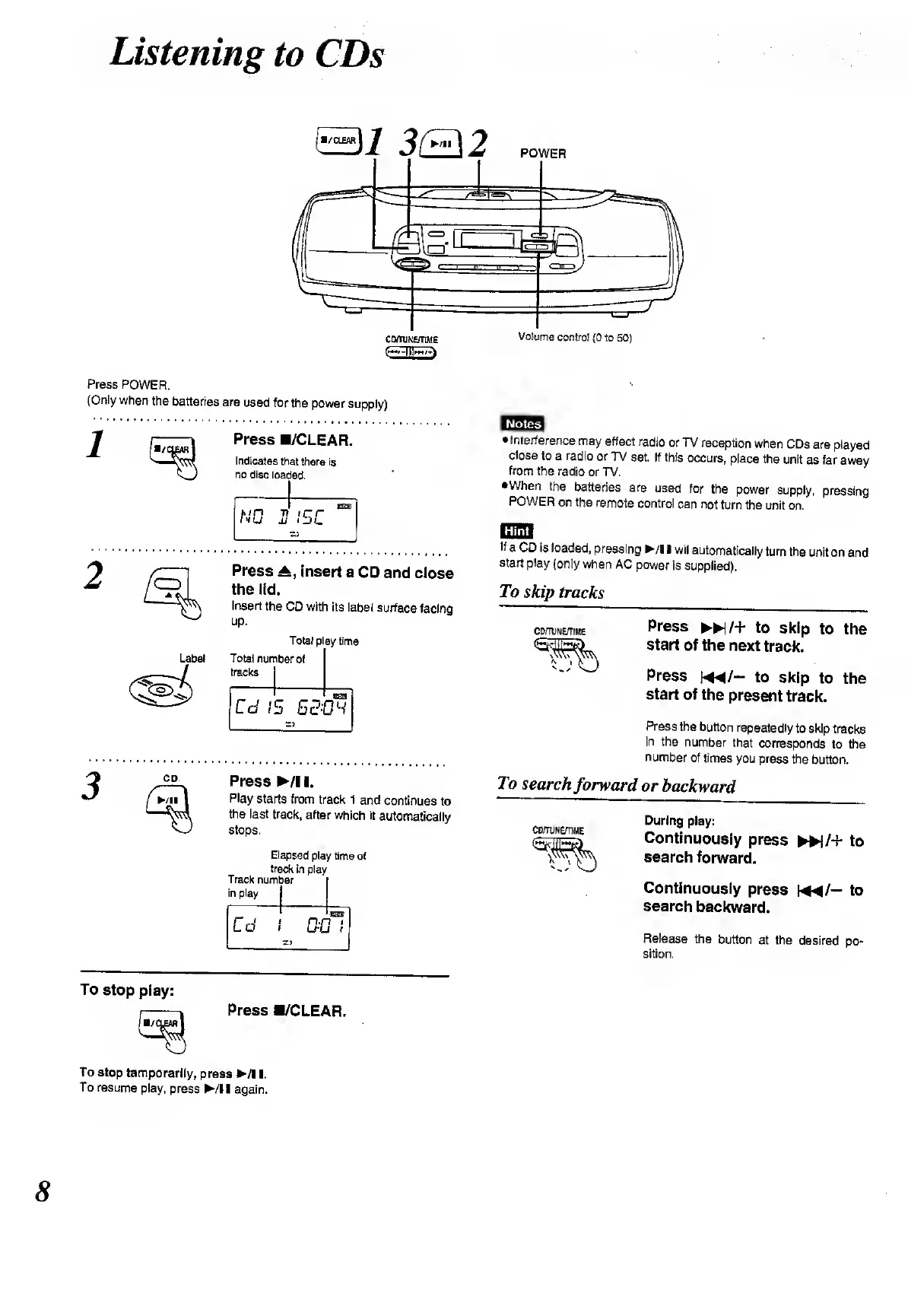
POWER
listening
to
CDs
(
E)i
3(H\2
Press
POWER.
(Only
when
the
batteries
are
used
for
the
power
supply)
Press
B/CLEAR.
Indicates
that
there
is
no
disc
loaded.
NO
2
ISO
Press
insert
a
CD
and
close
the
lid.
Insert
the
CD
with
its
label
surface
facing
up.
Label
Total
nun
tracks
iber
of
Cd
1
OH
CD
Press
/!
I.
Play
starts
from
track
1
and
continues
to
the
last
track,
after
which
it
automatically
stops.
Elapsed
play
time
of
track
in
play
Track
number
in
play
j
Cd
i
DC
z>
-toot
7
»
1
1
Notes
Interference
may
affect
radio
or
TV
reception
when
CDs
are
played
close
to
a
radio
or
TV
set.
If
this
occurs,
place
the
unit
as
far
away
from
the
radio
or
TV.
•When
the
batteries
are
used
for
the
power
supply,
pressing
POWER
on
the
remote
control
can
not
turn
the
unit
on.
fTTHTl
If
a
CD
is
loaded,
pressing
/!
I
wil
automatically
turn
the
unit
on
and
start
play
(only
when
AC
power
is
supplied).
To
skip
tracks
CDmjNE/TIME
Press
*/+
to
skip
to
the
start
of
the
next
track.
Press
m/-
to
skip
to
the
start
of
the
present
track.
Press
the
button
repeatedly
to
skip
tracks
in
the
number
that
corresponds
to
the
number
of
times
you
press
the
button.
To
search
forward
or
backward
CD/TUNE/TIME
During
play:
Continuously
press
►►
)/+
to
search
forward.
Continuously
press
f-
4
^/—
to
search
backward.
Release
the
button
at
the
desired
po¬
sition.
To
stop
play:
Press
B/CLEAR.
To
stop
temporarily,
press
/!!.
To
resume
play,
press
/!!
again.
8

Related product manuals