EasyManua.ls Logo

Panasonic RX-ES50 - Recording from

Panasonic RX-ES50
32 pages
Print Icon
To Next Page IconTo Next Page
To Previous Page IconTo Previous Page
Loading...
Recording
from
CD
Easy
CD
Recording
(AUTO)
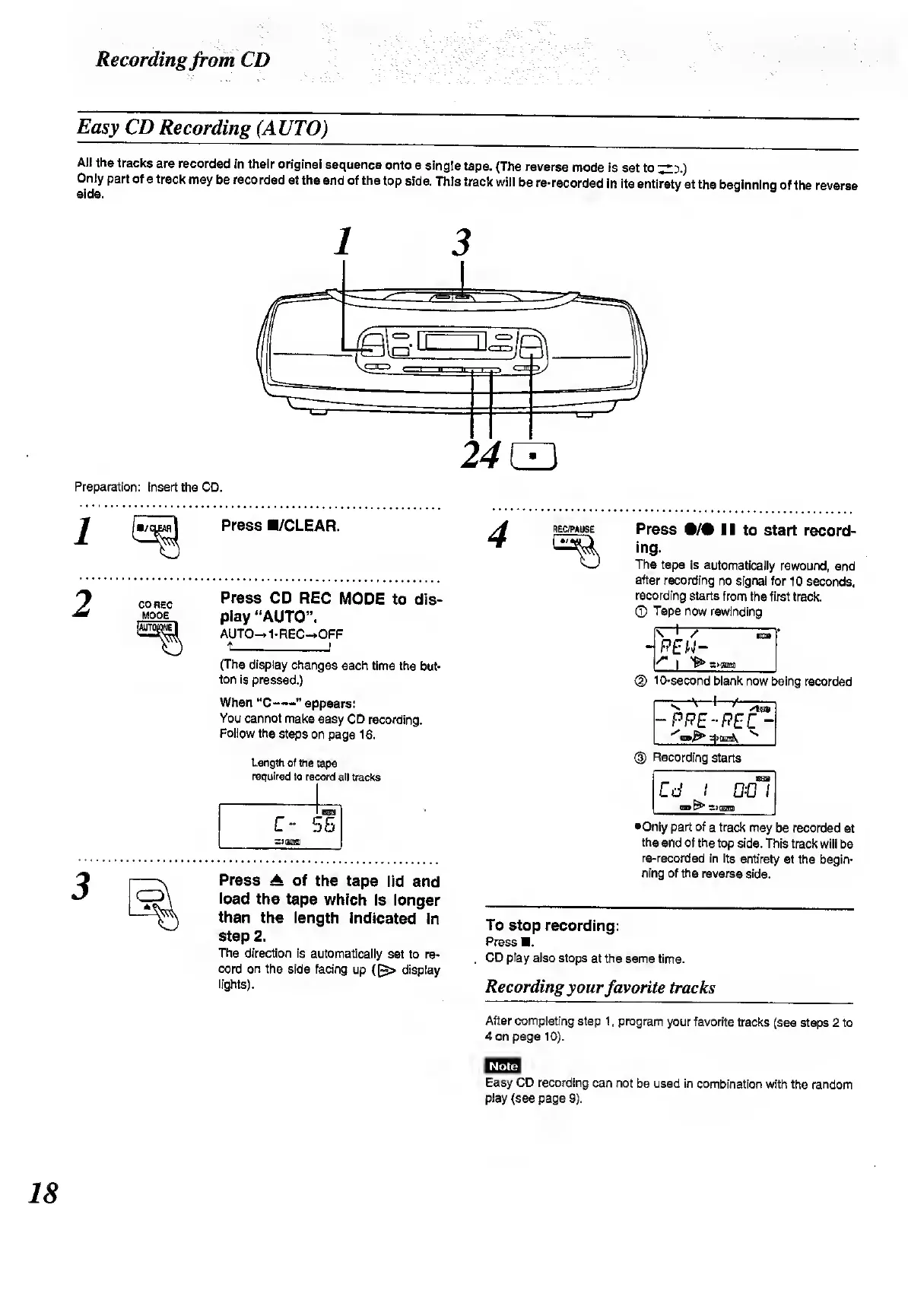
All
the
tracks
are
recorded
in
their
original
sequence
onto
a
single
tape.
(The
reverse
mode
is
set
to
^
3
.)
side
°
f
8
tr8Ck
m8y
^
f
eCOrded
at
th6
®
nd
°
f
thS
l
°
P
Side
'
T
hls
track
wi
"
be
re
-
recorded
,n
its
entirety
at
the
beginning
of
the
reverse
1
3
Preparation:
Insert
the
CD.
Press
B/CLEAR.
CD
REC
MODE
Press
CD
REC
MODE
to
dis¬
play
“AUTO”.
AUTO—*
1
-REC—»OFF
(The
display
changes
each
time
the
but¬
ton
is
pressed.)
When
“C-”
appears:
You
cannot
make
easy
CD
recording.
Follow
the
steps
on
page
16.
Length
of
the
tape
required
to
record
all
tracks
C-
5
XJGBUffi
ass
IB
Press
A
of
the
tape
lid
and
load
the
tape
which
is
longer
than
the
length
indicated
in
step
2.
The
direction
is
automatically
set
to
re¬
cord
on
the
side
facing
up
{(~>
display
lights).
R
EC/PAUSE
Press
•/#
II
to
start
record¬
ing.
The
tape
is
automatically
rewound,
and
after
recording
no
signal
for
10
seconds,
recording
starts
from
the
first
track.
CD
Tape
now
rewinding
10-second
blank
now
being
recorded
^
^
*
f
stow
-
P
PE-REC
-
*^m^
heh\
(
3
)
Recording
starts
Cd
I
odl
CUB
~)(£SS3
•Only
part
of
a
track
may
be
recorded
at
the
end
of
the
top
side.
This
track
will
be
re-recorded
in
its
entirety
at
the
begin¬
ning
of
the
reverse
side.
To
stop
recording:
Press
.
CD
play
also
stops
at
the
same
time.
Recording
your
favorite
tracks
After
completing
step
1,
program
your
favorite
tracks
(see
steps
2
to
4
on
page
10).
Note
Easy
CD
recording
can
not
be
used
in
combination
with
the
random
play
(see
page
9).
18

Related product manuals