EasyManua.ls Logo

Panasonic RX-ES50 - Page 28

Panasonic RX-ES50
32 pages
Print Icon
To Next Page IconTo Next Page
To Previous Page IconTo Previous Page
Loading...
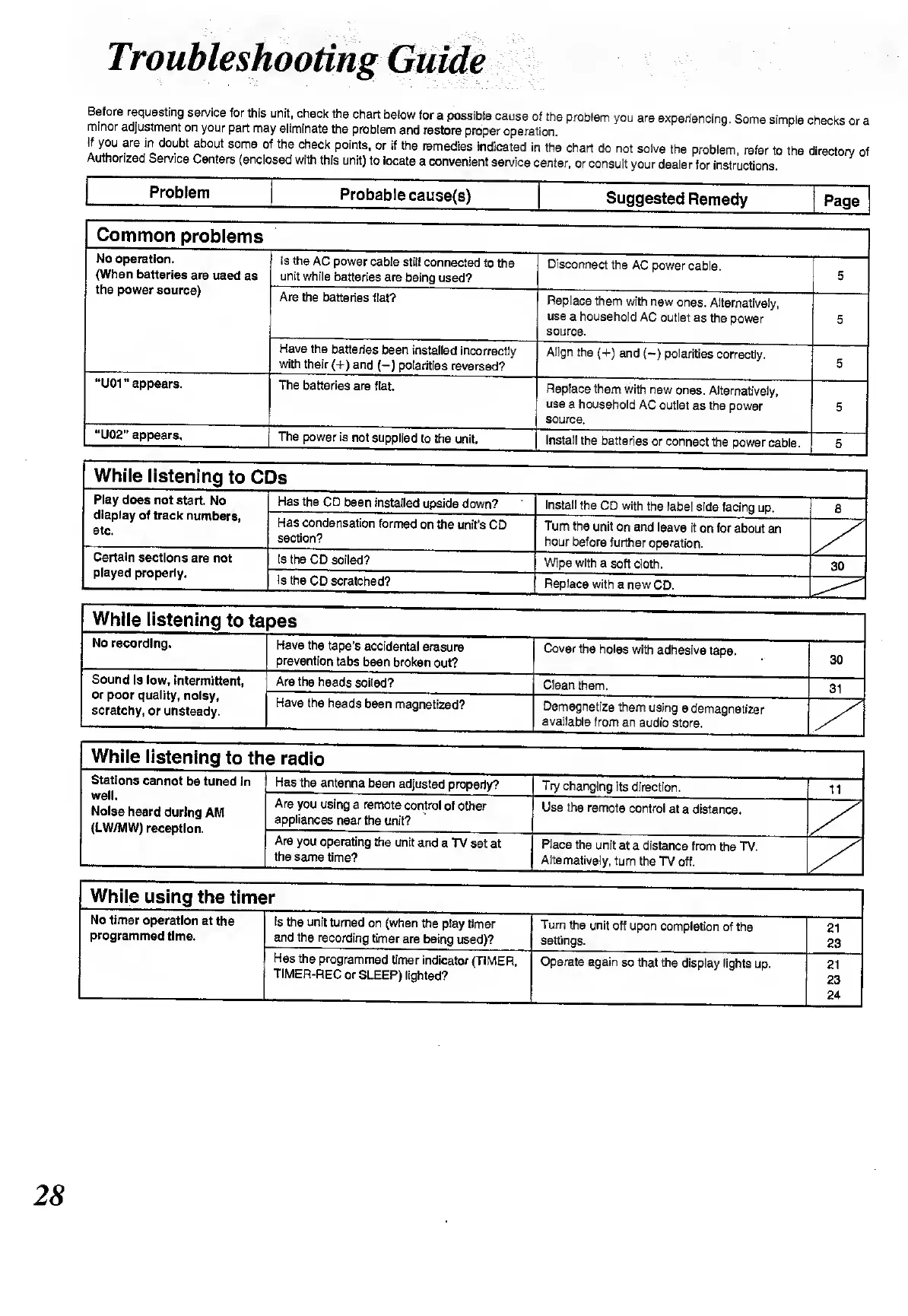
Before
requesting
service
for
this
unit,
check
the
chart
below
for
a
possible
cause
of
the
problem
you
are
experiencing.
Some
simple
checks
ora
minor
adjustment
on
your
part
may
eliminate
the
problem
and
restore
proper
operation.
If
you
are
in
doubt
about
some
of
the
check
points,
or
if
the
remedies
indicated
in
the
chart
do
not
solve
the
problem,
refer
to
the
directory
of
Authorized
Service
Centers
(enclosed
with
this
unit)
to
locate
a
convenient
service
center,
or
consult
your
dealer
for
instructions.
Problem
Probable
cause(s)
Suggested
Remedy
Page
Common
problems
No
operation.
(When
batteries
are
used
as
the
power
source)
Is
the
AC
power
cable
still
connected
to
the
unit
while
batteries
are
being
used?
Disconnect
the
AC
power
cable.
5
Are
the
batteries
flat?
Replace
them
with
new
ones.
Alternatively,
use
a
household
AC
outlet
as
the
power
source.
5
Have
the
batteries
been
installed
incorrectly
with
their
(+)
and
(—)
polarities
reversed?
Align
the
(+)
and
(—)
polarities
correctly.
5
“UQ1”
appears.
The
batteries
are
flat.
Replace
them
with
new
ones.
Alternatively,
use
a
household
AC
outlet
as
the
power
source.
5
“U02"
appears.
The
power
is
not
supplied
to
the
unit.
Install
the
batteries
or
connect
the
power
cable.
5
While
listening
to
CDs
Play
does
not
start.
No
display
of
track
numbers,
etc.
Has
the
CD
been
installed
upside
down?
Install
the
CD
with
the
label
side
facing
up.
8
Has
condensation
formed
on
the
unit’s
CD
section?
Turn
the
unit
on
and
leave
it
on
for
about
an
hour
before
further
operation.
Certain
sections
are
not
played
properly.
Is
the
CD
soiled?
Wipe
with
a
soft
cloth.
30
Is
the
CD
scratched?
Replace
with
a
new
CD.
While
listening
to
ta
pes
No
recording.
Have
the
tape’s
accidental
erasure
prevention
tabs
been
broken
out?
Cover
the
holes
with
adhesive
tape.
30
Sound
is
low,
intermittent,
or
poor
quality,
noisy,
scratchy,
or
unsteady.
Are
the
heads
soiled?
Clean
them.
31
Have
the
heads
been
magnetized?
Demagnetize
them
using
a
demagnetizer
available
from
an
audio
store.
While
listening
to
th
e
radio
Stations
cannot
be
tuned
in
well.
Noise
heard
during
AM
(LW/MW)
reception.
Has
the
antenna
been
adjusted
properly?
Try
changing
its
direction.
11
Are
you
using
a
remote
control
of
other
appliances
near
the
unit?
Use
the
remote
control
at
a
distance.
Are
you
operating
the
unit
and
a
TV
set
at
the
same
time?
Place
the
unit
at
a
distance
from
the
TV.
Alternatively,
turn
the
TV
off.
While
using
the
timer
No
timer
operation
at
the
programmed
time.
Is
the
unit
turned
on
(when
the
play
timer
and
the
recording
timer
are
being
used)?
Turn
the
unit
off
upon
completion
of
the
settings.
21
23
Has
the
programmed
timer
indicator
(TIMER,
TIMER-REC
or
SLEEP)
lighted?
Operate
again
so
that
the
display
lights
up.
21
23
24
28

Related product manuals