·
It shall move up one counter when the above operations ends. The counter will reset to 00000 when 99999 is reached.
·
To exit CD aging test mode, press
button, the tray will return to its PLAY position and power will be off.
12.4. Micon ROM Checksum and Version Display Mode
1. Functional Summary
Display version number and calculated checksum of the micon software.
2. To enter into Micon ROM checksum and Version Display Mode.
a. Enter into Self-Diagnos tic Mode (Refer to Section 11.2).
b. In the Self-Diagnos tic Mode, Press
twice.
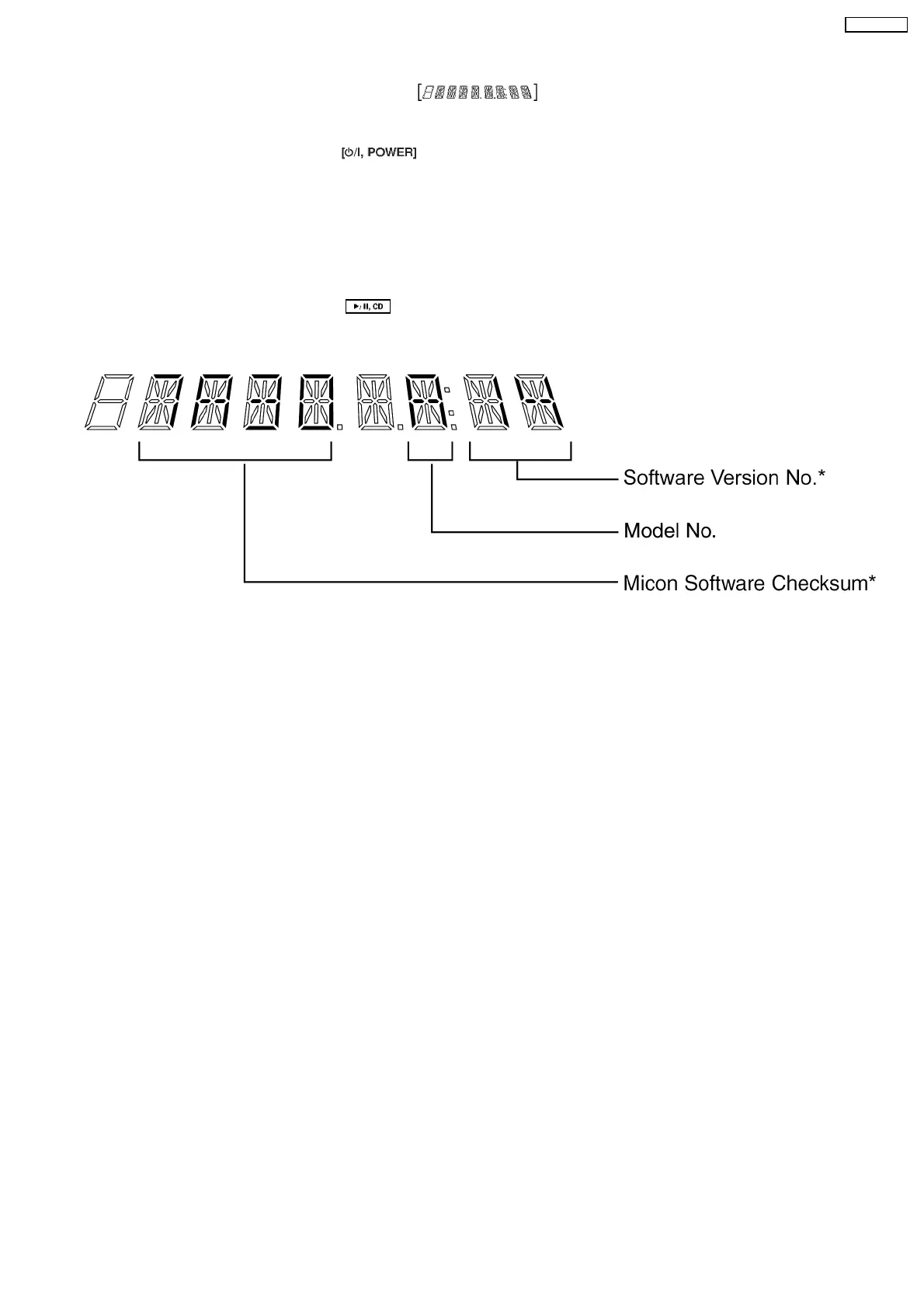
The version number and the calculated ROM Checksum of the current software will be displayed on the FL as shown in this
example:
* Note: The Software Version No. & Micon Software Checksum differs from set to set.
·
The ROM Checksum is calculated on demand, not hard coded.
·
The ROM Checksum is calculated by talking the arithmetic SUM of the ROM contents form the program’s START
address until the END address.
START address = [1080]H
END address = [FFFD]H
47
SA-AK330EE



 To Next Page