•
• •
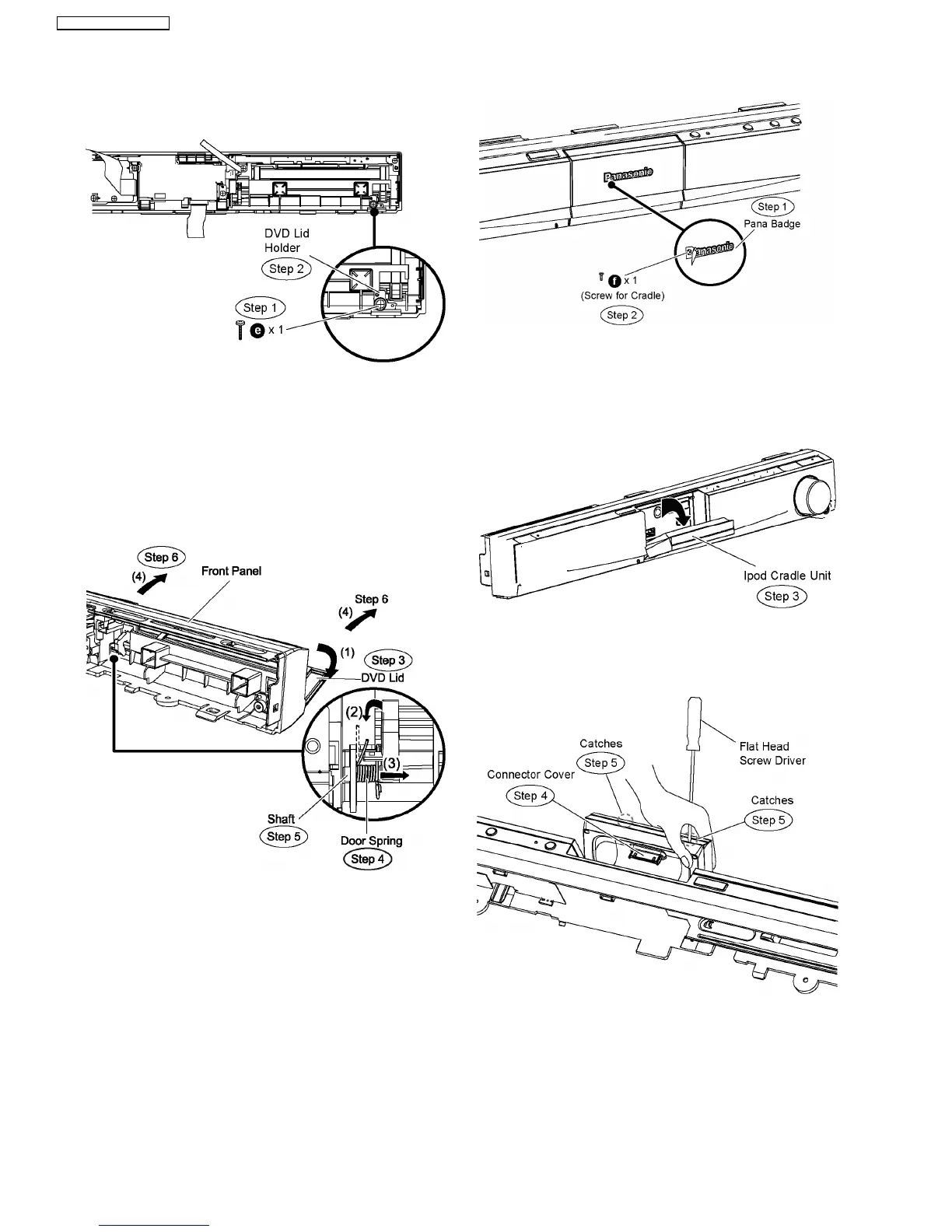
• Disassembly of DVD Lid Holder
Step 1 Remove 1 screw from the DVD lid holder.
Step 2 Remove the DVD lid holder.
Caution Note: Keep the DVD lid holder in safe place. Avoid
denting it. Place it back during assembling.
Step 3 Open the DVD lid in the direction of arrow (1), until it is
aligned parrallel with the front panel.
Step 4 Lift the door spring in the direction of arrow (2).
Step 5 Move the shaft of the DVD lid in the direction of arrow
(3).
Step 6 Remove the DVD lid in the direction of arrow (4).
9.10. Disassembly of Ipod Cradle
P.C.B.
•
• •
• Follow (Step 1) to (Step 3) of Item 9.3.
•
• •
• Follow (Step 1) to (Step 7) of Item 9.6.
Step 1 Peel off the portion of the pana badge (paste type) with
a pen knife.
Step 2 Remove the screw for cradle.
Caution Note: Keep the screw in safe place. Place it back
during assembling.
Step 3 Flip the Ipod cradle unit for 45 degree as the direction
of arrow.
Step 4 Remove theconnector cover.
Step 5 Use a flat head screwdriver (0.5-0.7mm) to release the
catches according to the diagram show.
Step 6 Remove cradle cover A as the direction of arrow.
50
SA-PT760P / SA-PT760PC



 To Next Page