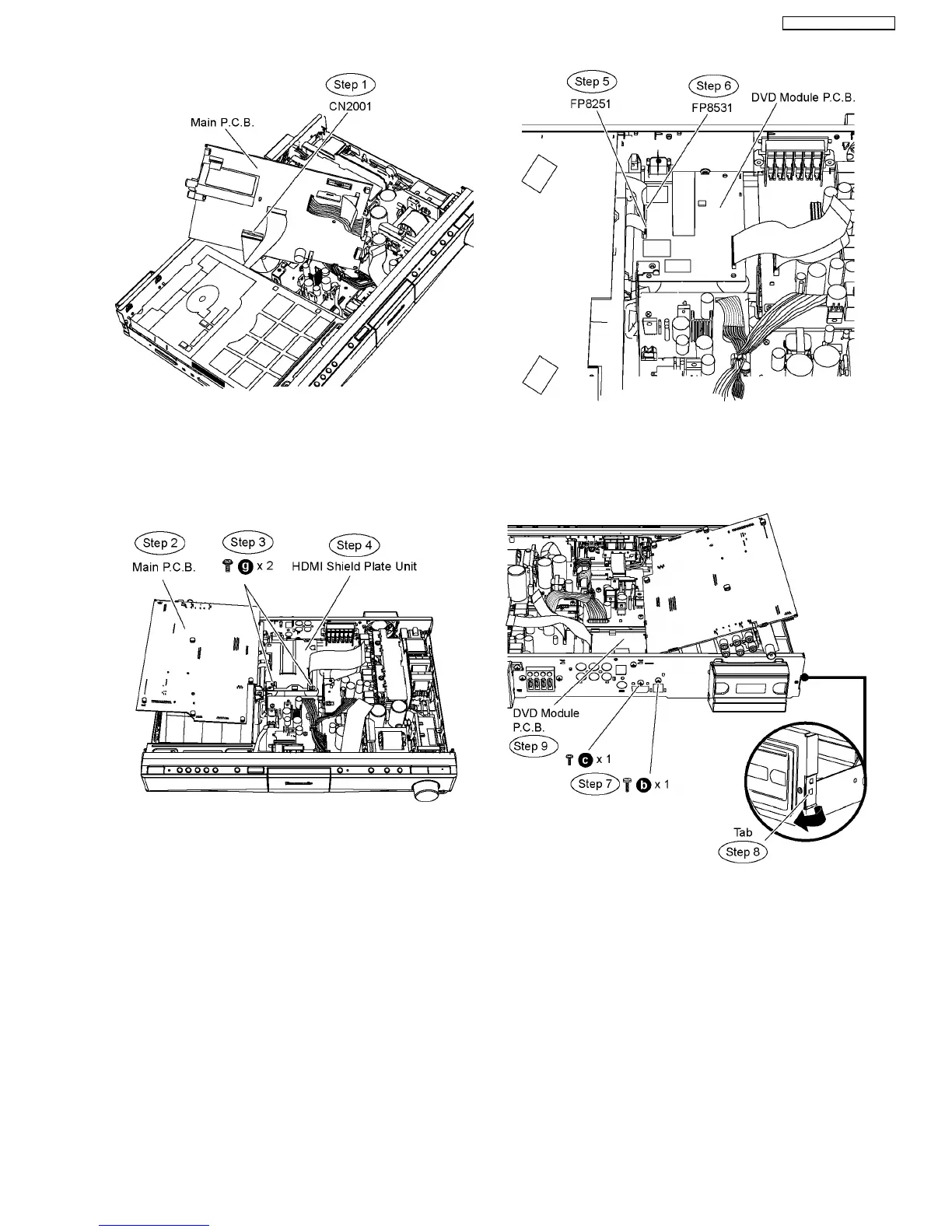
Step 2 Move aside Main P.C.B. and position it according to the
diagram shown.
•
• •
• Disassembly at HDMI Shield Plate Unit
Step 3 Remove 2 screws from the HDMI shield plate unit.
Step 4 Remove the HDMI shield plate unit.
Caution Note: Keep the HDMI shield plate unit in safe
place. Avoid denting it. Place it back during assembling.
Step 5 Detach 7P cable at the connector (FP8251) on DVD
Module P.C.B.
Step 6 Detach 26P cable at the connector (FP8531) on DVD
Module P.C.B.
Step 7 Remove 2 screws at the rear panel.
Step 8 Release the tab of the rear panel in the direction of
arrow.
Step 9 Remove DVD Module P.C.B.
Special Note: During reassembling procedures, ensure the
P.C.B. is seated properly at the locators.
65
SA-PT760P / SA-PT760PC



 To Next Page