EasyManua.ls Logo

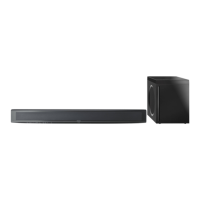
Panasonic SC-HTB500 - User Manual

Panasonic SC-HTB500
36 pages
Print Icon
To Next Page IconTo Next Page
Loading...
2010/07/02
EG GN GS
RQTX1185-B
Operating Instructions
Home Theater Audio System
Model No. SC-HTB500
Dear customer
Thank you for purchasing this product.
For optimum performance and safety, please read these instructions carefully.
Before connecting, operating or adjusting this product, please read the instructions completely.
Please keep this manual for future reference.
The illustrations shown may differ from your unit.
Included Installation Instructions
The installation should never be done by any other than a qualified installation specialist.
Before commencing work, carefully read these installation instructions and the operating instructions
to ensure that installation is performed correctly.
(Please keep these instructions. You may need them when maintaining or moving this unit.)
SCHTB500EGGNGS_RQTX1185-B.book Page 1 Wednesday, July 7, 2010 5:18 PM

Questions and Answers

  • J
    John ReedAug 19, 2025
    How to fix a Panasonic SC-HTB500 remote control that is not working?
    • J
      Jennifer TannerAug 19, 2025
      If the remote control for your Panasonic Home Theater System isn’t working correctly, try these steps: Remove the insulation sheet. Change the code on the remote control. If you've recently changed the battery, it may be necessary to set the code of the remote control again.
  • N
    Natalie CampbellAug 22, 2025
    Why is there no sound or image on my Panasonic SC-HTB500 Home Theater System?
    • S
      Sean OneillAug 22, 2025
      If you're not getting any sound or picture on your Panasonic Home Theater System, here are a few things to try: First, make sure muting is off. Then, check all the connections to your other devices. Also, verify the audio output settings on the connected device. Try turning the unit off and then on again. If you are connected to an ARC compatible TV, ensure the TV’s connected terminal is ARC compatible. There might also be a problem with the cables, so try reconnecting the unit with different cables. Finally, note that this system cannot play audio with a sampling frequency greater than 48 kHz when using the optical digital audio cable.
  • M
    Malik DennisAug 25, 2025
    What to do if VIERA Link operations are not functioning properly on my Panasonic SC-HTB500?
    • P
      Pamela SavageAug 25, 2025
      If VIERA Link operations aren't working as expected on your Panasonic Home Theater System, check the “VIERA Link” setting on the connected devices. Note that issues can arise if HDMI connections are changed, after a power failure or after the AC mains lead has been removed.
  • M
    mcgeekathleenAug 26, 2025
    How do I get my Panasonic SC-HTB500 to output audio instead of the TV speakers?
    • J
      Jeffrey RobertsAug 26, 2025
      If audio is coming from your TV speakers instead of your Panasonic Home Theater System, and you're connected to a VIERA Link (HDAVI Control) compatible TV, change the audio output settings to this unit.
  • D
    Diana JohnsonAug 28, 2025
    Why is the wireless link indicator light red on my Panasonic SC-HTB500 Home Theater System?
    • A
      Alyssa YoungAug 28, 2025
      If the wireless link indicator on your Panasonic Home Theater System is red, it indicates there's no link between the unit and the active subwoofer. First, check that the main unit is turned on. Ensure that the digital transmitter is fully inserted into the digital transmitter dock on the main unit. Try turning the active subwoofer off and then back on. As a last resort, turn the active subwoofer off, disconnect the AC mains lead and then reconnect it. If the problem persists, consult your dealer.
  • J
    jeffreymitchellAug 30, 2025
    Why does my Panasonic SC-HTB500 react in an unwanted manner when operating the connected device?
    • J
      Julie ParsonsAug 30, 2025
      If your Panasonic Home Theater System reacts unexpectedly when operating a connected device, it might be because HDAVI Control commands are using a different signal depending on the device's make. Try setting “VIERA Link” to “Off.”
  • I
    ihernandezSep 1, 2025
    What to do if my Panasonic SC-HTB500 has no power?
    • J
      Javier ButlerSep 1, 2025
      If your Panasonic Home Theater System has no power, first ensure the AC mains lead is securely inserted. If, after turning the unit on, the “TV, BD/DVD” or “ D/DTS” indicator blinks and the unit immediately turns off, unplug the AC mains lead and consult your dealer.
  • D
    Darlene WilliamsSep 3, 2025
    Why is the audio from the subwoofer interrupted on my Panasonic Home Theater System?
    • K
      Kenneth CowanSep 3, 2025
      If the audio from the subwoofer of your Panasonic Home Theater System is interrupted, it may be because the active subwoofer is automatically seeking a clear channel. If the interference continues, move other wireless devices away from the active subwoofer or move the active subwoofer closer to the main unit.
  • D
    Daniel StewartSep 5, 2025
    How to stop my Panasonic SC-HTB500 Home Theater System from outputting both main and secondary audio simultaneously?
    • B
      brian07Sep 6, 2025
      If both main and secondary audio are outputting at the same time on your Panasonic Home Theater System, change the digital audio output setting on the TV or connected device and then select the desired audio channel.
  • V
    Vanessa MooreSep 7, 2025
    Why does my Panasonic Home Theater System turn off when the input for the TV is changed?
    • V
      valvaradoSep 8, 2025
      If your Panasonic Home Theater System turns off when the input for the TV is changed, this is normal when using VIERA Link (HDAVI Control 4 or later). For details, consult the operating instructions for your TV.

Summary

Operating Instructions

Welcome and General Safety

Welcome message, general warnings, and cautions for safe operation and handling.

System Setup and Controls

Accessories, Unit Care, and Controls

Details of supplied accessories, unit cleaning, and an overview of unit and remote controls.

Placement and Connections

Unit and Subwoofer Placement

Guidance on optimal positioning of the main unit and active subwoofer to ensure performance and avoid interference.

Wiring and Connectivity Options

Instructions for connecting the system to a TV, other devices, and power sources, including wireless setup.

Operation and Features

Basic Operation and Audio Effects

How to operate the unit, select sources, adjust volume, and utilize various audio effects.

VIERA Link and System Settings

Guide to setting up VIERA Link for integrated TV control and adjusting system settings like TV audio.

Specifications and Troubleshooting

Technical Specifications and Troubleshooting Guide

Product specifications, audio format information, and solutions for common operational problems.

Installation Guide

Installation Safety and Procedures

Comprehensive instructions for safe wall mounting, including precautions, steps, and securing the unit.

Regulatory and Disposal Information

Declaration of Conformity and Disposal

Official compliance statements and information on recycling and proper disposal of electronic products and batteries.

Panasonic SC-HTB500 Specifications

General IconGeneral
Audio decodersDolby Digital, Dolby Pro Logic II, DTS
RMS rated power240 W
Audio output channels2.1 channels
Audio Return Channel (ARC)Yes
Impedance4 Ω
Tweeter diameter65 mm
Soundbar speaker RMS power120 W
Tweeter diameter (imperial)2.5 \
Total Harmonic Distortion (THD)10 %
Subwoofer connectivityWireless
Receiver includedNo
Product colorBlack
Recommended usageHome theatre
Consumer Electronics Control (CEC)VIERA Link
Apple docking compatibilityNot supported
Soundbar dimensions (WxDxH)1029 x 58 x 108 mm
Subwoofer dimensions (WxDxH)250 x 356 x 323 mm
HDMI in1
Connectivity technologyWired
AC input voltage220-240 V
AC input frequency50 - 60 Hz
Power consumption (standby)0.2 W
Power consumption (typical)29 W
Weight and Dimensions IconWeight and Dimensions
Soundbar weight2800 g
Subwoofer weight6700 g

Related product manuals