9 Self diagnosis and special mode setting
This unit is equipped with functions for checking and inspecting namely: Self-Diagnostic and Test Mode.
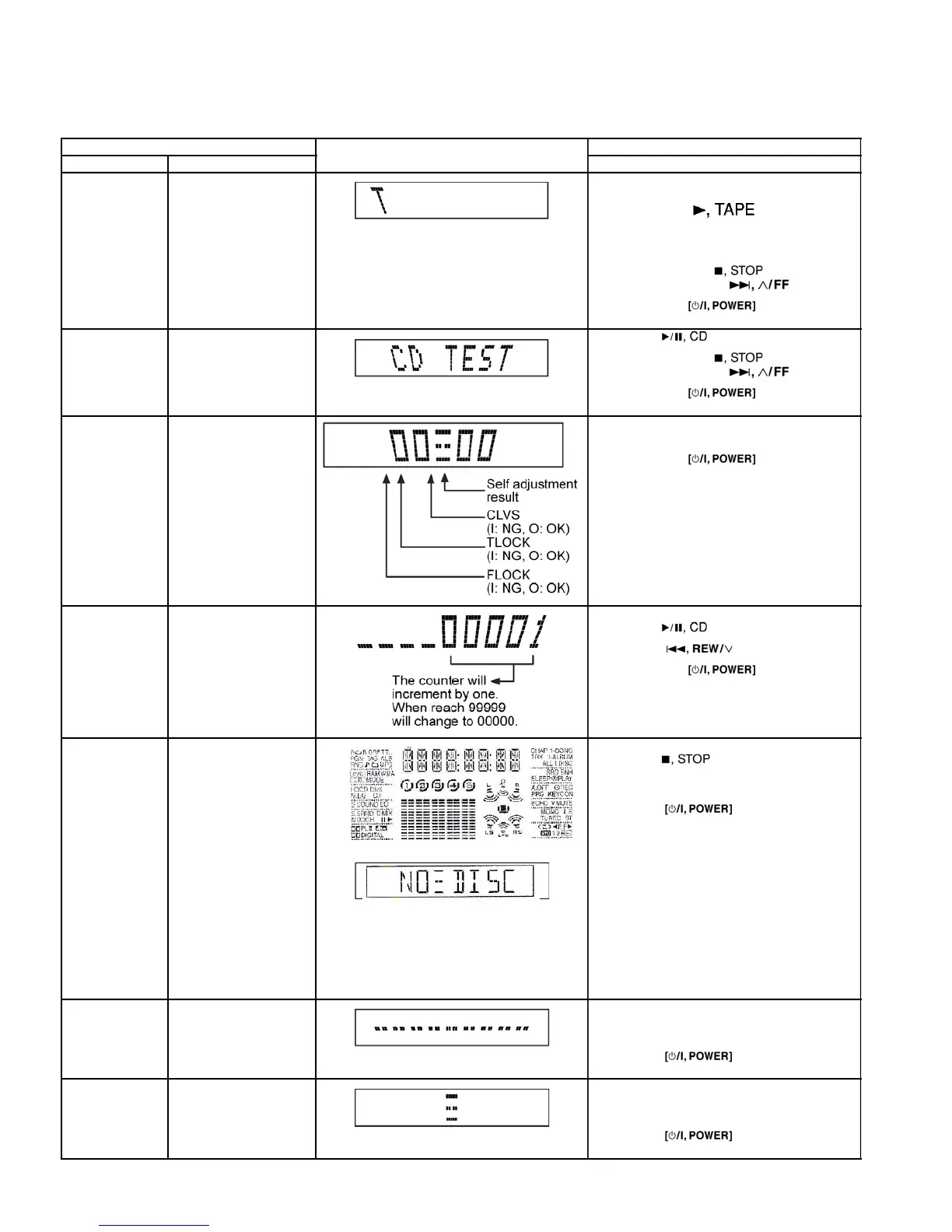
9.1. Special Mode Table
Item FL Display Key Operation
Mode Name Description Front Key
Self -Diagnostic
Mode
To enter into self
diagnos
tic checking for
mai
n unit.
1. Select [
] for TAPE mode (Ensure no tape is
inserted).
2. Press and hold [
]button for 3
second
s follow by [ ].
To exit, press button on
mai
n unit or remote control.
CD Test Mode To enter into checking the
reliabilit
y of changer unit.
1. Select [ ] for CD mode.
2. Press and hold [ ] button for 3
second
s follow by [ ].
To exit, press
button on
mai
n unit or remote control.
CD Auto
Adjustment
To check the CD auto
adjustmen
t result for
FLOCK
, TLOCK and
CLVS.
In CD Test Mode:
1. Press [0] button on the remote control.
To exit, press button on
mai
n unit or remote control.
CD Changer
Reliabilit
y Test
(CRS1)
To determine the
reliabilit
y of CD Changer
Unit.
(Fo
r more information,
refe
r to section 9.1.1)
In Self-Diagnostic Mode:
1. Select [ ] for CD mode.
2. Press [ ] button.
To exit, press button on
mai
n unit or remote control.
(T
he tray will return to PLAY position and then
powe
r off)
Doctor Mode To enter into Doctor
Mod
e for checking of
variou
s items and
displayin
g EEPROM and
firmwar
e version.
1.
2.
1. All segments will light up for 1 second.
2. The Check Sum of EEPROM and firmware
versio
n will be display.
* ROM correction
** Firmware version No:
In any mode:
1. Press [ ] button on main unit
follow by [4] and [7] on remote control.
To exit, press [ENTER] button on remote
contro
l or
button on main
uni
t or remote control.
Cold Start To activate cold start
upo
n next AC power up.
In doctor mode:
1. Press [4] button on remote control.
To exit, press [ENTER] button on remote
contro
l or button on main
uni
t or remote control.
Changer
Reliabilit
y Test
To check the function
operatio
n of changer unit.
(Fo
r more information,
re
fer to 9.1.1)
In doctor mode:
1. Press [DISC] on remote control.
To exit, press [ENTER] button on remote
contro
l or button on main
uni
t or remote control.
13
service manual SC-TM760








 To Next Page