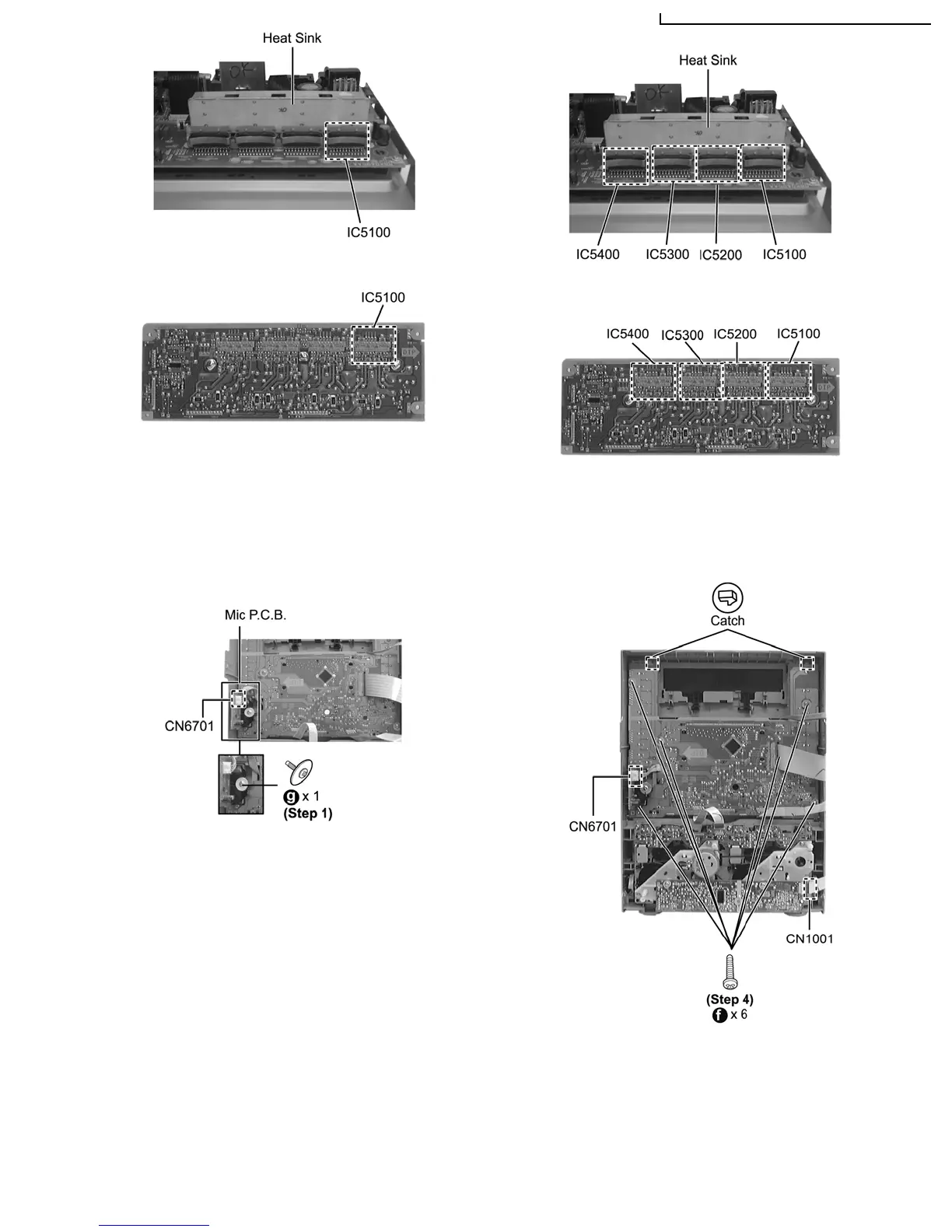
Step 2 Flip over the P.C.B..
Step 3 Desolder IC5100.
Step 1 Remove 1 screw.
Step 2 Disconnect connector CN6701 at Mic P.C.B..
Step 3 Lift up the Mic P.C.B to remove it.
Step 4 Remove 6 screws.
Replament of Power Amp IC (IC5200/ IC5300/ IC5400)
Repeat (Step 1) - (Step 3) of Item 11.11 for IC5200/
IC5300/IC5400.
Step 5 Release 2 catches.
Step 6 Remove Panel P.C.B..
11.13.1. Disassembly of Tact Switch P.C.B.
Step 7 Remove the Volume knob & Mic Volume Knob.
11.13. Disassembly of Panel P.C.B., Mic P.C.B. & Tact Switch P.C.B.
• Follow the (Step 1) - (Step 2) of Item 11.4 - Disassembly of Top Cabinet
• Follow the (Step 1) - (Step 4) of Item 11.5 - Disassembly of CD/DVD Changer Unit
• Follow the (Step 1) - (Step 4) of Item 11.8 - Disassembly of Front Panel Unit
SA-VK950GC / SA-VK950GS / SA-VK950GCS / SA-VK950GC
28
service manual SC-TM760








 To Next Page