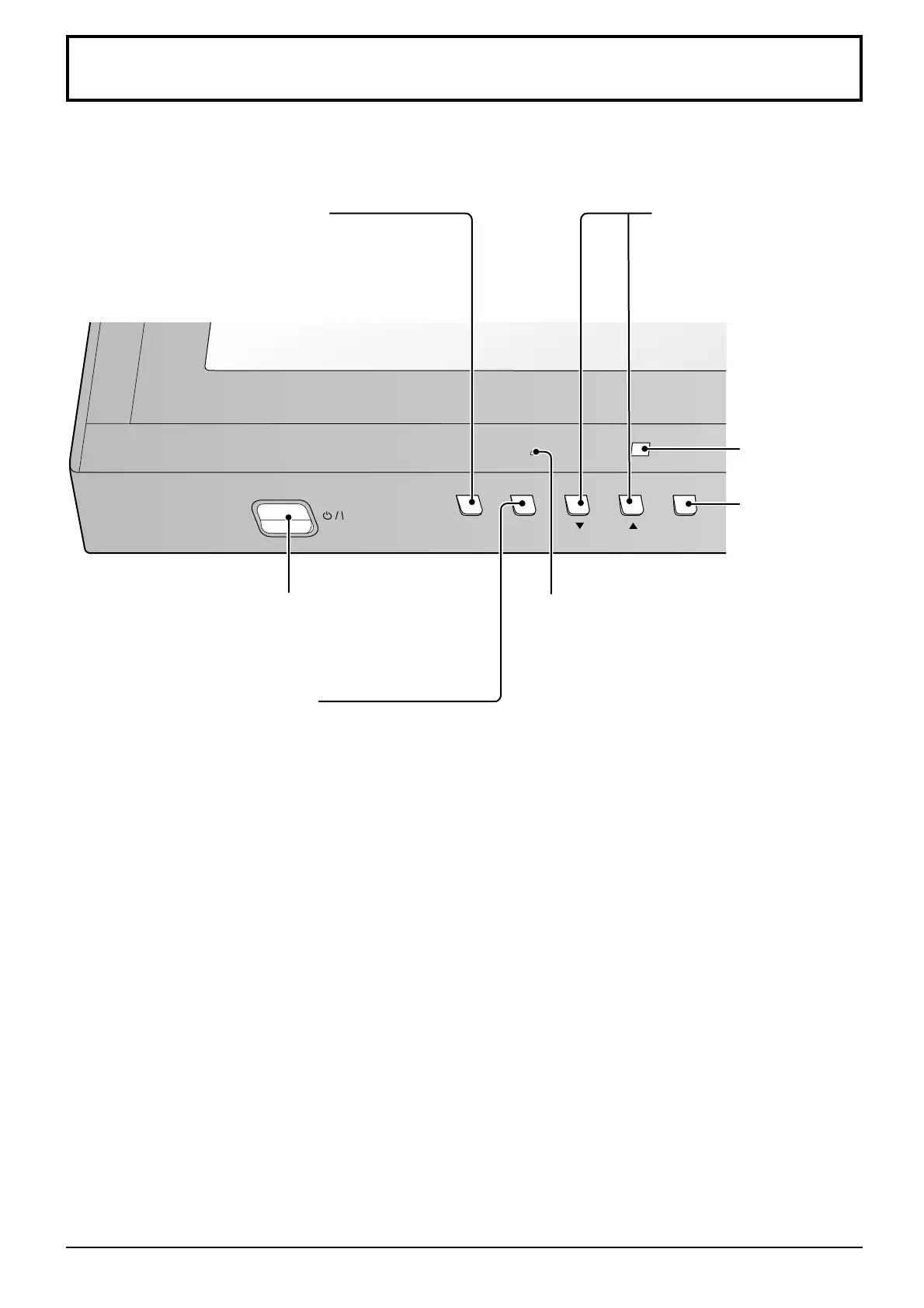
INPUT MENU
ENTER/
■
14
Main Unit
MENU Screen ON / OFF
Each time the MENU button is pressed, the menu
screen will switch. (see page 18)
When the menu screen is displayed:
“
▲
” : press to move the cursor up
“
▼
” : press to move the cursor
down (see page 18)
Remote control
sensor
Power Indicator
The Power Indicator will light.
Power-OFF ...... Indicator not illuminated (The
unit will still consume some
power as long as the power
cord is still inserted into the
wall outlet.)
Standby .......... Red
Power-ON ....... Green
DPMS .............. Orange (With PC input signal
and during operation of PC’s
screensaver.)
•
•
•
•
Main Power On / Off Switch
INPUT button
(INPUT1, INPUT2,
INPUT3 and PC
selection)
(see page 13)
Enter / Aspect
button
(see page 17, 18)
Basic Controls








 To Next Page