EasyManua.ls Logo

Panasonic TH-50VX100E - Picture Profiles

Panasonic TH-50VX100E
52 pages
Print Icon
To Next Page IconTo Next Page
To Previous Page IconTo Previous Page
Loading...
24
Picture Profiles
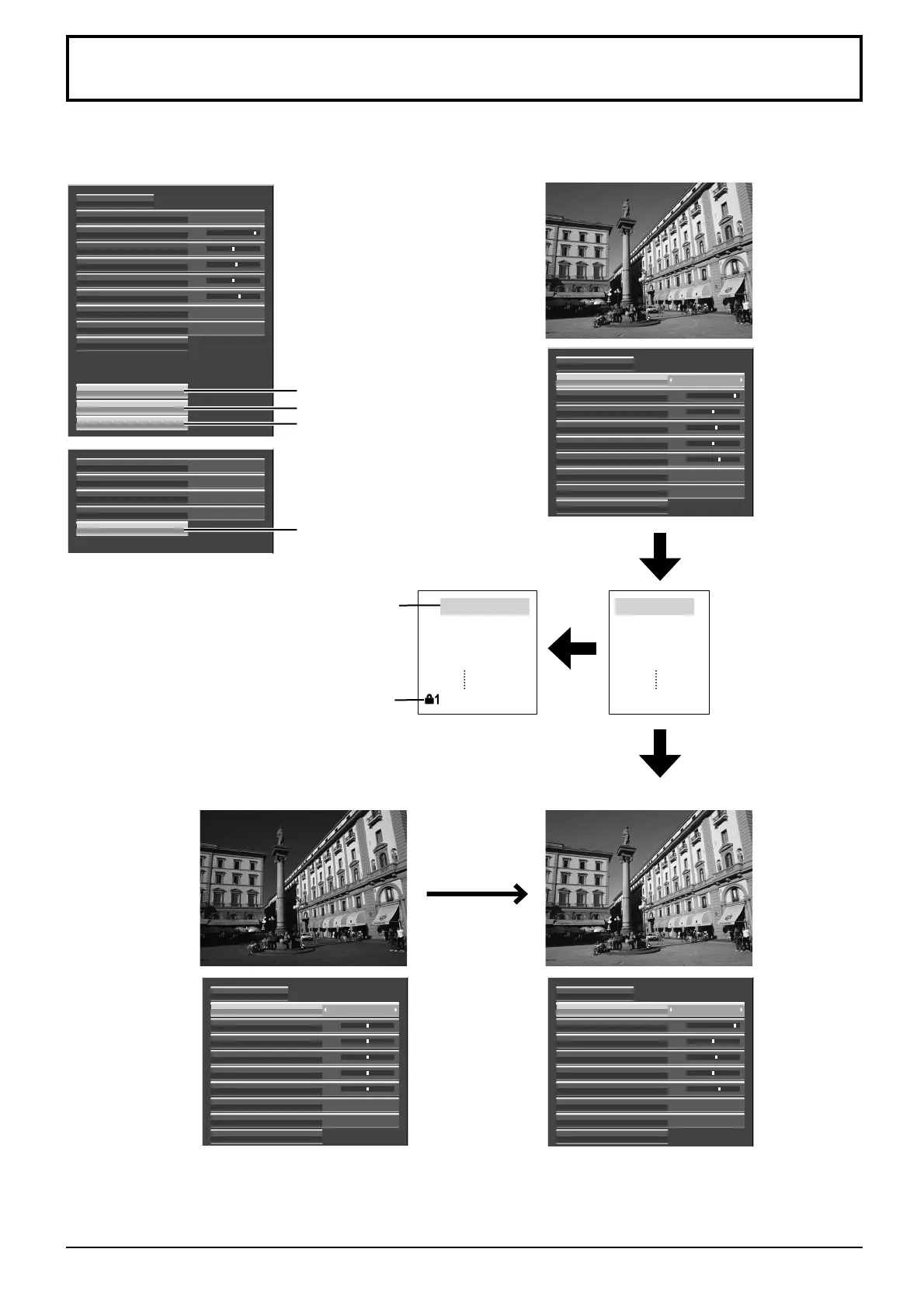
Up to 16 combinations of picture adjustment values (in the Picture menu and Advanced settings) can be stored in
the display memory as profiles and applied as needed, for a convenient way to enjoy your preferred picture settings.
Custom picture
Picture Mode Dynamic
25
0
5
Off
Normal
Contrast
Normalise
Brightness
Sharpness
White balance
Colour Management
Advanced settings
Memory save
Memory load
Memory edit
6Colour
0Hue
25
0
5
6
0
Normal
Advanced settings
Picture Mode
Off
Normal
Contrast
Normalise
Brightness
Colour
Hue
Sharpness
White balance
Colour Management
OnOnscreen display
Scrolling bar
Off
OffAll Aspect
Studio mode
Function button assign
Memory lock
25
0
5
6
0
Normal
Advanced settings
Picture Mode
Off
Normal
Contrast
Normalise
Brightness
Colour
Hue
Sharpness
White balance
Colour Management
Normal
Advanced settings
Picture Mode
Off
Normal
Contrast
Normalise
Brightness
Colour
Hue
Sharpness
White balance
Colour Management
0
0
0
0
0
Original picture
Lock profiles(page 28, 29)
Save the picture
adjustment values in the
MEMORY1 profile
Save profiles
Apply the MEMORY1
profile
Load the profile
MEMORY1
MEMORY2
MEMORY3
MEMORY4
MEMORY16
Edit the profile
Delete or rename
the profile
Save profiles(page 25)
Load profiles(page 26)
Edit profiles(page 27)
Locked profile
My Memory
MEMORY2
MEMORY3
MEMORY4
MEMORY16

Other manuals for Panasonic TH-50VX100E

Related product manuals