25
Picture Profiles
Saving profiles
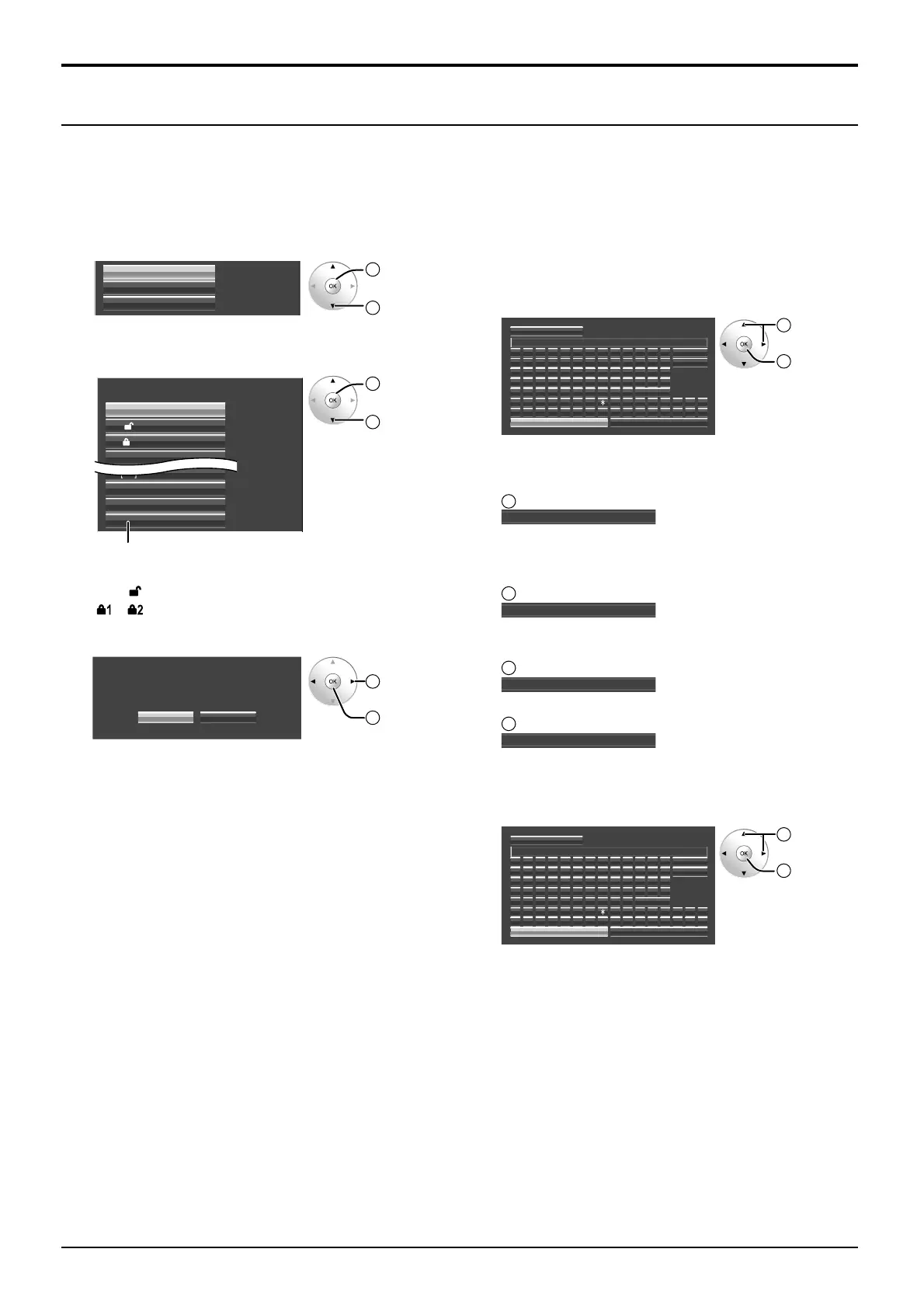
Follow these steps to save picture adjustment values as profiles.
1
Specify the picture quality in the Picture menu and
Advanced settings. (see page 20-23)
2
In the Picture menu, select “Memory save”.
Memory save
Memory load
Memory edit
2
OK
1
select
3
Select a profile name for saving the picture
adjustment values.
1.
[]
MEMORY1
MEMORY2
2.
[]
MEMORY3
3. [ 1]
MEMORY4
4.
[]
MEMORY13
13.
[]
MEMORY1414.
[]
MEMORY15
15.
[]
MEMORY16
16.
[]
Memory save
2
OK
1
select
Profiles are labeled with these icons to indicate
their locked status. (see page 26)
[ ], [ ]:Settings can be saved in this profile.
[ ], [ ]:
Settings cannot be saved in this profile.
4
Select “Ok”.
Ok Cancel
Memory save
Save the adjusted value in MEMORY1
1
select
2
OK
5
Enter a name for the profile.
[Entering profile names]
Profile names can be up to 16 characters.
To enter text, select characters in the on-screen
keyboard.
Edit the default profile name in the text box as
desired.
Ok
A
MEMORY1
█
Memory name input
B C D E F G H I J K L M All delete
N O P Q R S T U V W X Y Z Delete
Space
abcdef gh i j k lm
nopqr s t uvwxyz
0123456789
!”#$%&’ +–/=?
_` |~<>() [ ] {} ,
@\ ˆ
.;:
Cancel
1
select
2
OK
Example: Specifying “MY PICTURE”
1
Select “All delete”.
MEMORY1
█
All text is deleted.
To delete individual characters, select “Delete”.
2
Select “M”.
M
█
Repeat this process to enter the next character.
3
Select “Y”.
MY
█
4
Select “Space”.
MY
█
6
When you finished entering the profile name, select
“Ok”.
To cancel saving the profile, select “Cancel”.
A
MY PICTURE
█
BCDEFGH I J KLM
NOPQRS TUVWXY Z
abcdef gh i j k lm
nopqr s t uvwxyz
0123456789
!”#$%&’ +–/=?
_` |~<>() [ ] {} ,
@\ ˆ
.;:
Ok
Memory name input
All delete
Delete
Space
Cancel
1
select
2
OK








 To Next Page