29
Picture Profiles
<isf Mode Setting>
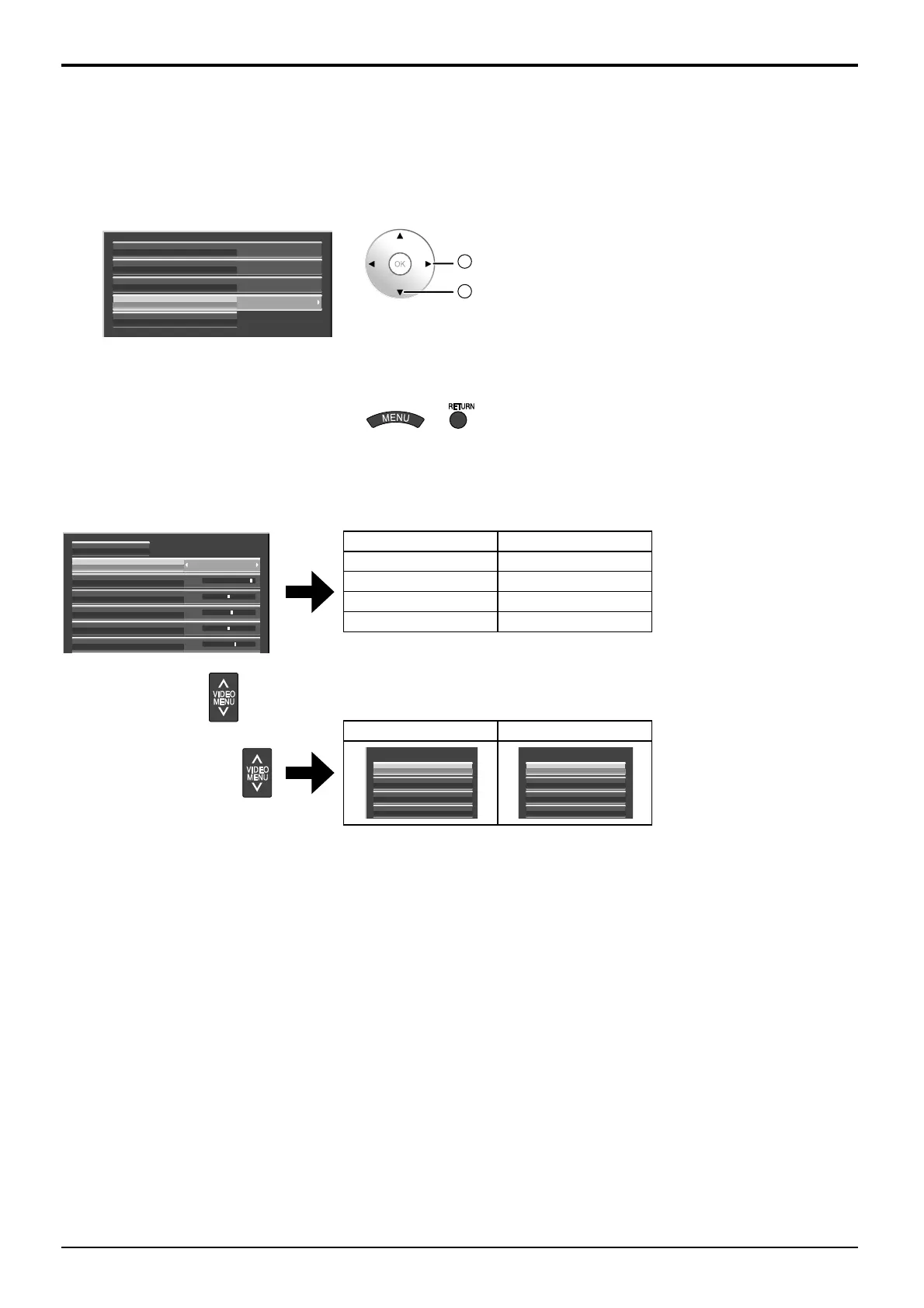
Switches to “Picture Mode” mode display.
1
Follow steps 1–5 in the previous procedure,
<Locking and unlocking profiles>.
2
Select “isf Mode”.
Lock1
Change password
MEMORY1
Off
Off
MEMORY2
MEMORY12
Offisf Mode
2
set
1
select
3
Specify “On” or “Off”.
4
Exit the menu.
or
Specifying “On” for isf Mode changes the “Picture Mode” mode display as follows.
“Picture Mode” mode display
25
0
5
6
0
NormalPicture Mode
Contrast
Normalise
Brightness
Colour
Hue
Sharpness
isf Mode: Off isf Mode: On
Normal Normal
Dynamic isf Mode Day
Cinema isf Mode Night
Monitor Monitor
Mode display when is selected
isf Mode: Off isf Mode: On
Picture Mode
Cinema
Dynamic
Normal
Monitor
Picture Mode
isf Mode Night
isf Mode Day
Normal
Monitor











 To Next Page