87
English
2
Press <FUNCTION> to switch function
group.
Example: Memory load
1.
2.
3.
4.
5.
6.
MEMORY 1
MEMORY 2
MEMORY 3
MEMORY 4
MEMORY 5
----
Memory load
When using OpenPort PLATFORM input, number 6
will be [KEYBOARD].
3
Press <1> - <6>.
The function for the pressed button starts to operate.
Example: When <2> is pressed.
Memory load
Load from “MEMORY 2”
Ok Cancel
Display orientation
Sets the on-screen display orientation in the portrait
setting.
[Landscape]:
On-screen display angle is for horizontal
installation.
[Portrait]:
The on-screen display rotates anticlockwise by 90
degrees for easy view in the portrait setting.
When the setting is changed, a confirmation message to
restart OpenPort PLATFORM is displayed.
Display orientation
Do you want to reboot OpenPort PLATFORM?
Yes No
Select [Yes] with ◀ ▶ and press <ENTER> to restart.
(Startup of OpenPort PLATFORM: see page 40)
Power indicator
18:00
Note
●
In the portrait setting, the power indicator shall come
to the downside.
●
The display may be greyed out and setting cannot
be made in some conditions, such as when the
OpenPort PLATFORM system is starting up.
OSD position
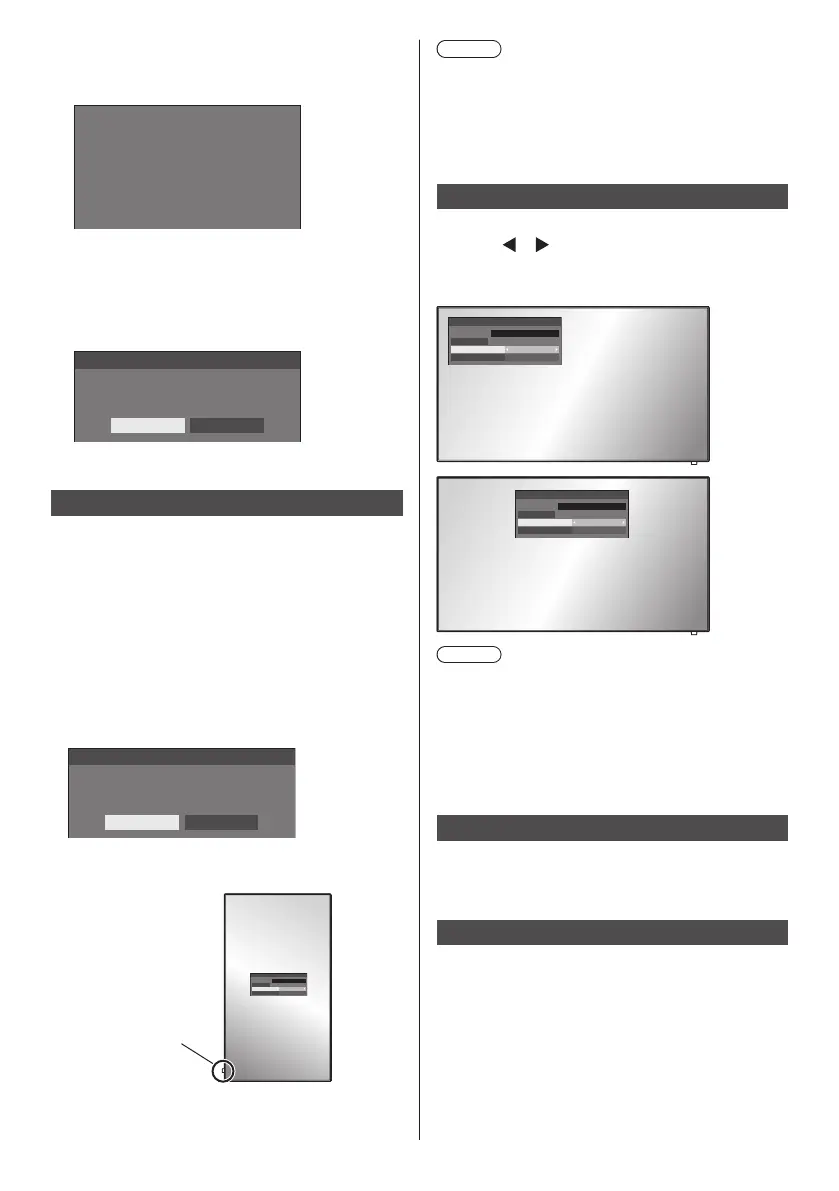
Sets the display position of the on-screen menu.
Each time
or is pressed, the display position of the
on-screen menu changes.
Display example:
Left
18:00
Centre
18:00
Note
●
Display position settings vary depending on the
setting of [Display orientation].
[Display orientation]: When it is set to
[Landscape]
[Left] / [Centre] / [Right]
[Display orientation]: When it is set to [Portrait]
[Upper] / [Centre] / [Lower]
Menu display duration
Sets the display duration time for the on-screen menu.
[5 sec] to [180 sec]
Menu transparency
Sets the transparency rate of the on-screen display
background.
0 to 100






 To Next Page