45
With the faucet turned off, press
or repeatedly until the
amount to be measured is reached.
૽ᖛ㕻ㆊ〦ℤŊྈ
᳅ӷӛบᛵ⸇᱿ᄲϊ
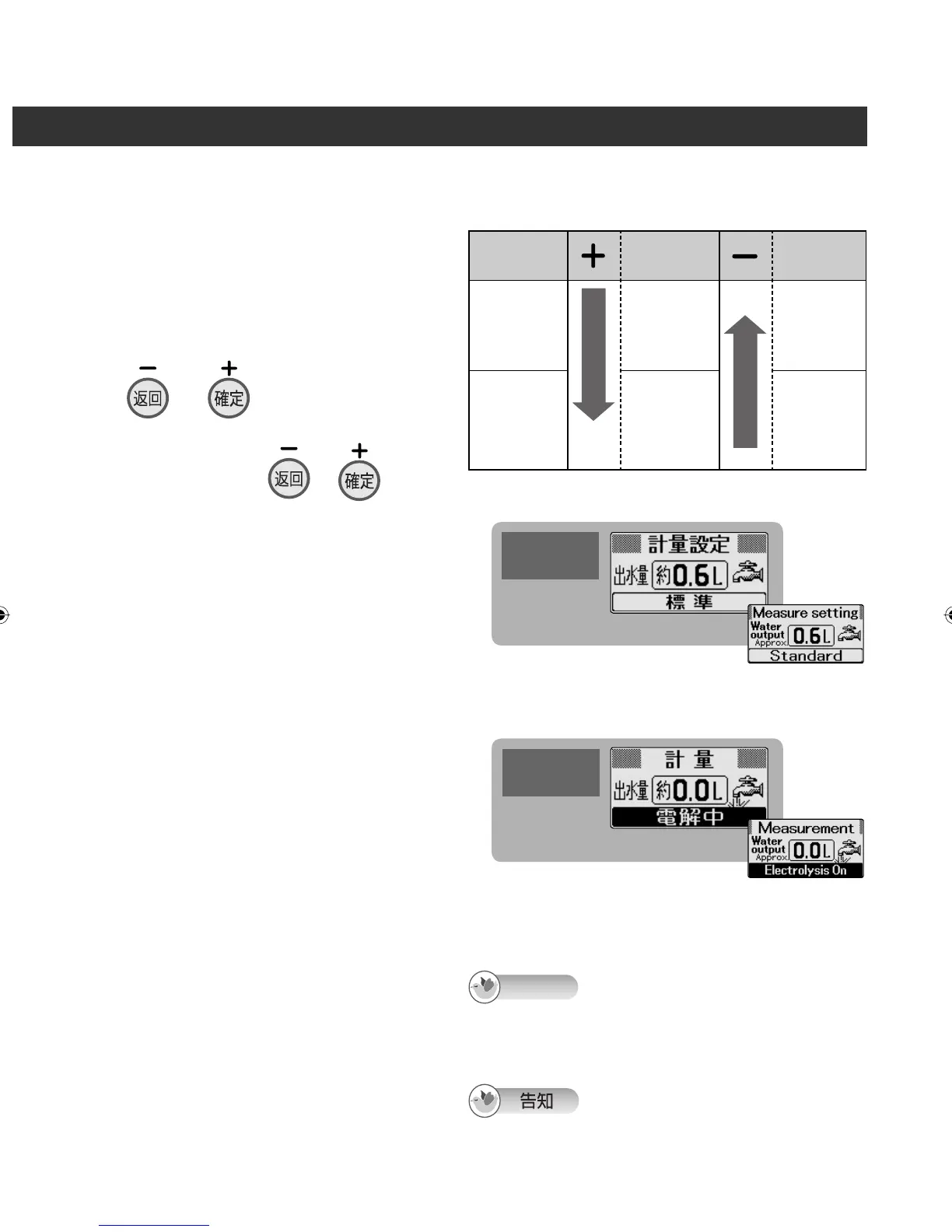
The LCD display changes to the “Measure
setting” screen.
The water output amount which can be set
ranges from 0.6 to 5.0 liters.
Figures in a range from 0.6 to 2.0 liters can be
set in 0.2-liter increments.
Figures in a range from 2.0 to 5.0 liters can be
set in 0.5-liter increments.
(See table on the right.)
ᇘㆴḻ⩐ໞȵ⤺⸇⥑હȶᯉㄇȯ
ר⥑હߣᆯ 0.6 Ɯ 5.0 ҝ֗ȯ
ר⥑હ᱿ᄲϊᆯ
0.6 Ɯ 2.0 ҝ֗Ŋ܈ᆯ 0.2 ҝ֗
2.0 Ɯ 5.0 ҝ֗Ŋ܈ᆯ 0.5 ҝ֗
ņאᤫ⠧Ň
To stop the setting/ ʑᔋ⥑હᆹ
Press another control button or another water
quality selector button.
⦼ྈҢ˟Ⴝ⸹ᖛ⫨ӡဘ⸹ȯ
2
Press the water quality selector
button corresponding to the water
quality that is to be selected.
ྈᓥᮢ᱿ᖛ⫨ӡဘ⸹
1
Open the faucet.
༌ᖛ㕻ㆊ
As soon as the “Preparation time” display is
cleared, the measurement begins.
ȵЈʑȶ᱿ㆴḻౡᚉᆹŊ֯আ⤺⸇ȯ
3
When the advisory buzzer beeps,
turn off the faucet.
بᵧ⨸ب⊖ᱹӛȵܶƞȶ⊖ᆹŊ
⦼〦ℤᖛ㕻ㆊȯ
4
Ș To sound the advisory buzzer when the amount to be measured is reached
ӛบᛵ⸇᱿ᄲϊരŊ⩕بᵧ⨸ب⊖ㅨ⊖᱿⥑હ
ଔᾰ⬢⳧⥑હ᱿ᄲϊŊᗞሷ〦ʀᖛ㕻ㆊ᱿⥾Ŋⴒᆯሳ↧↲⤺
⸇Ŋㆴḻӛᖛ⸇ȯⳆᆹαᕓⳏӛᖛ⸇₎Ⳮ 0.2 ҝ֗ᆹŊӛᖛ
⸇⨸ḻㅠሳᱹӛȵܶȶ⊖ȯ
Ʃ The previously set figure is
displayed for the second and
subsequent times.
Ʃ Ὦʷᓝ˫രŊሳㆴḻʀɺᓝ⥑હ᱿ᄲϊȯ
LCD display
ᇘㆴḻ
Example:
0.6 liter
)
0.6 ҝ֗
▼
The advisory buzzer beeps when the
set amount is reached.
ӛᖛ⸇⩐ໞ⥑હ᱿ᄲϊരŊبᵧ⨸ب
⊖ሳᱹӛȵܶƞȶ⊖
Setting range
⥑હ᱿ߣ
Display
ㆴḻ
Display
ㆴḻ
0.6 to 2.0
liters
0.6 Ɯ 2.0
ҝ֗
Increased in
increments
of 0.2
ᕓᓝ࣑Խ
0.2
ҝ֗
Lower
⩐ଅ
Reduced in
increments
of 0.2
ᕓᓝᛧଇ
0.2
ҝ֗
2.0 to 5.0
liters
2.0 Ɯ 5.0
ҝ֗
Increased in
increments
of 0.5
ᕓᓝ࣑Խ
0.5
ҝ֗
Reduced in
increments
of 0.5
ᕓᓝᛧଇ
0.5
ҝ֗
Higher
⩐
Each time button is pressed
ྈɺᓝ
Each time button is pressed
ྈɺᓝ
LCD display
ᇘㆴḻ
If the faucet is not turned off even when the set amount is
passed, the measurement will continue and the water output
displayed. In this case, the water output buzzer will beep
once for each 0.2 liter of water output.
Note
ZGS0TK7585HKE0Z.indb 45ZGS0TK7585HKE0Z.indb 45 2009/12/09 9:50:422009/12/09 9:50:42












 To Next Page