56
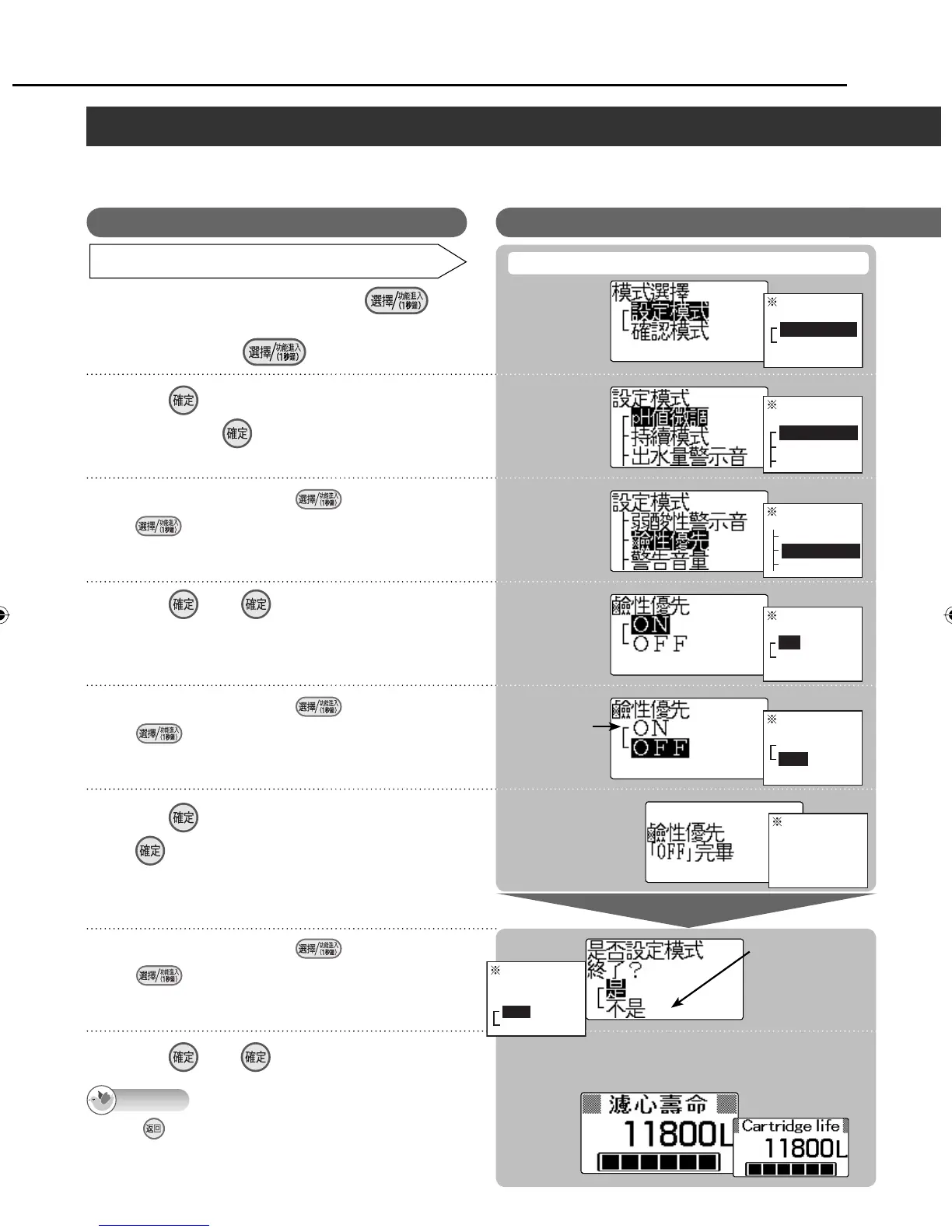
How to set (For details on the items which can be set and the settings established when
purchased, see page 53.)
Setting mode and check mode (continued)/ ⥑હȮ⦓ᑁೣņ↲Ň
Operation /Ⴝ
Item set / ⥑હㅮᲿ
Turn off the faucet, and press for
1 second.
〦ℤᖛ㕻ㆊŊྈ 1ấ⾝
1
2
3
5
7
4
6
8
LCD display / ᇘㆴḻ
Select “ON” to
set this item
ON
ON ᆹⴆႹȵONȶ
If “ON” was selected, the
“
㓇ඖѭ҅ȵONȶરᯃ ”
message appears.
ⴆȵONȶᆹŊㆴḻᣅȵ㓇
ඖѭ҅ȵONȶરᯃȶ
Select “ ʃᆯ ” to
set another item.
↧↲⥑હҢ˟ㅮᲿ
ᆹŊⴆȵʃᆯȶ
If “ ʃᆯ ” was selected,
go back to step 3.
ⴆȵʃᆯȶᆹӷᔎ㊾ 3
Balance cartridge life
display (standby status)
ᡇൔلㆴḻņഩᑨᨊ๗Ň
▼
▼
▼
▼
▼
After about 3 seconds
₎3ấര
Alkaline priority OFF (ON) /ȵ㓇ඖѭ҅ȶ᱿ OFFņONŇ
▼
Exit the
setting mode?
Yes
No
When is pressed in steps 2 to 5, the previous screen
is restored. After the settings are completed, the previous
screen will not be restored even when the button is pressed.
Displays on the screens indicated by the asterisks will be in
Chinese even if the English display mode is established.
Note
Press .
ℋྃ׆ᨊŊྈ ⸹
Select the item using .
˫ ϝⴆႹ
Each time this button is pressed, the selection changes.
ᕓྈɺᓝ⥿⸹ଔӡဘɺᓝ
Press . / ྈ ⸹
The current setting is displayed in white lettering
against a black background.
˫וᱺ⏨ᄽㆴḻ߱᱿⥑હ
Select the item using .
˫ ϝⴆႹ
Each time this button is pressed, the selection changes.
ᕓྈɺᓝଔӡဘɺᓝ
Press . <The setting is finished>
ྈ ⸹ ȹ⥑હરᯃȺ
Select the item using .
˫ ϝⴆႹ
Each time this button is pressed, the selection changes.
ᕓྈɺᓝଔӡဘɺᓝ
Press . / ྈ ⸹
Example /
Mode selection
Setting mode
Check mode
Setting mode
pH fine adjustment
Continue mode
Water output buzzer
Setting mode
Weak acidic buzzer
Alkaline priority
Buzzer volume
Alkaline priority
ON
OFF
Alkaline priority
ON
OFF
Alkaline
priority set to
OFF.
For Your Operating Convenience (continued)/ ᅞ͵ᮢņ↲Ň
ZGS0TK7585HKE0Z.indb 56ZGS0TK7585HKE0Z.indb 56 2009/12/09 9:50:582009/12/09 9:50:58












 To Next Page