58
Operation /Ⴝ
Turn off the faucet, and press
for 1 second.
〦ℤᖛ㕻ㆊྈ 1ấ⾝
1
Press , and select
“ ⦓ᑁೣ ”.
ྈ Ŋ ⴆႹȵ⦓ᑁೣȶ
2
3
5
Select the item using .
˫ ϝⴆႹ
Each time this button is pressed, the
selection changes.
ᕓྈɺᓝ⥿⸹ଔӡဘɺᓝ
4
Select the item using .
˫ ϝⴆႹ
Each time this button is pressed, the
selection changes.
ᕓྈɺᓝ⥿⸹ଔӡဘɺᓝ
8
6
Press .
ྈ ⸹
7
Setting mode and check mode (continued)/ ⥑હȮ⦓ᑁೣņ↲Ň
Item checked / ⦓ㅮᲿ
Press .
ྈ ⸹
9
Optional accessory: Cartridge / ⴆ⫵ٴŘᡇൔ
If “ ʃᆯ ” was selected,
go back to step 4
ⴆȵʃᆯȶᆹӷᔎ㊾ 4
▼
▼
▼
▼
▼
▼
Check the model number.
⦓ࠣ⚦
▼
(Go to step 7)
ņӷᔎ㊾ 7Ň
Select “ ʃᆯ ” to
check another item.
↧↲⦓Ң˟ㅮᲿᆹŊ
ⴆȵʃᆯȶ
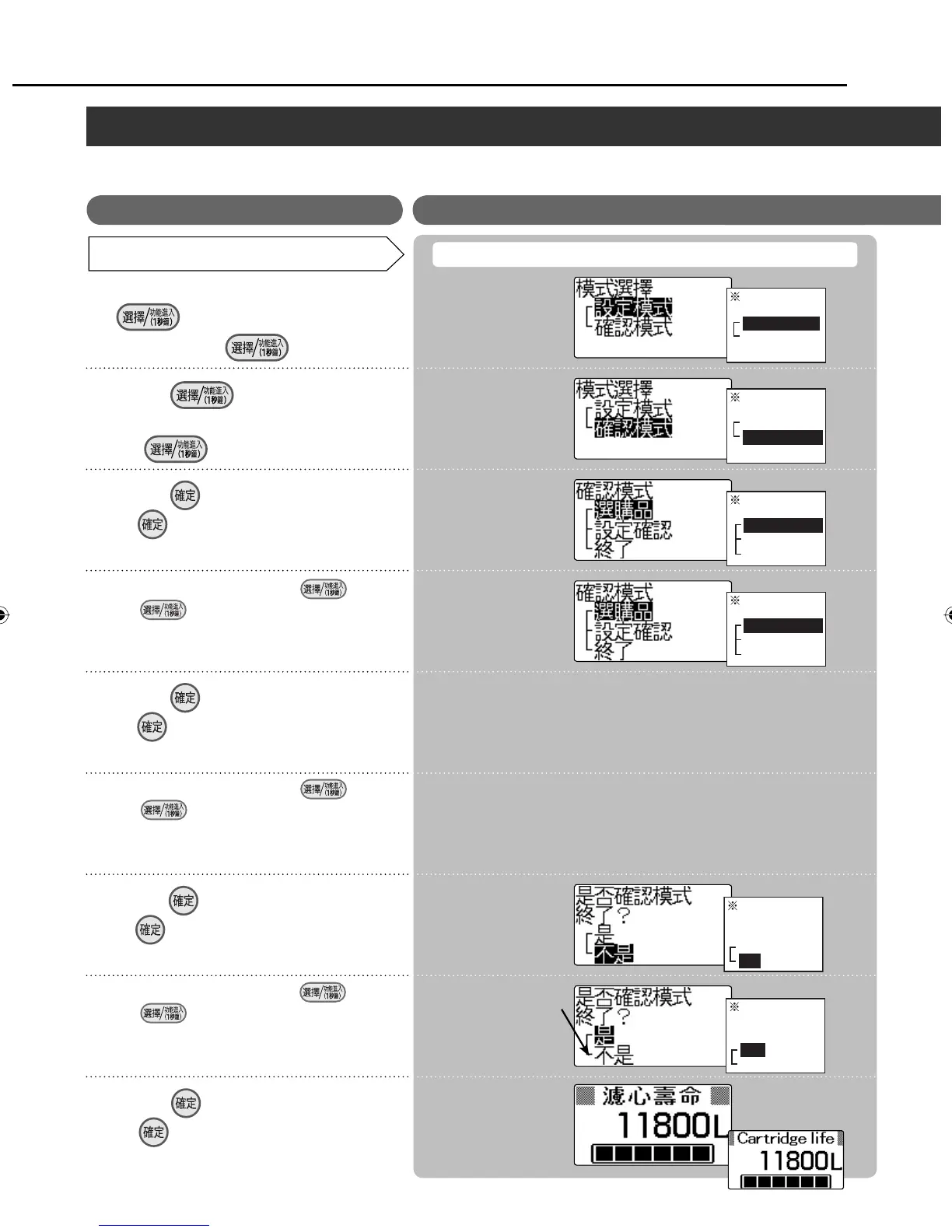
Mode selection
Setting mode
Check mode
Mode selection
Setting mode
Check mode
Check mode
Optional accessories
Setting checks
Exit
Check mode
Optional accessories
Setting checks
Exit
Exit the check
mode?
Yes
No
Exit the check
mode?
Yes
No
How to check (For details on the items which can be checked, see page 53.)
Press .
ྈ ⸹
Press .
ྈ ⸹
Select the item using .
˫ ϝⴆႹ
Each time this button is pressed, the
selection changes.
ᕓྈɺᓝ⥿⸹ଔӡဘɺᓝ
LCD display / ᇘㆴḻ
Balance cartridge life
display (standby status)
ᡇൔلㆴḻ
ņഩᑨᨊ๗Ň
Example /
For Your Operating Convenience (continued)/ ᅞ͵ᮢņ↲Ň
ZGS0TK7585HKE0Z.indb 58ZGS0TK7585HKE0Z.indb 58 2009/12/09 9:51:022009/12/09 9:51:02












 To Next Page