EasyManua.ls Logo

Panasonic TX-86PW100A - Page 17

Panasonic TX-86PW100A
48 pages
Print Icon
To Next Page IconTo Next Page
To Previous Page IconTo Previous Page
Loading...
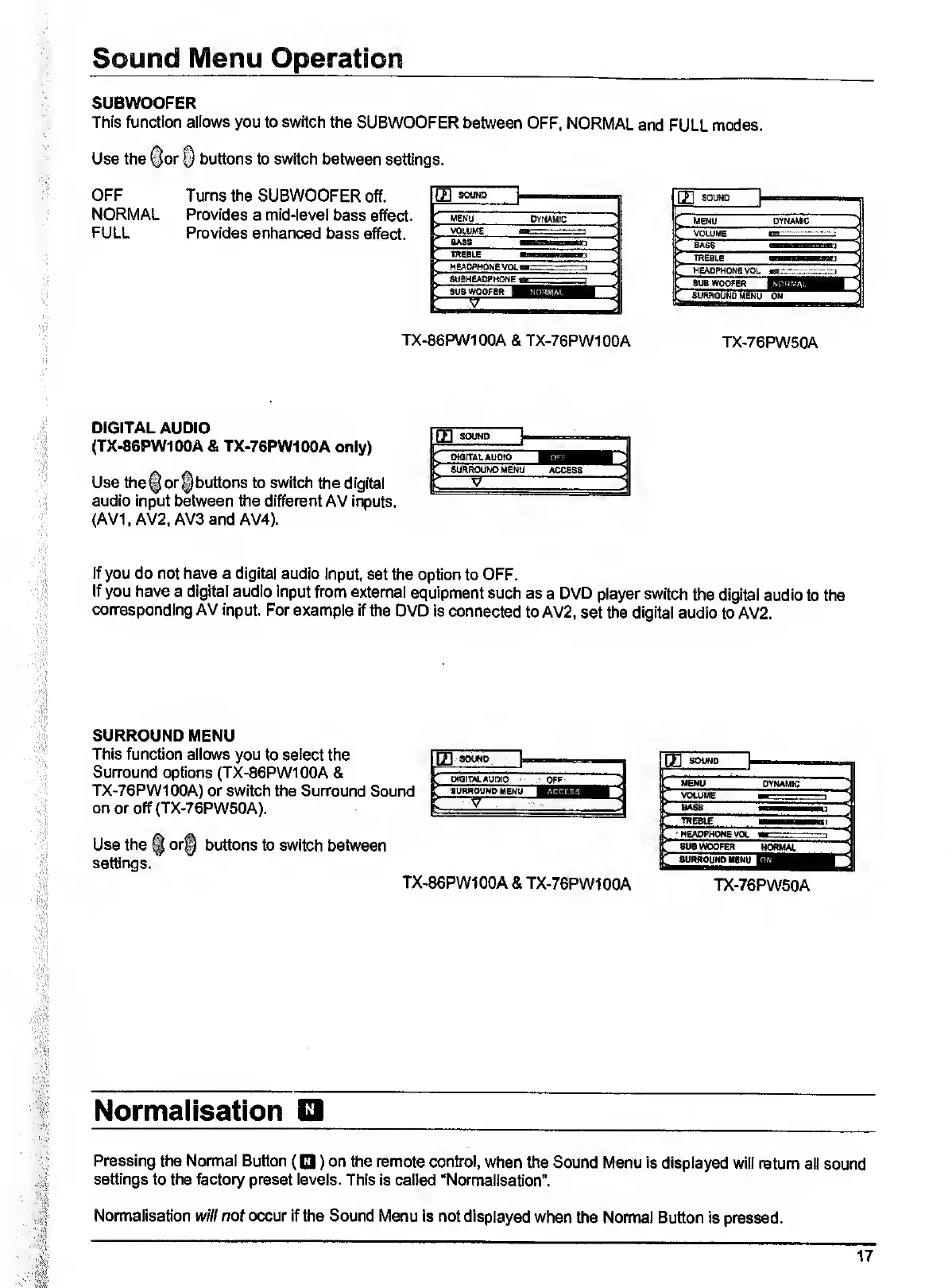
SUBWOOFER
This
function
allows
you
to
switch
the
SUBWOOFER
between
OFF,
NORMAL
and
FULL
modes.
Use
the
^or
§
buttons
to
switch
between
settings.
OFF
NORMAL
FULL
Turns
the
SUBWOOFER
off.
Provides
a
mid-level
bass
effect.
Provides
enhanced
bass
effect.
DYNAMIC
VOLWE
-1
BASS
'
meBLE
ngoBHaMHari
HEADPHONE
VOL
--,
SUEHEADPHONE
suewoofER
1
^
1
.
TX-86PW100A
&
TX-76PW100A
MENU
DYNAMIC
VOLUME
..
BASS
BJ
TREBLE
aarj
HEADPHONE
VOL
t-.-r:,::.—
SUBWOOFER
r
SURROUND
MENU
ON
TX-76PW50A
DIGITAL
AUDIO
(TX-86PW100A
&
TX-76PW100A
only)
Use
the
§
or
§
buttons
to
switch
the
digital
audio
Input
between
the
different
AV
inputs.
(AV1,
AV2,
AV3
and
AV4).
If
you
do
not
have
a
digital
audio
Input,
set
the
option
to
OFF.
If
you
have
a
digital
audio
input
from
external
equipment
such
as
a
DVD
player
switch
the
digital
audio
to
the
corresponding
AV
input.
For
example
if
the
DVD
Is
connected
to
AV2,
set
the
digital
audio
to
AV2.
SURROUND
MENU
This
function
allows
you
to
select
the
Surround
options
(TX-86PW100A
&
TX-76PW100A)
or
switch
the
Surround
Sound
on
or
off(TX-76PW60A).
K
OtOITAL
AUDIO
OFF
K
SURROUND
MENU
Use
the
§
or§
buttons
to
switch
between
settings.
TX-86PW100A
&
TX-76PW100A
in
SOWD
r
MENU
DYNAMIC
L
VOLUME
I
1
fil
TREBLE
P
HEADPHONE
VOL
M--
F
SUBWOOFER
NORMAL
L
SURROUND
MENU
TX-76PW50A
Normalisation
Pressing
the
Normal
Button
(O)
on
the
remote
control,
when
the
Sound
Menu
is
displayed
will
return
all
sound
settings
to
the
factory
preset
levels.
This
is
called
“Normailsatlon”.
Normalisation
will
not
occur
if
the
Sound
Menu
is
not
displayed
when
the
Normal
Button
is
pressed.

Related product manuals