EasyManua.ls Logo

Panasonic TX-86PW100A - Page 18

Panasonic TX-86PW100A
48 pages
Print Icon
To Next Page IconTo Next Page
To Previous Page IconTo Previous Page
Loading...
Puqh
the
Surround
(
e)
to
confirm
that
the
Surround
feature
is
On.
If
the
on
Lree^mesrse
that
appears
indicates
Surround
is
Off.
Push
again
to
turn
the
Nme-'tf
Surround
is
Off.
the
sound
output
is
two
channel
{ie:
left
and
right)
stereo
or
mono.
Push
the
SOUND
(
B)
button.
Select
to
Surround
menu
by
using
.
Access
Surround
menu
by
using
Qory
Move
to
chose
menu
option
by
using
C^or^.
Adjust
chosen
option
or
access
chosen
menu
by
using;
jor
.
j.
Push
^
to
go
back
to
watching
TV.
If
a
DTS
/
Dolby
Digital
input
is
detected
the
Surround
options
instantly
change
-
Surround
mode
is
not
a'/ateble^
(TTie
DVD
output
must
be
labeled
"DTS"
or
"Dolby
Oigita
).
Ensure
that
the
Digital
Audio
option
in
the
SOUND
menu
is
set
to
me
correct
AV
input
(see
pages
17
and
40).
A
message
f
centre
of
the
screen
shows
whether
the
signal
is
DTS
“f
D°lby
Digital
and
gives
a
code
indicating
which
channels
are
detected
(see
table
to
the
right).
Subwoofer
output
is
not
listed;
if
a
subwoofer
channels
is
detected
then
its
contents
are
output.
Code
Front
outputs
Rear
surround
outputs
Left
Riaht
Centre
Left
Riqht
U1
Dual
mono
output
1/0
Mono
output
2/0
/
3/0
/
v'
•/
2/1
/
Mono
output
3/1
/
/
Mono
output
2/2
V'
3/2
/
/
VOLUME
SURROUND
MODE
SPEAKER
SETTING/
SIMULATED
SPEAKER
LEVEL
FRONT
DISTANCE
REAR
DISTANCE
INTERNAL
SPEAKER
The
volume
adjustment
sets
the
overall
Surround
output
volume.
When
a
DTS/
Dolby
Digital
input
is
not
detected
this
option
is
shown.
Choose
between
PRO
LOGIC
and
SIMULATED.
The
mode
chosen
here
dictates
the
next
menu
option.
If
a
DTS
/
Dolby
Digital
input
is
detected,
or
if
Pro
Logic
is
selected
in
Surround
mode,
this
menu
option
is
Speaker
setting,
allowing
selection
of
NORMAL,
PHANTOM
or
3
STEREO
modes,
as
described
on
page
20
.
If
Simulated
is
selected
in
Surround
mode,
this
menu
option
is
Simulated
setting,
allowing
selection
of
DISCO,
MOVIE
or
STADIUM
modes,
as
described
on
page
20.
Allows
adjustment
of
the
volume
for
each
speaker,
as
described
on
page
20.
Allows
setting
of
the
distance
from
the
listening
position
to
the
front
speakers.
Distances
or
1.2,
3,4,
5,6,7
or
8M
can
be
selected.
Allows
setting
of
the
distance
from
the
listening
position
to
the
rear
speakers.
If
the
rear
surround
speakers
are
closer
to
you
than
the
centre
speaker,
you
may
hear
“dialogue
leakage”
from
the
rear
surround
speakers.
It
may
be
necessary
to
reduce
the
volume
of
the
rear
DiSnc'es
or
1,2,
3,4,
5,6,7
or
8M
can
be
selected.
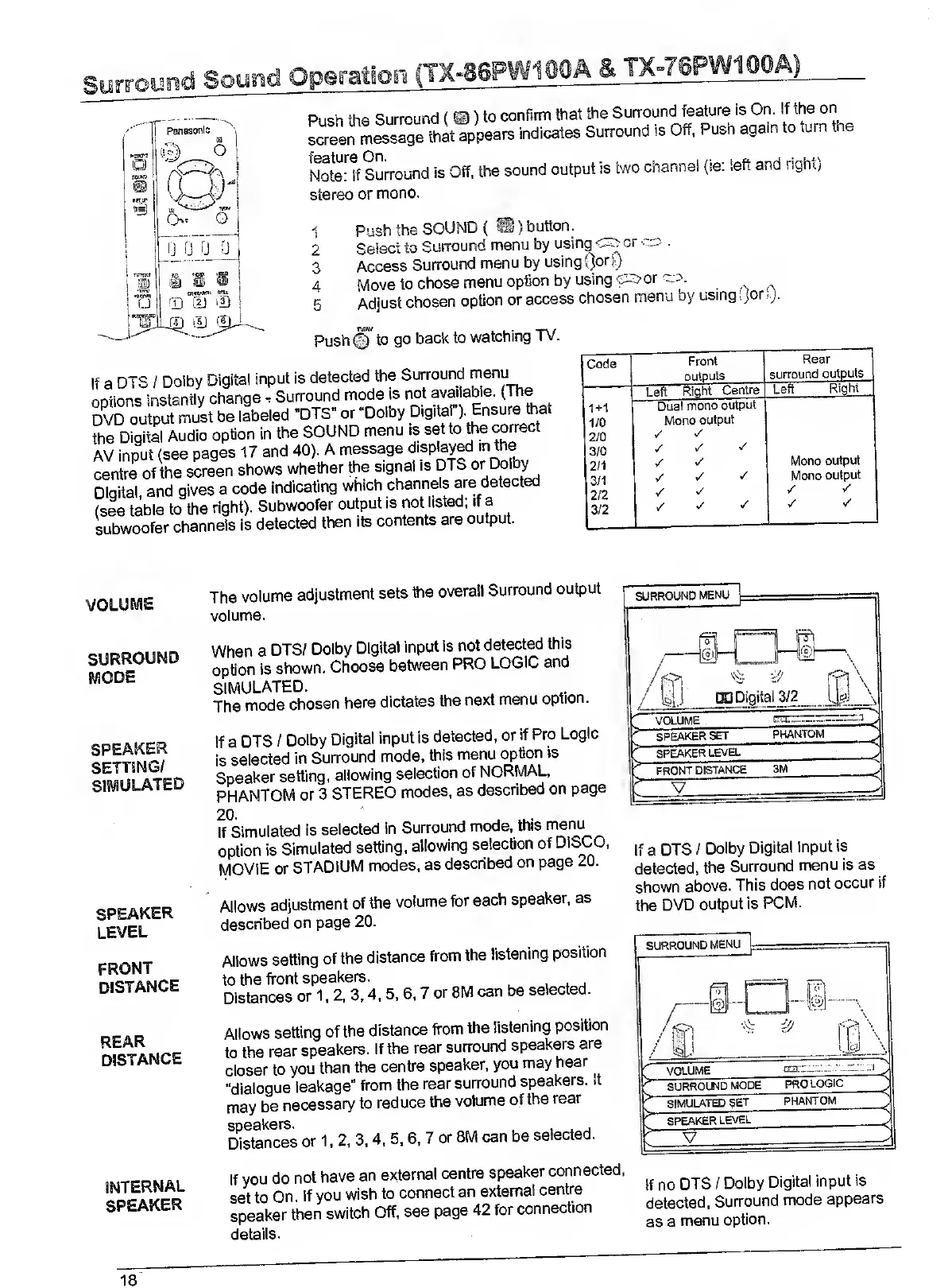
If
a
DTS
/
Dolby
Digital
Input
Is
detected,
the
Surround
menu
is
as
shown
above.
This
does
not
occur
if
the
DVD
output
is
PCM.
If
you
do
not
have
an
external
centre
speaker
connected,
set
to
On.
If
you
wish
to
connect
an
external
centre
speaker
then
switch
Off,
see
page
42
for
connection
details.
if
no
DTS
/
Dolby
Digital
input
is
detected,
Surround
mode
appears
as
a
menu
option.
VV^

Related product manuals