EasyManua.ls Logo

Panasonic TX-86PW100A - Page 24

Panasonic TX-86PW100A
48 pages
Print Icon
To Next Page IconTo Next Page
To Previous Page IconTo Previous Page
Loading...
Teletext
is
only
available
on
certain
broadcast
channels.
The
time
taken
to
display
the
pages
and
sub-pages
is
set
by
the
teletext
transmitter
and
not
by
the
television.
Teletext
is
also
used
for
Closed
Captioning
of
television
programmes
for
the
hearing
impaired.
Closed
captions
can
be
found
on
Teletext
Page
801.
TOP
(Table
Of
Pages)
MODE
In
TOPTEXT
mode,
the
red
button
moves
to
the
previous
page
number
and
the
green
button
moves
to
the
next
page
number.
The
yellow
and
blue
buttons
correspond
to
different
subjects.
These
subjects
can
be
accessed
by
Pushing
the
coloured
button.
This
is
the
current
preferred
method
of
operation
in
Australia.
FASTEXT
MODE
In
FASTEXT
mode,
four
differently
coloured
subjects
are
displayed
at
the
bottom
of
the
screen.
To
access
more
information
about
one
of
these
subjects,
push
the
corresponding
colour
coded
button
on
the
remote
control.
This
Is
the
current
preferred
method
of
operation
in
New
Zealand.
LIST
MODE
In
LIST
mode,
four
different
coloured
page
numbers
are
shown
at
the
bottom
of
the
screen.
Each
of
these
numbers
can
be
altered
and
stored
in
the
TV’s
memory.
These
coloured
page
numbers
correspond
to
the
colour
coded
buttons
on
the
remote
control.
Please
refer
to
page
21
for
Instructions
on
how
to
change
modes
between
TOP/FASTEXT
and
LIST.
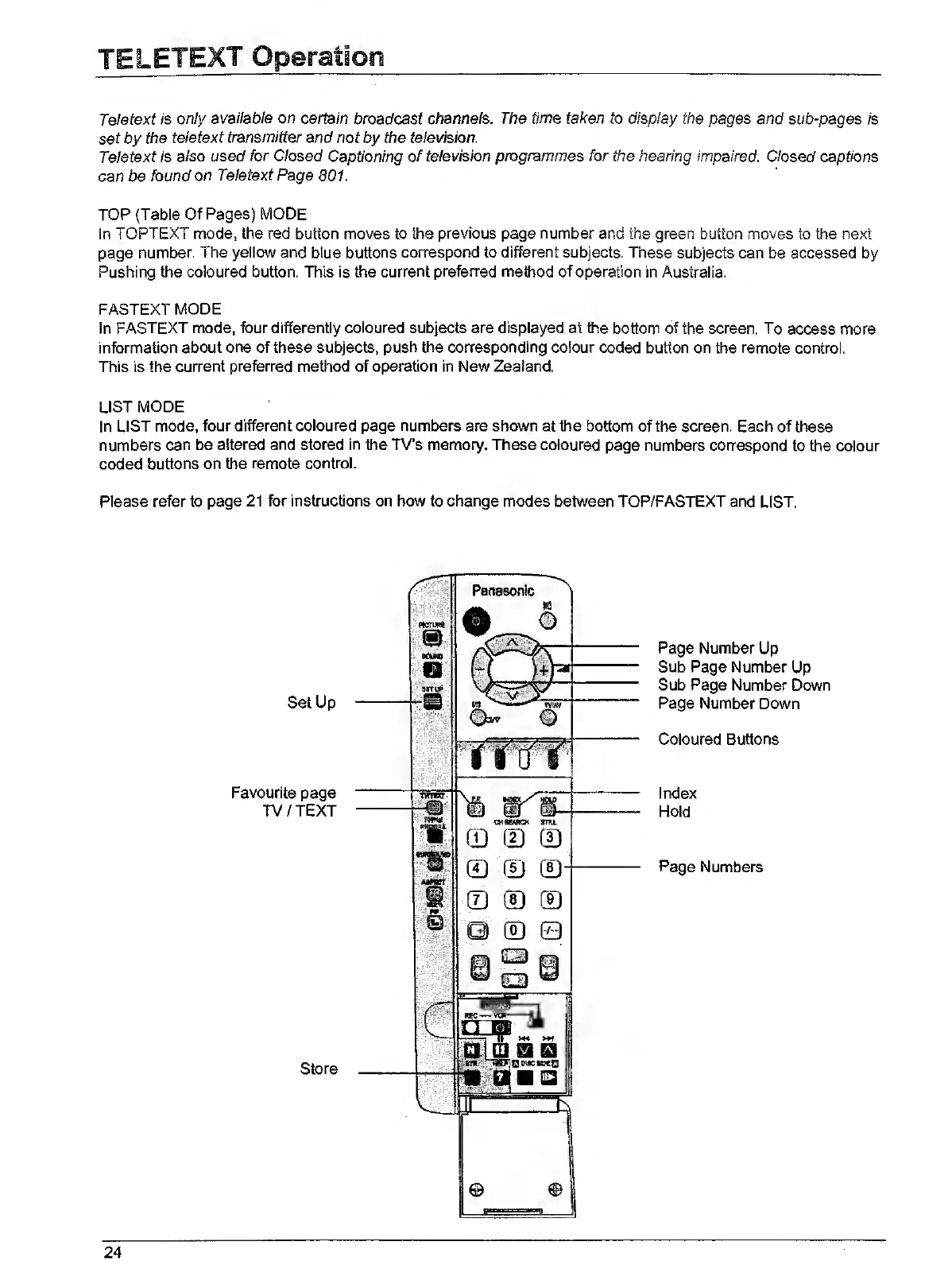
Set
Up
Favourite
page
TV/TEXT
Store
Page
Number
Up
Sub
Page
Number
Up
Sub
Page
Number
Down
Page
Number
Down
Coloured
Buttons
Index
Hold
Page
Numbers
24

Related product manuals