27
9.1.2. Initialization Pulse Adjust
1. Input the White signal to plasma video input.
2. Set the picture controls as follows.
Picture menu : Dynamic
PNR : Min
Aspect : 16:9
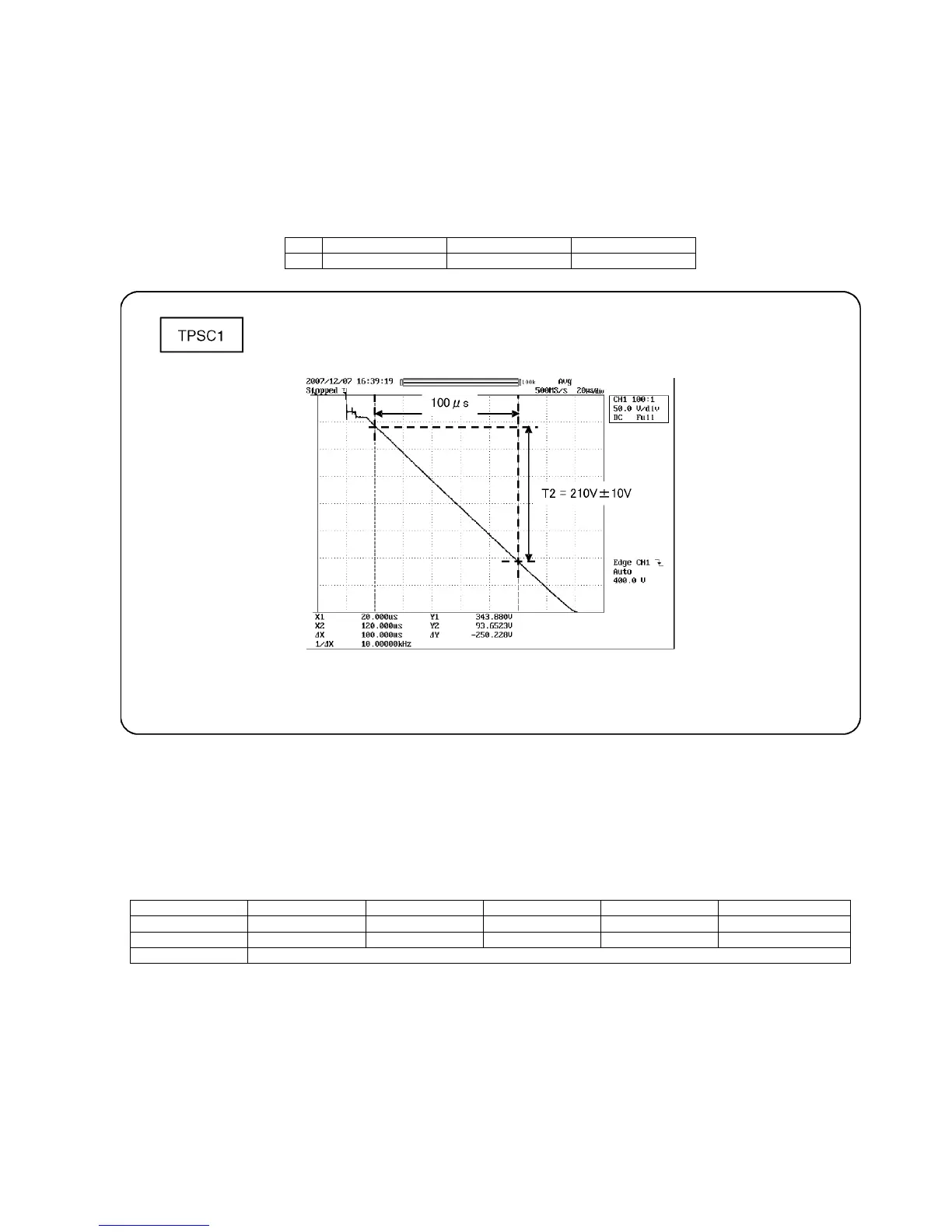
3. Connect Oscilloscope to TPSC1 (SC).
Check the voltage (T2) at 100μs period on the down slop.
9.1.3. P.C.B. (Printed Circuit Board) exchange
9.1.3.1. Caution
1. To remove P.C.B., wait 1 minute after power was off for discharge from electrolysis capacitors.
9.1.3.2. Quick adjustment after P.C.B. exchange
Adjust the following voltages with the multimeter.
*See the Panel label.
Caution:
Absolutely do not reduce Vsus below Ve not to damage the P.C.B.
Test point Volume Level
T2 TPSC1 (SC) VR16601 (SC) 210 V ± 10 V
P.C.B. Name Test Point Voltage Volume Remarks
P Board Vsus TPVSUS (SS) Vsus ± 2V R737 (P) *
SC Board Vad TPVAD (SC) -180V ± 2V VR16600 (SC)
A Board White balance and Sub brightness for RF and 1080i signals








 To Next Page