10 English
1
2 3 4
5
6 7
Part Names
Continued
■
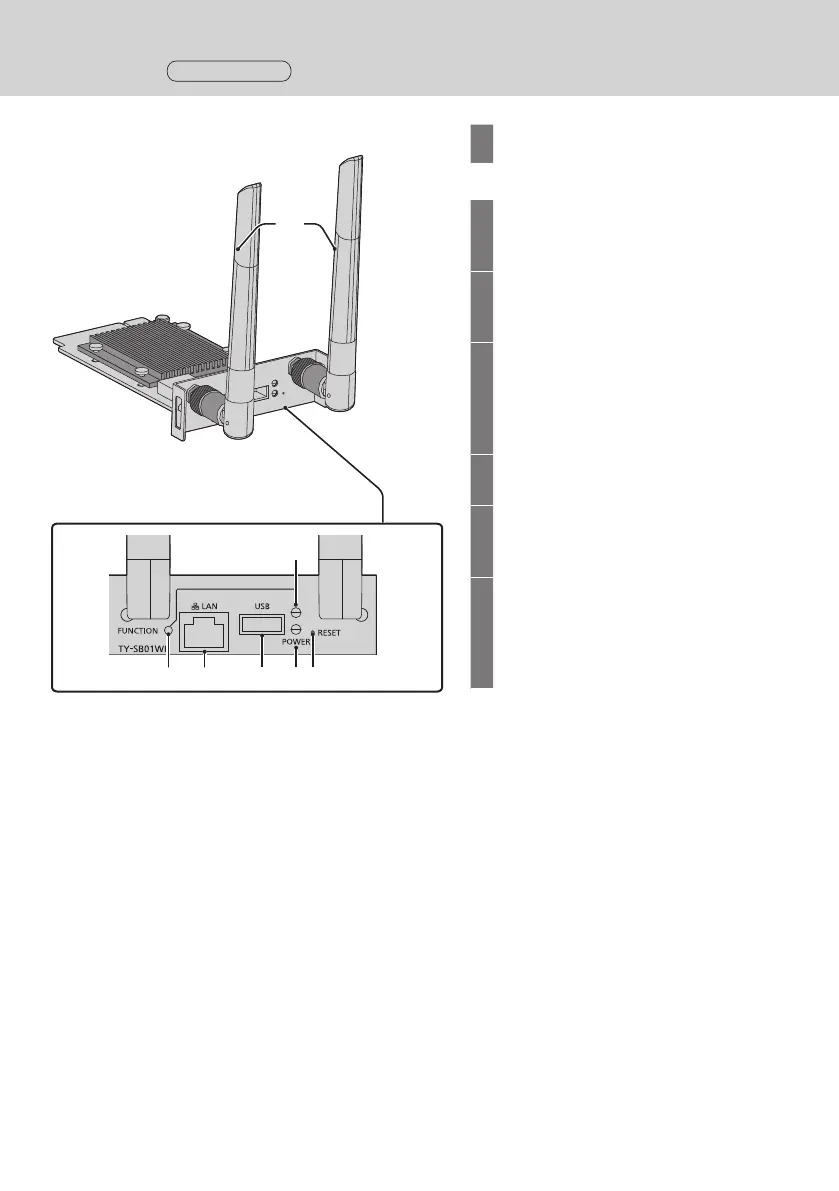
Receiver board (TY-SB01WP)
1
Antenna
▼Connectionterminals/Controls
2
FUNCTION button
Used to save a pairing file to the USB
memory.
3
LAN terminal (RJ45)
Connects to the network to change the
settings of the product.
4
USB terminal (Type-A)
Connects the transmitter or USB
memory when pairing devices.
Use this by connecting an HID device
(mouse, touch module). (page 9)
5
FUNCTION LED
Displays the pairing status.
6
Power Indicator
Displays the power supply status, and
connection statuses of LAN and USB.
7
Reset button
Restores the product to the factory
default state.
Reset operation starts when the reset
button is pressed for 5 seconds or more.
▼Connectionterminals/Controls



 To Next Page