11English
2
4
1
3
5 6
7
3 4
65
1
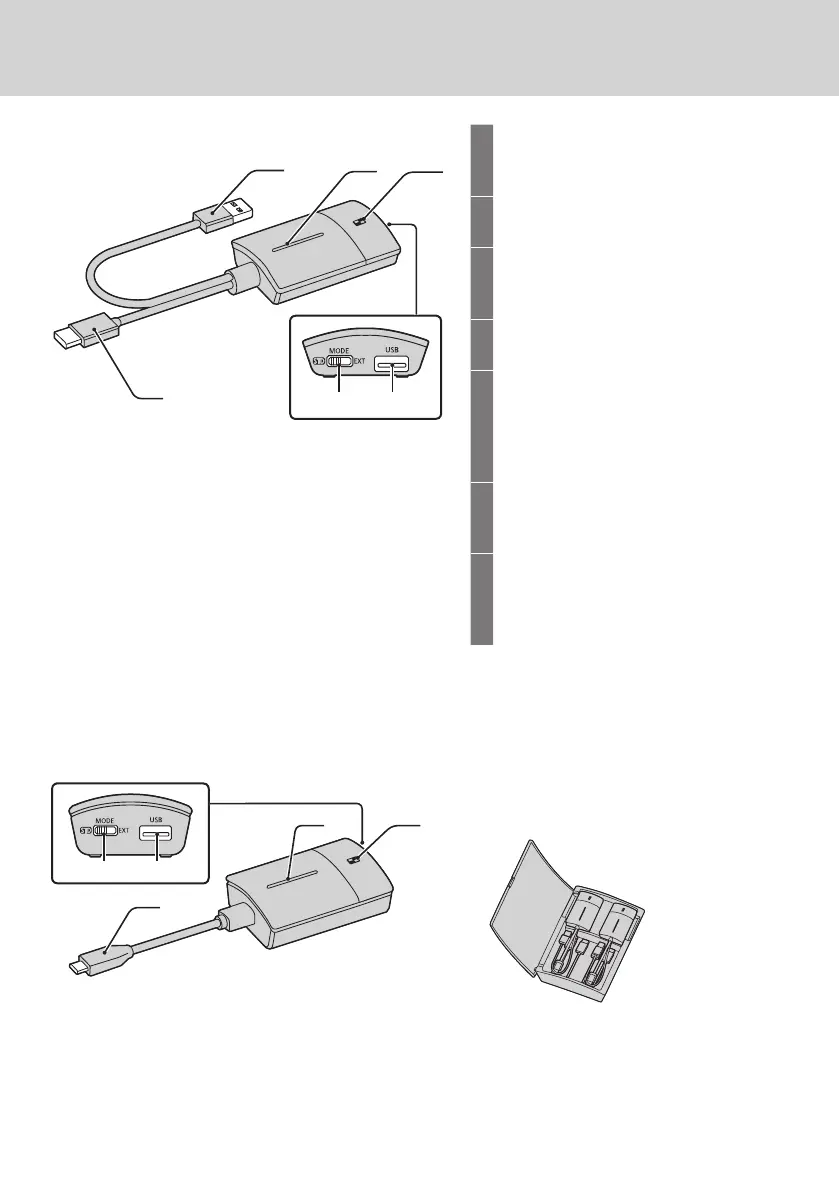
HDMI input terminal
Connect to an imaging device equipped
with HDMI output.
2
USB terminal (Type-A)
Connect to a USB power supply device.
3
Main button / LED
Switches between on and off of image
display.
4
Sub button / LED
Switches to the multi-screen mode.
5
Mode switch
It is used when pairing. (see page 20)
Set the switch to the STD side when
receiving information from an HID
device.
6
USB terminal (Type-A)
Connects a USB memory when pairing
with the receiver.
7
USB terminal (Type- C)
Connect to an imaging device with a
USB Type-C terminal that supports
DisplayPort Alt Mode output.
■
Transmitter (TY-WPB1 / TY-WPB1W)
■
USB-C transmitter
(TY-WPBC1 / TY-WPBC1W)
■
Transmitter case
2 transmitters and the USB extension cable
(supplied with the TY-WPS1 / TY-WPS1W /
TY-WP2B1 / TY-WP2B1W / TY-WPB1 /
TY-WPB1W) can be stored.



 To Next Page