50 English50
■
CEC-OFF link
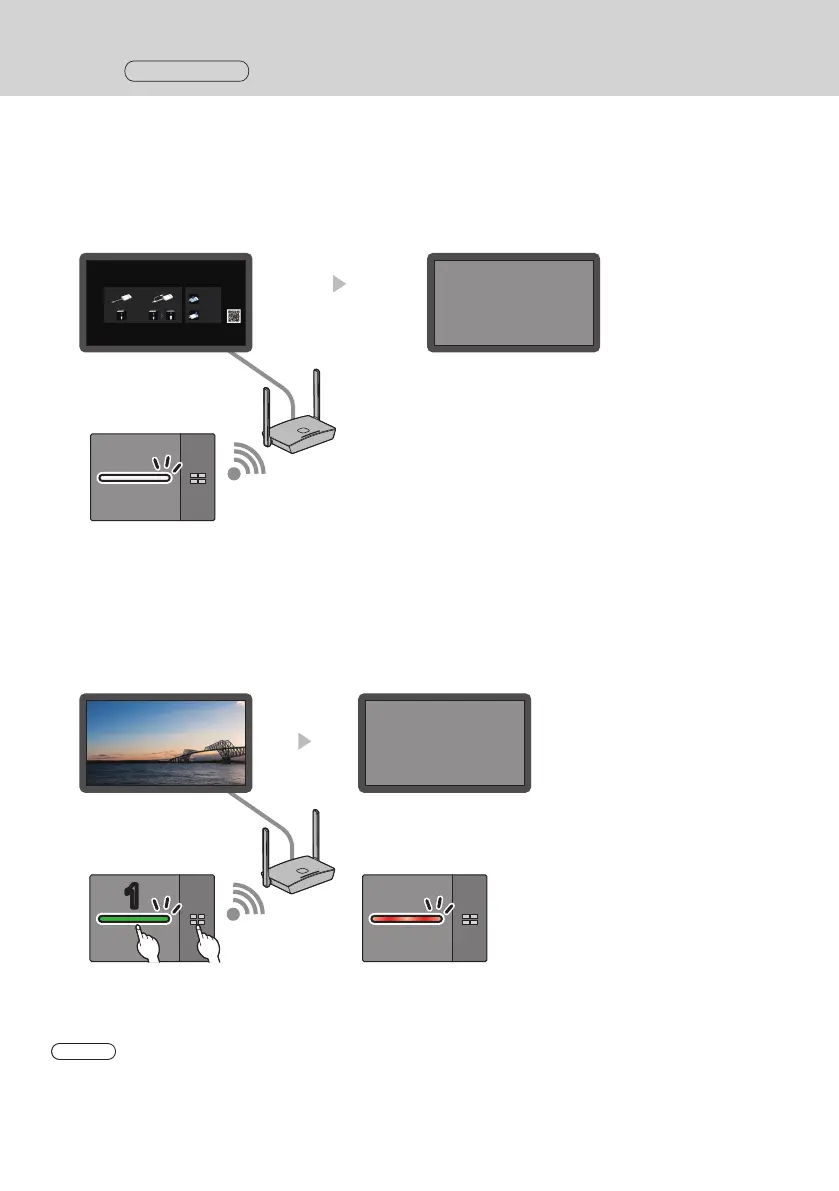
Performing the following 2 operations allows the display to be turned off (standby state).
(1) When the screensaver is activated
When the screensaver of this product is activated while the transmitter is in standby state, the display is turned off.
Standby screen Display power off (standby)
HDMI cable
Transmitter (in standby)
After the specified time
for screensaver has
elapsed
(2) When the transmitter is standby state
Press and hold the main button and the sub button of the transmitter simultaneously while the transmitter
connected. Then the display is turned off.
When the transmitter enters the standby state, the main LED blinks in red.
Image being displayed or
standby screen
Display power off
(standby)
11
HDMI cable
Press and hold the main and sub
buttons simultaneously
Transmitter (in standby)
Note
• To restore the transmitter from standby state to the active state, disconnect and connect the USB terminal of the
transmitter.
Setting
Continued



 To Next Page