INOXPAN S.L. EN - 9
4.3.
COOKING INFORMATION SCREE
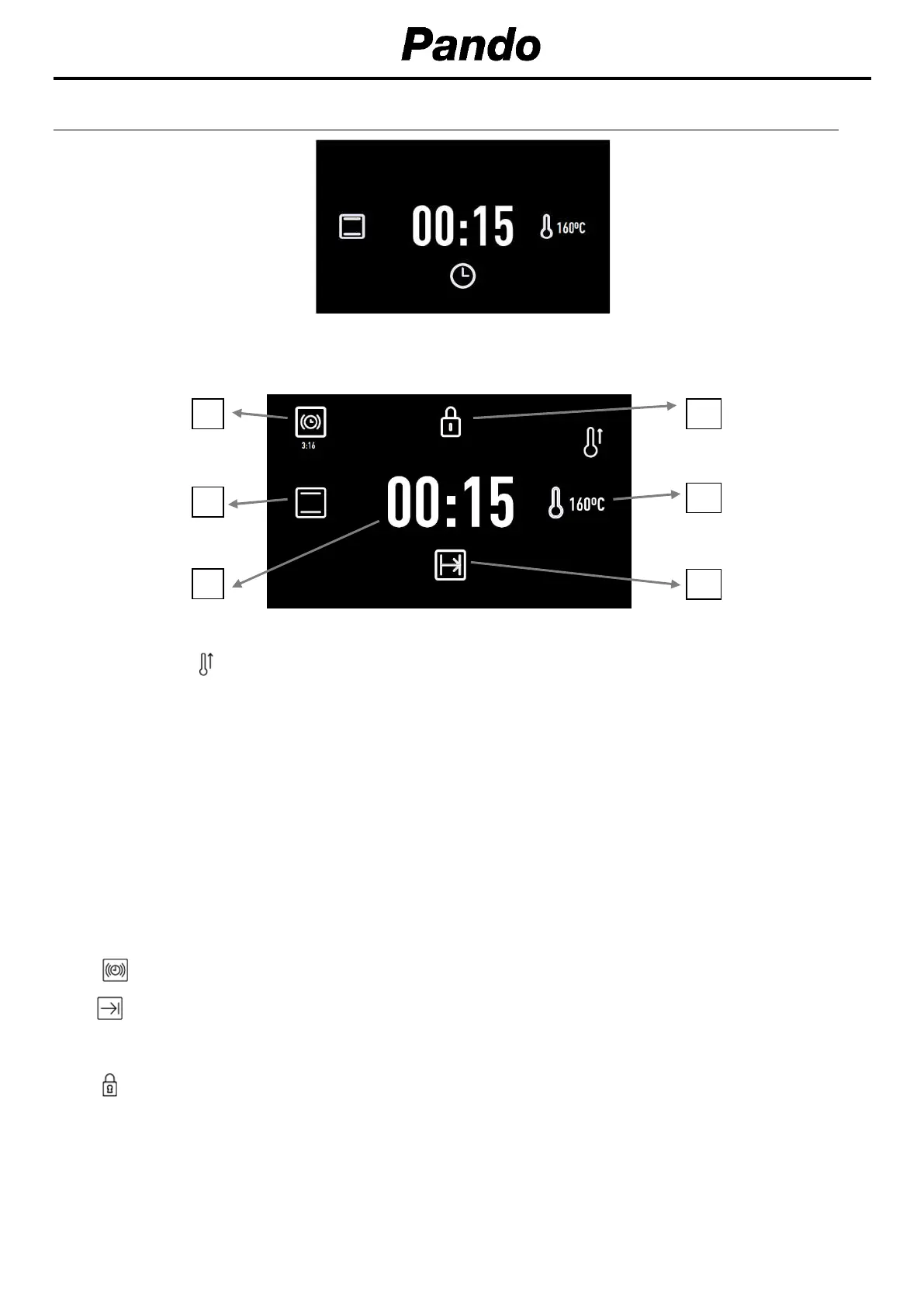
During cooking, the information on the oven’s status will appear on the screen around two central
circles:
1.
Selected temperature.
The symbol will flash red until the selected temperature is reached and whenever the oven
is transmitting heat to the food. When the selected temperature is reached, this symbol will turn
off, leaving only the blue indicator.
2.
Cooking time.
If the timer has not been programmed, the elapsed cooking time will be shown.
If the timer has been set, the time left until cooking ends (countdown) will be shown.
If the oven has been programmed, but is set to delay (cooking has not yet started), the total
programmed cooking time will be shown.
3.
Cooking settings or automatic recipe selection.
If time
settings have been programmed, information
relevant to these is shown on the right
side of the screen.
4.
Timer. Countdown with audible signal to indicate the cooking time has finished.
5.
Finish time.
If you have activated security functions, the information regarding this function is displayed on
the screen.
6.
Keypad lock. The child-safety lock will
light up when activated.


 To Next Page
 Loading...