EasyManua.ls Logo

Pantech Breeze IV - Camera Options

Pantech Breeze IV
210 pages
Print Icon
To Next Page IconTo Next Page
To Previous Page IconTo Previous Page
Loading...
Breeze Mode - Multimedia
61
60
01
02
05
06
01
02
03
04
05
06
07
03
04
Setting camera settings
1.Press in standby mode or
select Menu > Camera > Take
Pictures.
2.SelectOptions > Settings to
change settings prior to taking
a picture.
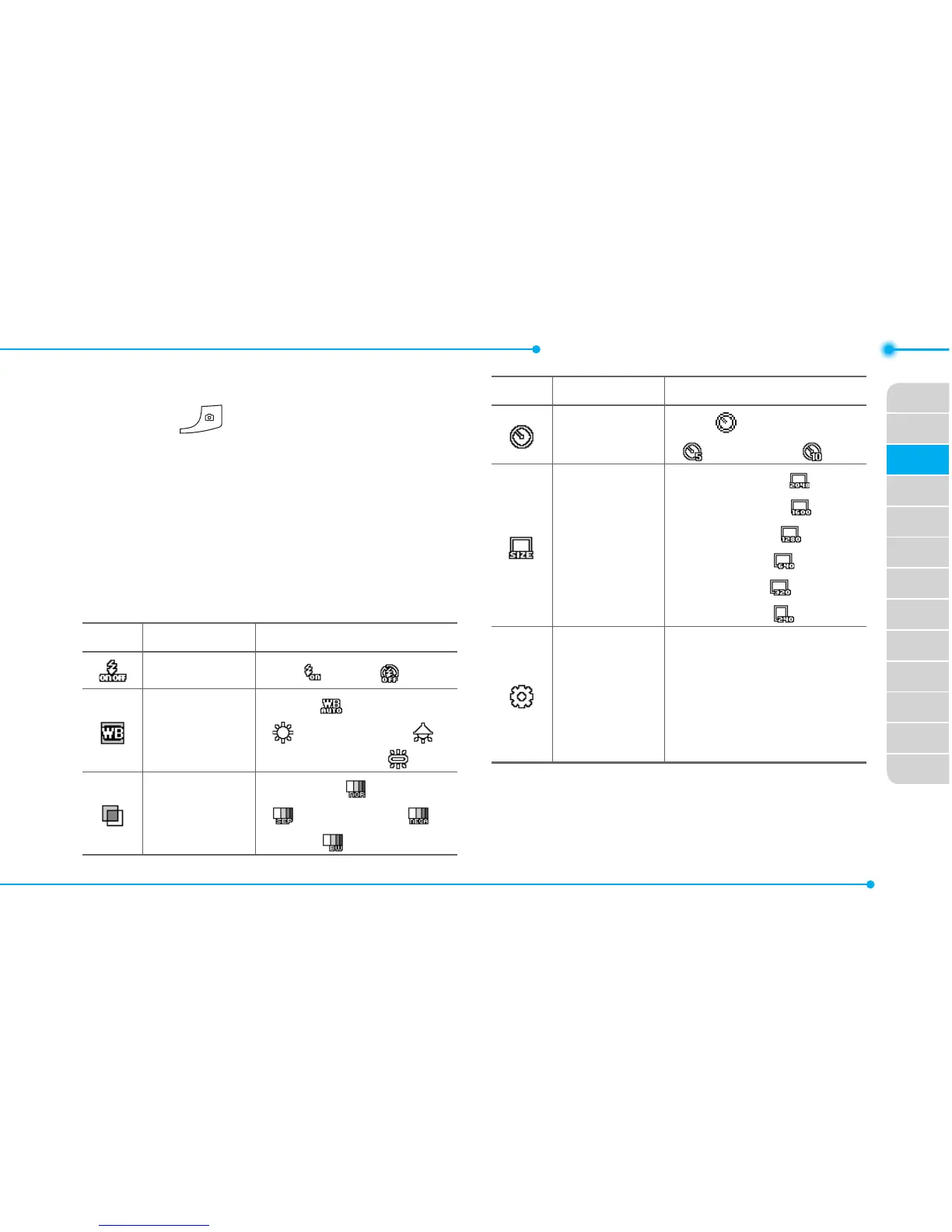
Camera options
Icon Name Descriptions
Flash
On( ),Off( )
White
Balance
Auto( ),DayLight
( ),Tungsten( ),
Fluorescent ( )
Effect
Normal ( ),Sepia
( ),Negative( ),
B&W( )
Icon Name Descriptions
SelfTimer
Off( ),5secs
( ),10secs( )
Size
2048x1536( ),
1600x1200( ),
1280x960( ),
640x480( ),
320x240( ),
240x400( )
Advanced
PictureQuality,
SaveLocation,
ShutterSound,
TimerSound,
AutoFocus

Table of Contents

Related product manuals