91
STANDARD MODE l BASIC OPERATION
Indicators
Indicator Description
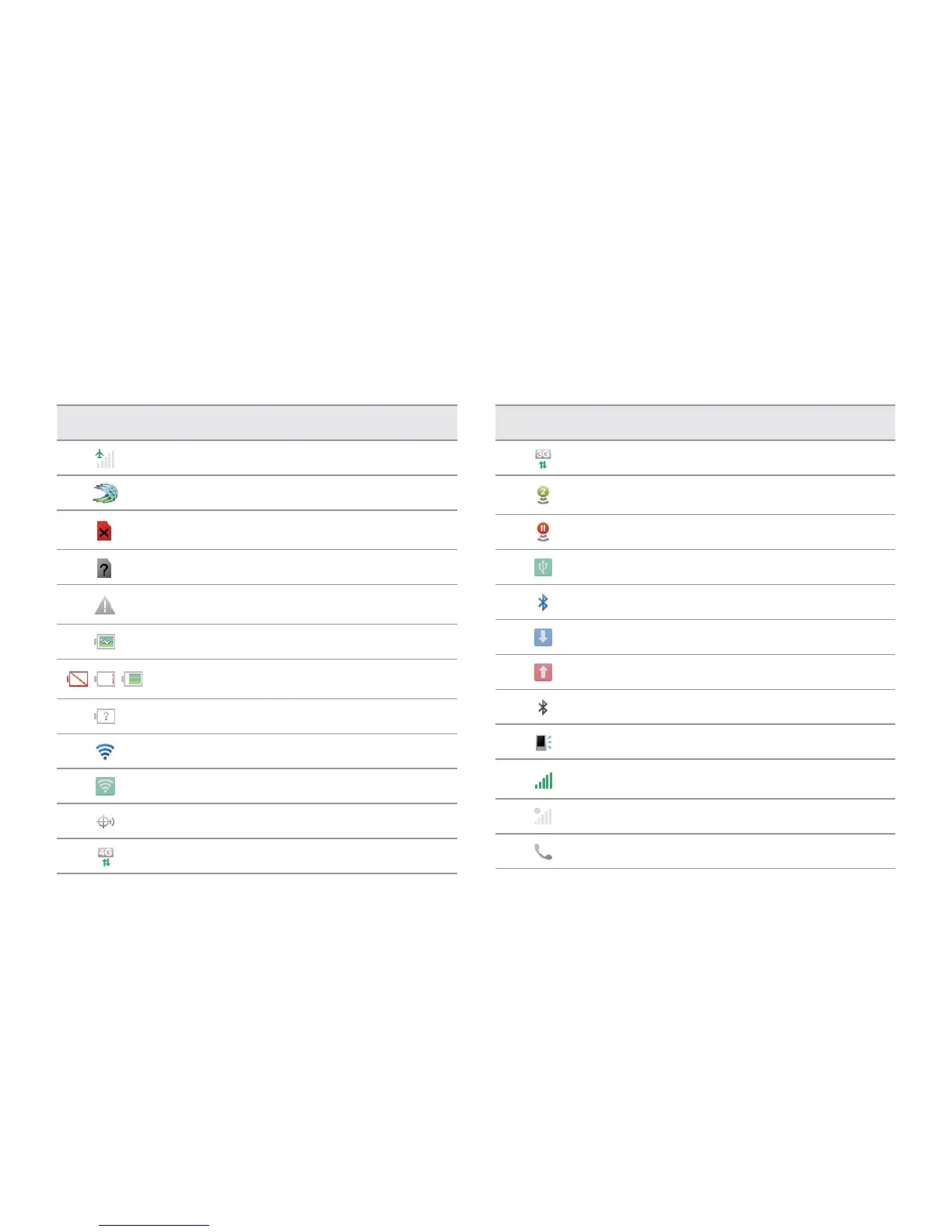
Set to airplane mode
SwiftKey for Pantech is available to check
There is no SIM/USIM card or no SIM/USIM card is
recognized
The inserted SIM/USIM card is not recognized
There is an error; data is disabled by the data restrict
time
The battery is charging
Strength of battery: The greener, the more battery
is charged
The battery is connected to unknown power supply.
Connected to a Wi-Fi network
Connected to Wi-Fi Direct
The GPS is active
Data is being transferred through the 4G network
Indicator Description
Data is being transferred through the 3G network
Mobile Hotspot is active: the number indicates the
number of people that use the tethering
Mobile Hotspot is not active
USB tethering is active
Bluetooth is connected
A file is ready to be delivered from other device
A file is ready to be delivered to other device
Bluetooth is active but not connected to other device
The speakerphone is active
Strength of signal: The bar becomes bigger when the
signal is stronger
There is no signal
A call is under way



 To Next Page