DEVICE MAINTENANCE AND CLEANING
TRAINING
©Parata
Warranty Verification
To verify if you have a part that is eligible for a warranty claim please contact Parata service.
For warranty verification and future claims please obtain and report the shot counter reading
from the ATP by following the procedure below. Without the shot counter reading, warranty
claims cannot be verified.
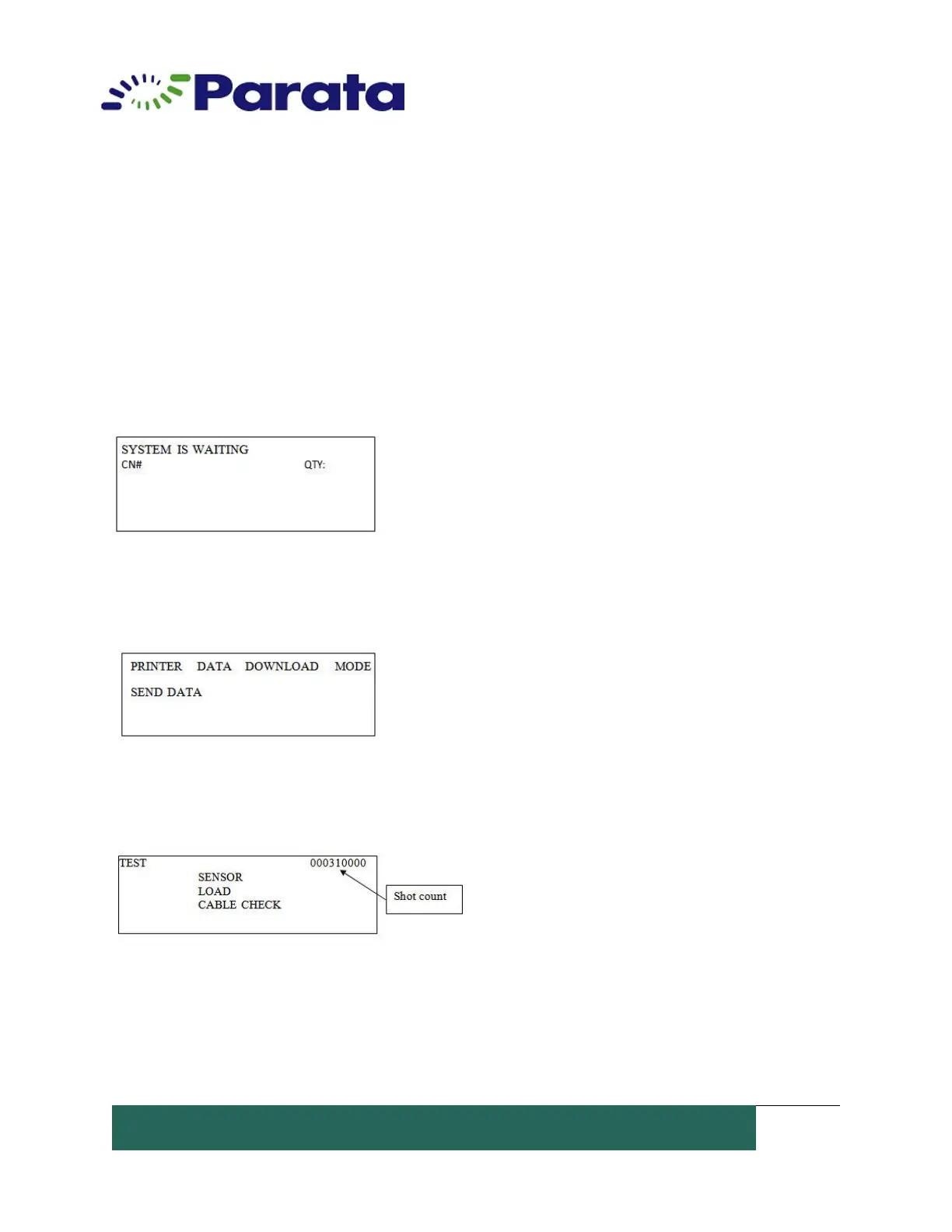
1. Verify on the ATP LCD display that the there are no machine or printer errors, and that
the phrase 'SYSTEM IS WAITING' is visible on the small ATP LCD screen located on the
front of the ATP device.
2. To the right of the LCD screen Press and hold the ‘MODE’ Button until the Information
on the LCD screen changes.
3. Release the ‘MODE’ button, press and hold it again until the screen information changes
a second time.
4. For warranty purposes, please record the number displayed for the Shot Count in the
upper right corner of the LCD.
5. Press and hold the ‘MODE’ button again for the next screen change.


 To Next Page