DATASHEET
15
Appendix
A quick guide to the main manual controls accessible to the user for both common use and configuration settings is provided below.
Using the PROGRAM SELECTION keypad (4 to 9), it is possible to set and adjust the main parameters of the P8136 Master Control Panel. It is also
possible to save the last configuration or to return to the stored previous configuration if unwanted changes have been made. Some of the following
controls, marked with *SW*, can also be adjusted by means of the dedicated P8136 Manager software.
• General output volume of the music channel *SW*
If none of the keys are pressed, the knob (2) controls the general (local) volume of the music channel.
Fig. A2
In this case the OUTPUT LEVEL Vu-meter, that in normal operating conditions indicates the level of the music and/or voice signal of
the system, acts as a level bar for controlling the volume.
1. CONTROLS AND SETTINGS OF THE
MASTER
UNIT
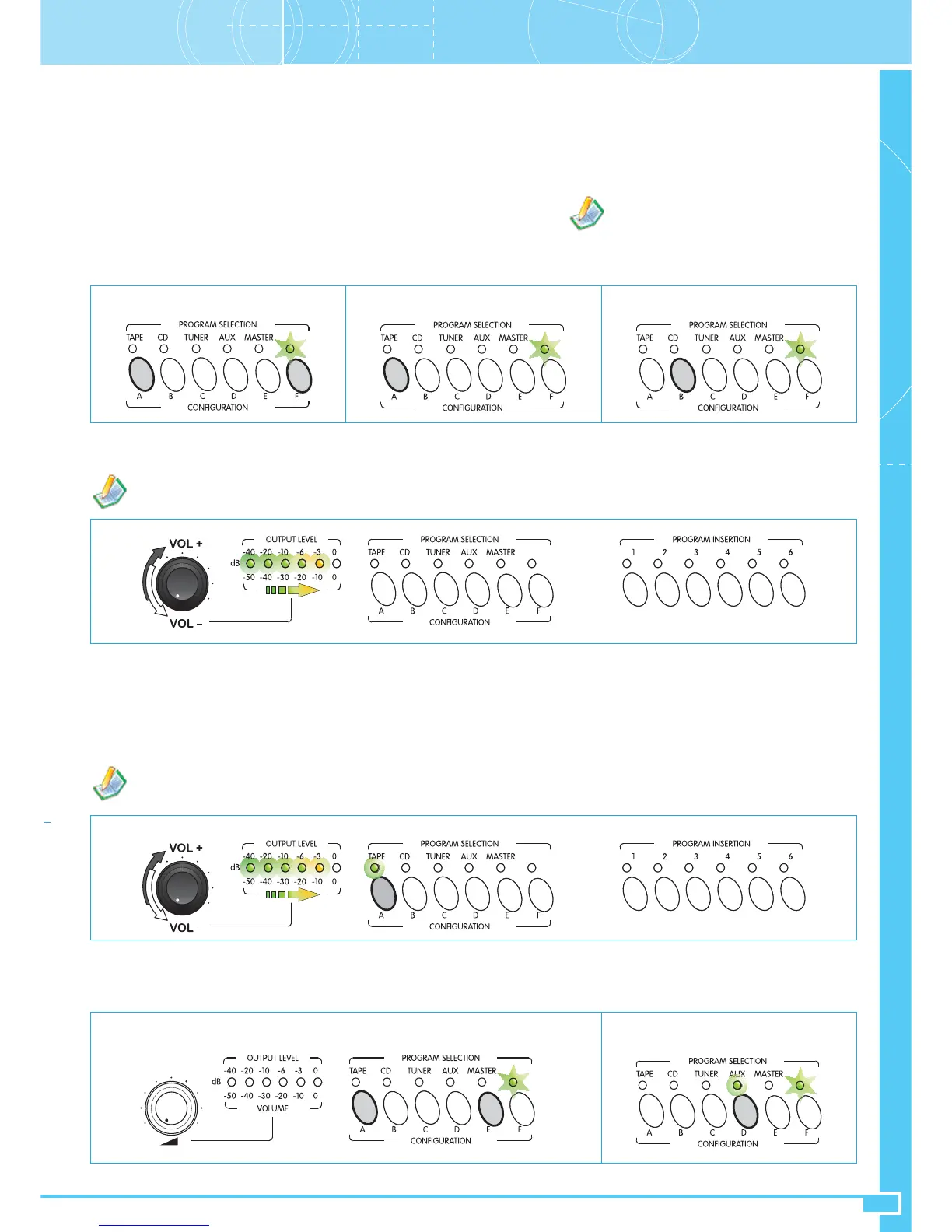
• Save/restore configuration
To store the settings you have made press keys A and F at the same time. LED F will start
to flash. Chose one of the following two options and press the appropriate key:
Key A = to save the current settings changed by you;
Key B = to return to the last configuration saved before making the changes.
Press F to confirm your choice.
Saving of the current state Restore of the last saved configuration
Fig. A1
Once you have entered the programming
mode, to exit without saving the last setting
and without calling up the stored configuration,
simply switch off the equipment then switch it on
again using the mains POWER switch (11).
Fig. A4
• Sending the selected music to the remote P8136’s *SW*
To enter the programming mode, press keys A and E at the same time; the LED F will start to flash. Press key D to enable the music to be sent to the
remote master units: the appropriate LED will light up. Press F to confirm your choice.
Music to the remote master units
ENABLED
• Selection of the source of sound and control of the input level *SW*
Press the key corresponding to the sound source you wish to select. Your selection will be confirmed by the relevant LED:
Led ON = source activated
Led OFF = source not activated
Once you have selected the sound source, you can control its volume by holding down the appropriate key and turning the knob (2). Selection of one
of the sources – TAPE, CD, TUNER or AUX – refers to the source connected to the MUSIC INPUT sockets (32); selection of the MASTER source
enables broadcasting of music from another remote P8136 via the MASTER LINK connection (20).
Fig. A3
In this case the OUTPUT LEVEL Vu-meter, that in normal operating conditions indicates the level of the music and/or voice signal of
the system, acts as a level bar for controlling the volume.
Section ASettings and Controls


 To Next Page