DATASHEET
α
22
Appendix
Shield
Signal
Settings and Controls see Appendix, Section A.
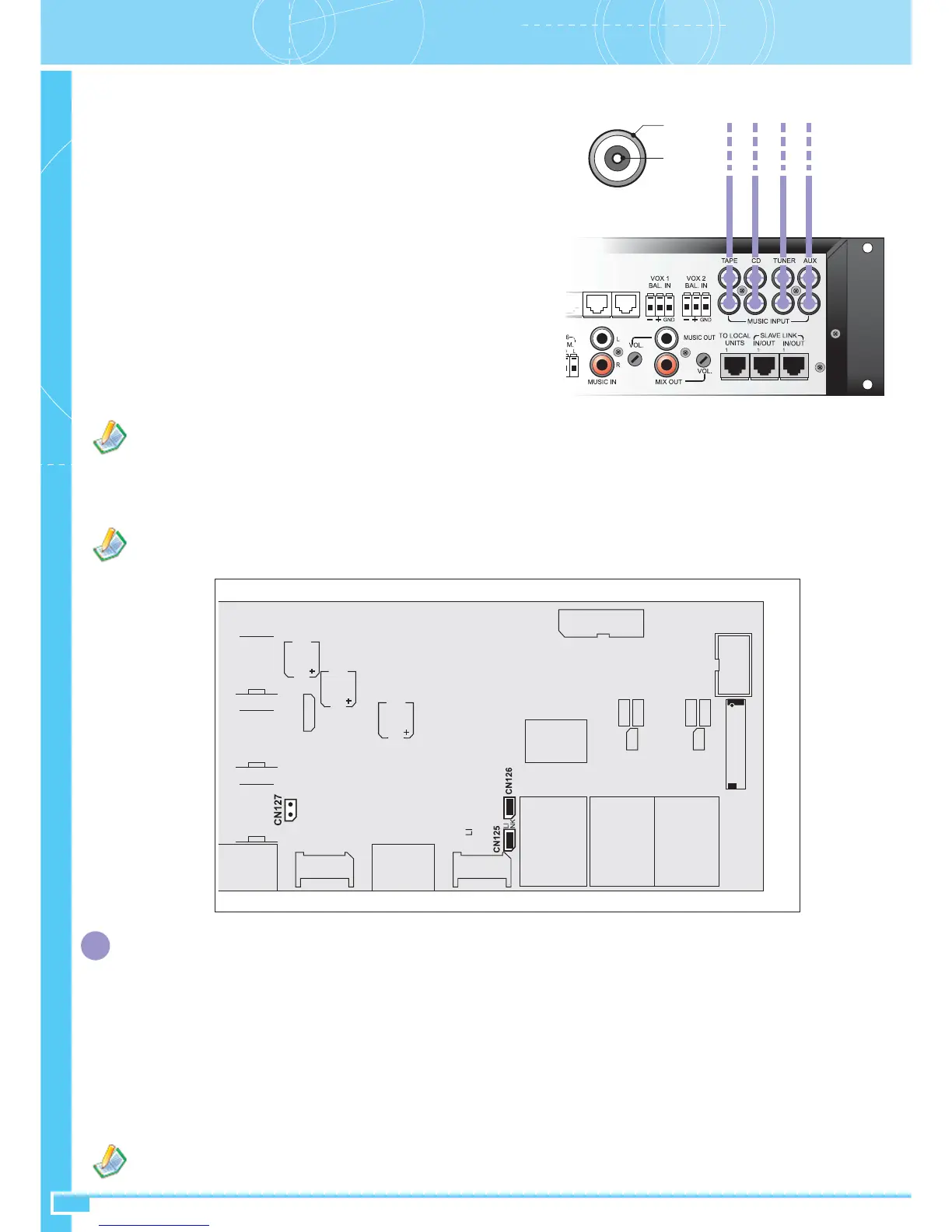
• Cutting of the music signal from a SLAVE LINK connection
If you wish to have local music only on a Slave Unit, rather than that selected for the Master Unit or available via the LINK, it is necessary to remove
CN127 from inside the equipment. This change will only affect the Slave Unit concerned and will not interfere with the signal sent to the subsequent
Slave Units.
It is necessary to enter the MUSIC IN input with a signal at line level of maximum 0 dB and it is not possible to adjust the volume towards the
other slave units. This volume can be set locally using the VOL trimmer referred to the output being used.
It is necessary to use cables with suitable shielding for line level audio signals to connect the VOX source.
Section BConnections (1)
CONNECTION OF MUSIC SOURCES
The music sources have to be connected to the TAPE, CD, TUNER and AUX inputs (32).
The front-panel PROGRAM SELECTION keys (4-5-6-7-8) have the purpose of selecting
one of the four sources connected or the music signal coming from another P8136 master
via the MASTER LINK IN/OUT sockets (20): it is possible to adjust the input volume
of each source so as to balance their levels and adjust the general volume of the music
channel that has been selected. The music signal will be present at the MUSIC OUT
outputs (26) or MIX OUT outputs (27) of the slave, depending on whether the DUAL or
SINGLE operating mode has been set, and including mixing of the signal, if any, at the
MUSIC IN input (25).
If the music channel from the master selector switch is not used, it will be possible to use
a local source connected directly to the MUSIC IN input (25). The music signal available
at the output is also distributed to all the slave units connected, by means of SLAVE LINK
socket (33). By enabling the music output on a remote Master Unit, it will be possible to
send the program that has been selected to other P8136’s of the system via the MASTER
LINK IN/OUT sockets (20). This output is not affected by the general volume control.
ATTENTION: In a system with several interconnected Master Units, it is advisable
that not more than one P8136 should convey the signal of the music source that
has been selected on the MASTER LINK line so as to make it available to the
remote Master Units.
CONNECTION OF SOURCES TO THE VOX INPUTS
The two inputs with removable terminals VOX1 (28) and VOX2 (29) enable balanced or unbalanced sources at line level to be connected for automatic
broadcasting of the input signal present without further activation controls. This makes it easier to implement applications with outside systems such
as automatic message players, alarm tone generators, PABXs with audio outputs having provisions for PA calls, etc.
As soon as the input detects a signal higher than the threshold that has been set, the SPEECH channel is seized for broadcasting the signal in question
to the zones set during programming.
A suitable GATE circuit enables the threshold to be adjusted so as to eliminate the effects of any background noise.
For each VOX input it is possible to set (referring to the P8136 Manager configuration *SW*):
- The input volume (this can also be adjusted via manual controls – See Appendix Section A)
- The sensitivity of the threshold (also adjustable via manual controls - See Appendix Section A)
- Priority (default setting: VOX1=5, VOX2=2)
- Any configuration of the broadcasting zones (default setting: all the zones covered by the Master Unit)
- A configuration of output events (the optional I/O ACIO8136 contact card will be required).


 To Next Page