DATASHEET
α
20
Appendix Section ASettings and Controls
•
= jumper connected
–
= jumper not connected
Master/Slave mode
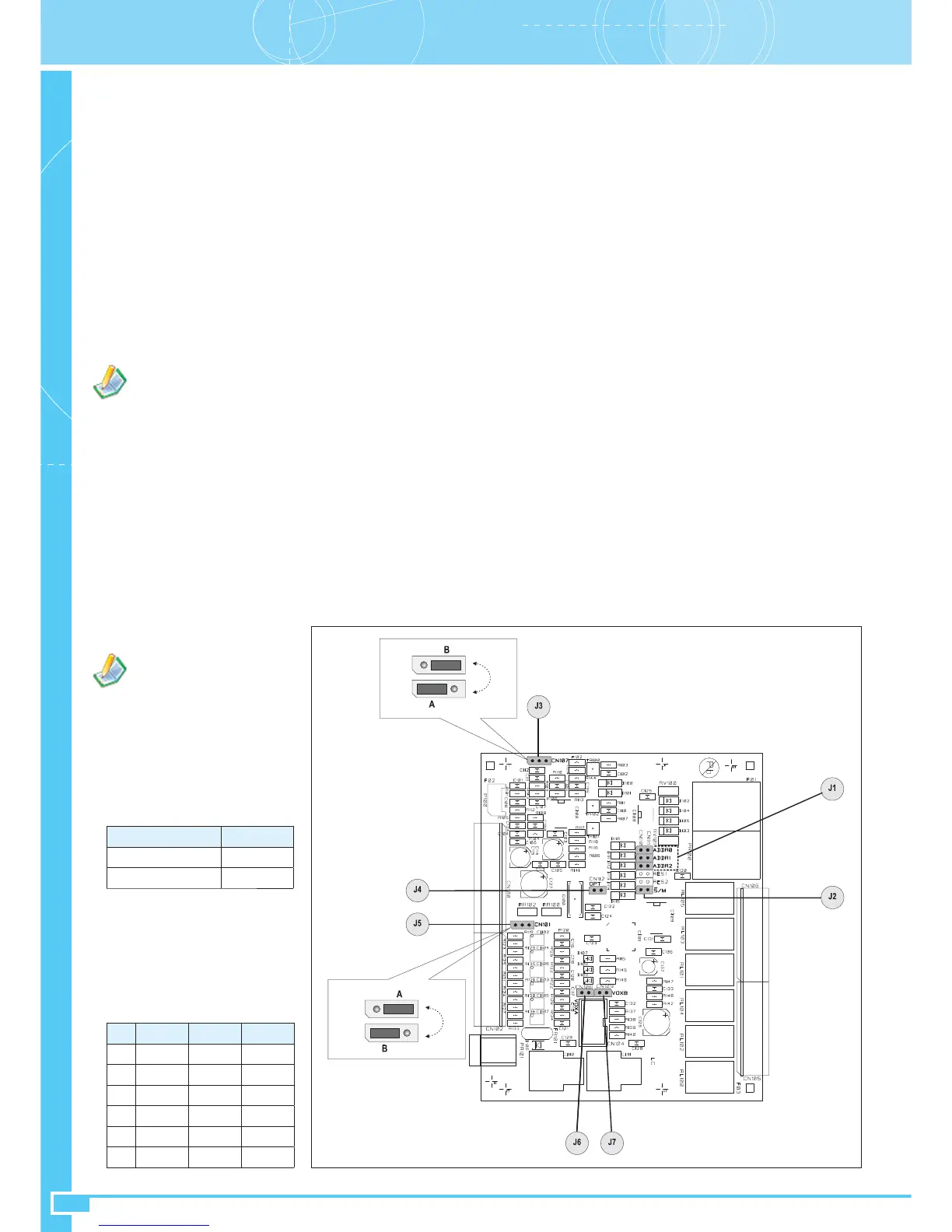
Jumper –S/M (J2) selects the
operating mode of the ACIO8136
card depending on whether it is
connected as a Master Unit (M) or a
Slave Unit (S):
Mode -S/M
P8136 •
P8236 -
•
Address
The three jumpers ADDR2 to
ADDR0 (J1) define the address of
the card, which must be between 1
and 6. The table shows the address
selection:
•
ID ADDR2 ADDR1 ADDR0
1
--•
2
- • -
3
- ••
4
• --
5
• - •
6
••-
4.1 General settings for Master and Slave ACIO8136’s
The settings of the ACIO8136 card are made by means of internal jumpers that are accessed by removing the four lateral fixing screws and the lid.
Fig. A15
4. ACIO8136 EXPANSION CARD
The optional ACIO8136 expansion card, for interfacing the system with external peripheral units, has:
• 6 optoinsulated input contacts.
• 6 relay type output contacts.
• 1 balanced audio line input with level control.
Depending on the required mode and on which connecting line is used, this card can function:
• as a
Master
Unit, connected to the TO MASTER UNITS socket (24) on the P8136 panel – (
master
mode).
• as a
Local
Unit, connected to the TO LOCAL UNITS socket (30) of a group-leader
slave
unit – (
slave
mode).
In the
Master
mode, the ACIO8136 card functions on the basis of the programming carried out by means of the P8136 Manager system software.
The following can be defined for each input contact:
• its priority.
• idle status.
• emission of the signal present on its audio input or playing of a pre-recorded message in the zones configured (it is possible to program any zone in
the whole system).
• activation of output events (it is possible to program the output contacts of any card in the whole system).
The optional ACMG816 card is required in order to send out a pre-recorded message. The configuration software can be used to set the idle
status of each output contact.
In the
Local
mode the ACIO8136 card functions as set at the time of installation by means of the jumper inside the card itself. Before proceeding
with the connection, check the general settings of the ACIO8136 described below and the local settings of the ACIO8136 illustrated subsequently.
Attention: ACIO8136 cards connected in the
slave
mode have a fixed priority of 5.
Before proceeding with the connection, check the general settings of the ACIO8136 described below.


 To Next Page