15
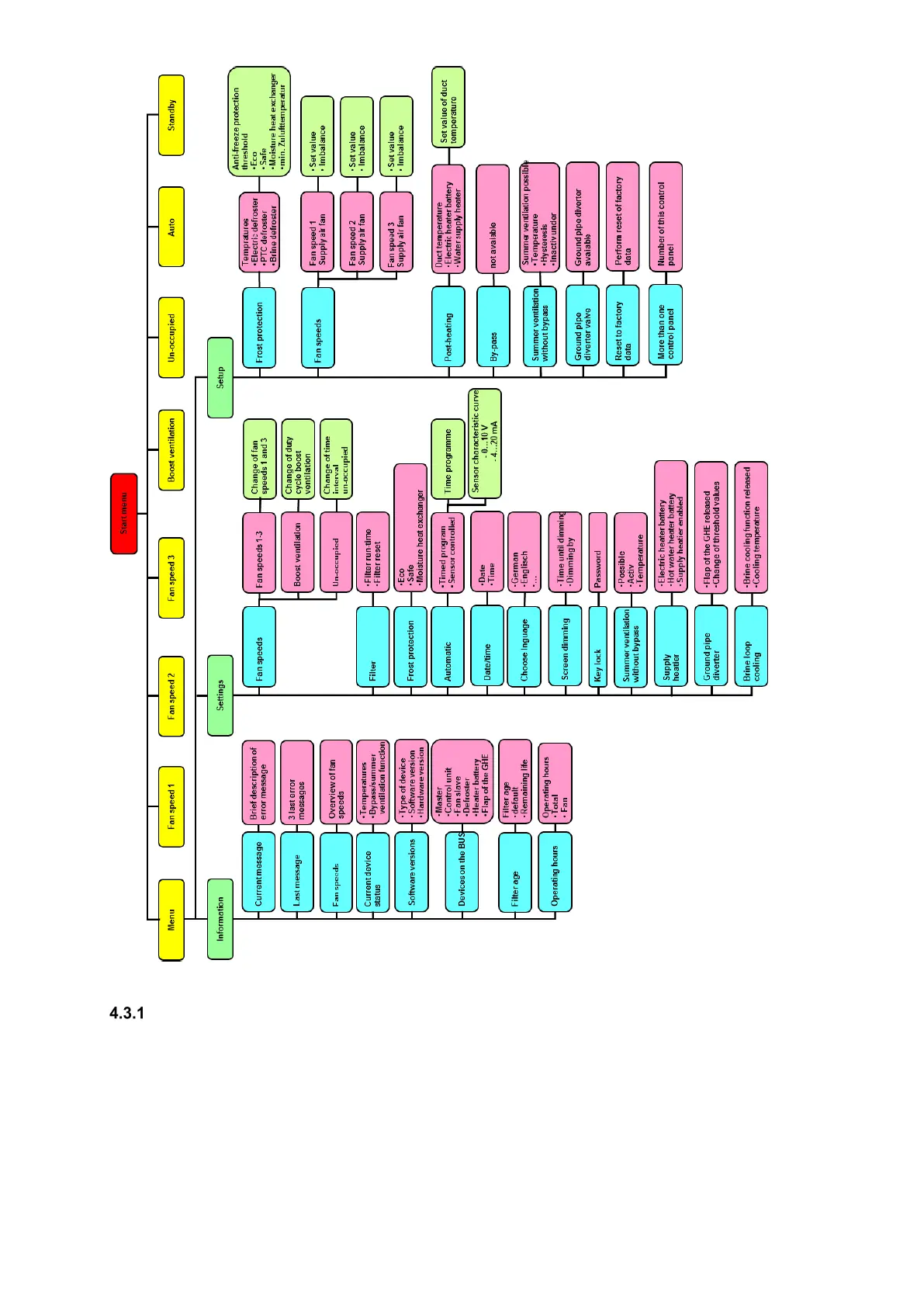
Fig. 5: Menu structure of the TFT control panel
Main menu Information
The main menu Information is divided into eight sub-menus. In the sub-menus information regarding the current unit
status as well as selected factory settings (e.g. unit type) are displayed. The respective sub-menus are selected with
the navigation buttons and opened via Enter.
4.3.1.1 Sub-menu Current message
In this sub-menu, information (e.g. replace filter) or errors (e.g. sensor disruption) are shown as current messages. In
addition to this message, a yellow warning triangle blinks on the top right edge of the screen. In general, only error
messages result in the shutting off of the fans.
4.3.1.2 Sub-menu Last message
This is where the last three occurred errors are registered with their date and time according to the event. In addition
to this message, a yellow warning triangle blinks on the top right edge of the screen.


 To Next Page