39
Main menu Setup
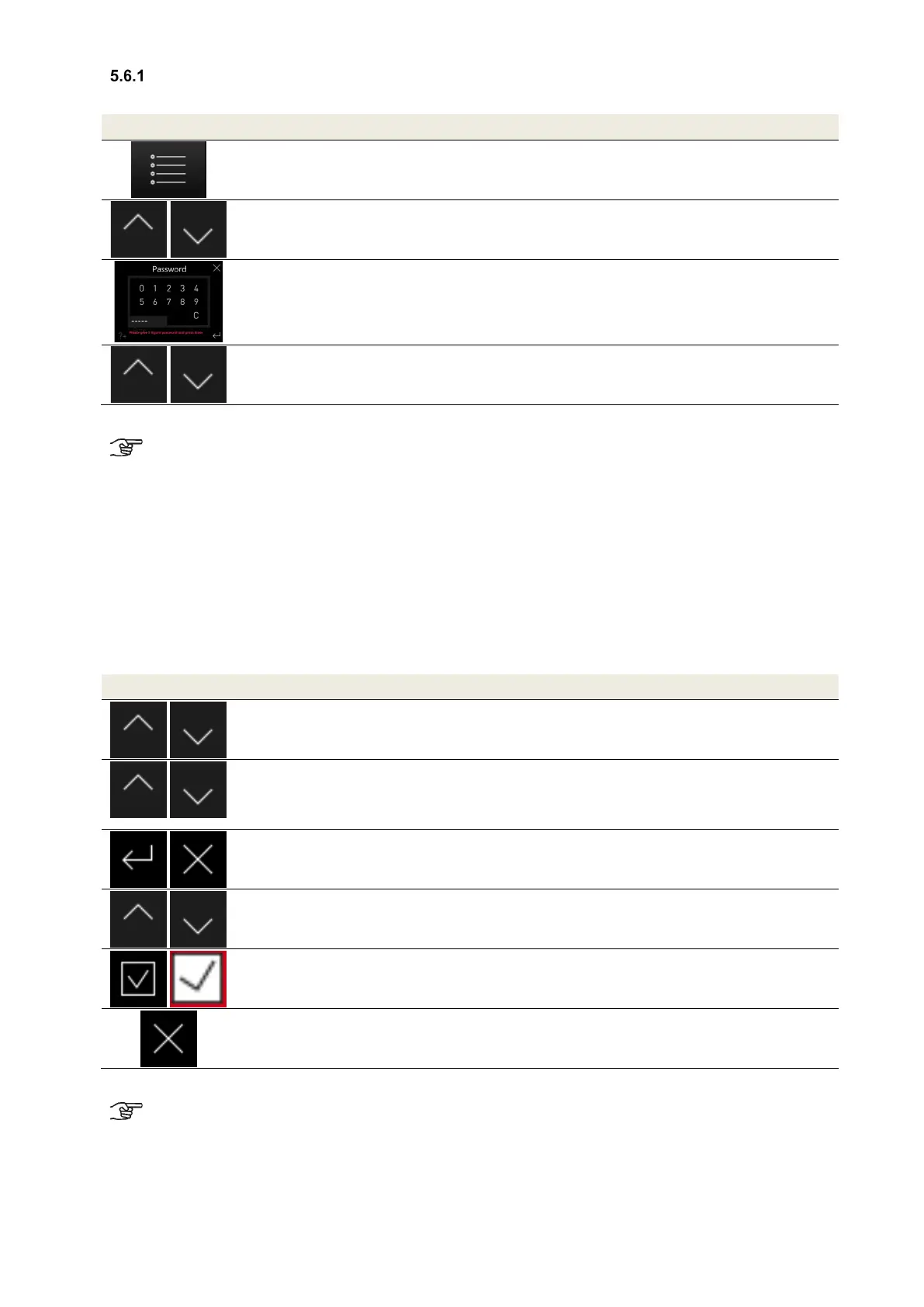
The main menu Setup is divided into eight sub-menus, access to which is password protected.
Symbol Description Explanation/Actions
Menu mode
By touching the menu mode button, you access the main menu.
Navigation
Touch the navigation buttons to select the main menu Setup and confirm
with the Enter button.
Password
Enter the password _ _ _ _ _ and confirm with the Enter button.
Navigation
Touch the navigation buttons to select the respective sub-menu and
confirm with the Enter button.
Table 30: Sequence of steps access to the main menu Setup
The settings in the sub-menus are only saved when the enter button is touched!
5.6.1.1 Sub-menu Frost protection
In the sub-menu frost protection, the following settings are carried out:
• Parametrisation of the temperatures, () values factory setting:
o Frost protection limit outdoor air Eco (-2.0 °C)
o Frost protection limit outdoor air Safe (0.0 °C)
o Frost protection limit outdoor air moisture heat exchanger (-8.0 °C)
o Frost protection limit minimum supply air temperature (5.0 °C)
• Selecting the defroster heating type:
o Electric defroster
o PTC defroster
o Brine defroster
Symbol Description Explanation/Actions
Navigation
Touch the navigation buttons to select (red text background) and confirm
with the Enter button.
Navigation
The nominal values (red text background) to be parametrised can be
selected with the navigation buttons and the values adjusted with the +/-
Enter
Cancel/return
Confirm by touching the Enter button and exit the menu level via the
Cancel/return button.
Navigation
Selecting the defroster heating type
Select the respective type by touching the navigation buttons (red text
background).
Check mark
By touching the check mark button, the type of defroster heating is
specified.
Cancel/return
Exit the menu levels by touching the cancel/return button until the start
menu appears.
Table 31: Parametrisation sub-menu Frost Protection
When temperatures drop below a frost protection limit, a potentially present frost protection
component is activated. If the temperature remains beneath the frost protection limit, it results in
shutting off the fans and an error message.
5.6.1.2 Sub-menu Fan speeds
In the sub-menu Fan speeds, settings can be made for the fan performance and balance compensation for all three
fan speeds. The supply air fans are parametrised separately in 1% increments between 17% and 100% per fan
speed. If required, balance compensation for each fan speed is implemented by adjusting the extract air fan in the


 To Next Page