PBI-300042-B 10/2010 COPYRIGHT © PBI-Dansensor A/S
10 User Guide EN CheckMate 3
CheckMate 3 Overview
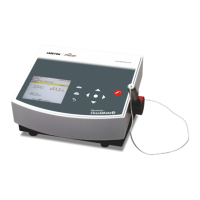
CheckMate 3 is based on an all-in-one concept which together with state-of-the-art sensor
technology ensures fail-safe tests and documentation. With full self-diagnostics, CheckMate
3 detects most common operator faults and offers an efficient automatic report function.
The arrow keys (navigation keys) are used to select menus and functions.
select previous item/scroll up
(Contrast adjustment in measuring screen)
select next item/scroll down (Contrast adjustment in measuring screen)
go to previous menu or undo a change/selection
go to next menu level
(select)
select menu or select/confirm a value
(formfeed) feeding printer paper (version with built-in printer only)
print current screen contents for built-in printer (version with built-in printer only)
undo a selection or a change. If you hold down the key you will automatically
return to the measuring screen or the warm-up screen
(measuring key) starts or stops a measurement
measuring gas inlet for connection of filter and needle set/Smart Pen


 To Next Page